# HeyPace - full content
> Pace is a private Mac voice agent that listens, reads the current screen, and takes approved actions with local models by default.
Generated: 2026-10-28
---
---
title: "HeyPace — private Mac voice agent that sees your screen"
description: "Pace is a private Mac voice agent that listens, reads the current screen, and takes approved actions with local models by default."
canonical: https://heypace.app/
---
# HeyPace — private Mac voice agent that sees your screen
> Pace is a private Mac voice agent that listens, reads the current screen, and takes approved actions with local models by default.
Canonical: https://heypace.app/
private voice agent · apple silicon mac
## a voice assistant that *sees your Mac.*
Hold ctrl+option, ask about the screen in front of you, and Pace can answer or take an approved action. Voice, screen understanding, and planning stay local by default. No account required.
[download the free preview](https://heypace.app/download)
[see the $29 local stack](https://heypace.app/pricing)
Free with Apple Foundation Models on macOS 26 · bundled local models are $29 once.
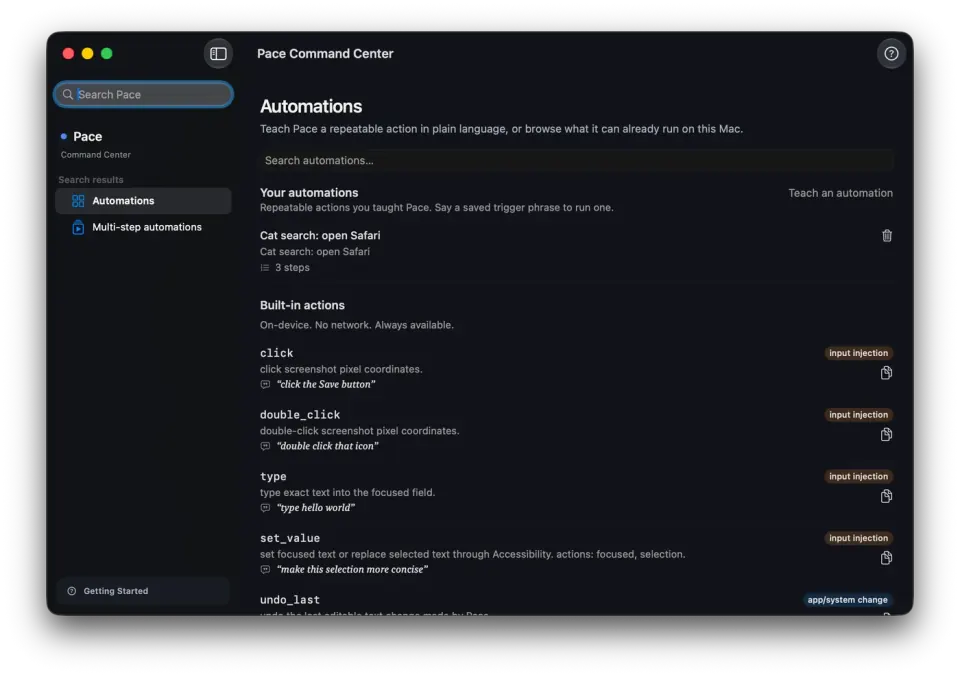
Current development capture. The public 0.3.19 preview may differ; it is ad-hoc signed and not notarized.
## in local mode, *Pace ships nothing.*
the on-device part
Your voice and screen are processed on your Apple Silicon. Conversation memory, journals, flows, and taught skills are ordinary local files under ~/Library/Application Support/Pace/. Downloads and update checks are reported separately.
## voice, screen, *approved actions.*
what it does
Ask about what is on your screen. Pace merges a local vision model, Apple Vision OCR, and the macOS Accessibility tree into one element map for the planner.
### listens
Hold ctrl+option, say something, let go. Always listening is an explicit opt-in in Settings.
### clicks
“Click submit,” “snap this window left,” “add this to my calendar.” Pace works through Accessibility, with approval before actions.
### teaches
Pace draws on your screen, points at the next thing to click, and advances when you actually click the right thing.
## repeat the work. *keep the intent.*
automation
Record a flow to replay clicks and keystrokes. Install a pre-built recipe by voice. Teach a skill in plain language: Pace re-reads your screen and re-plans each run instead of blindly repeating clicks. Skills are ordinary markdown files you own.
## without uploading *the meeting.*
meeting notes
Pace records your mic and the other side’s audio as separate tracks. Transcription runs on your Mac. A privacy-pinned local model writes the summary, action items, and decisions, even when you use a cloud planner elsewhere. Recordings and notes follow your retention window — 30 days by default.
## a bigger brain *only when you say so.*
reach
The planner runs on your Mac by default. Settings → Planner lets you choose a consented Codex or Claude CLI, or a bring-your-own-key API. An off-device turn tints the capsule amber and writes to the local audit log. External integrations are your choice, off by default.
## an agent that touches your Mac *has to be reversible.*
trust
Reversible changes leave a 5-second undo banner. Replay the same spoken answer for 30 seconds without running the planner again. If a click misses, Pace says so. The in-app Privacy dashboard measures bytes from the audit log: 0 bytes in local inference, then how much and to whom when a cloud tier you enabled runs.
## voice *and* screen *and* actions.
Pace starts with voice, current-screen context, and visible computer actions. Read the source-linked field comparison to see where the other Mac assistants fit and where Pace is behind.
[compare Mac assistants](https://heypace.app/compared)
## try it free. *$29 once* for the local stack.
The free preview uses Apple Foundation Models on macOS 26. The one-time purchase covers the current release and bundled local models. Payment, delivery, support, included updates, and any refund terms are confirmed before payment through the manual email path.
[download the free preview](https://heypace.app/download)
[see purchase details](https://heypace.app/pricing)
Apple Silicon only. The public preview is ad-hoc signed and not notarized; see the download page for installation steps.
## the questions *people actually ask.*
### Does it really run with no network?
Yes, in local mode. Voice, screen reading, planning, and TTS run on your Mac. The download_file tool fetches a URL only when you ask. Downloads and update checks are separate; an opt-in off-device planner turns the capsule amber and writes an audit entry. The in-app Privacy dashboard shows the exact byte count by surface.
### Where do my meeting recordings go?
`~/Library/Application Support/Pace/meetings/` — two WAV files per meeting (your mic, their audio) plus the notes. Transcription and note-writing both happen on your Mac, and the notes model is pinned local: it can't use a cloud tier even if you've enabled one elsewhere in Pace. Everything auto-deletes after the retention window in Settings — 30 days by default. Want it gone sooner? Delete the folder. They're ordinary files.
### How much disk and RAM are we talking?
The .app is about 50 megabytes. The in-process model — Qwen3-4B-Instruct-2507 in bf16, one toggle in Settings → Models — is ~8 gigabytes, downloaded once into your HuggingFace cache. With the vision model and transcription also loaded, peak RAM is ~14 GB. If your Mac has 16 GB, swap to the 4-bit variant in Settings → Models; that runs comfortably in ~6 GB.
### What Macs?
The current 0.3.19 preview requires macOS 26 on an Apple Silicon Mac. Intel Macs aren't supported and there's no plan to add them — MLX is Metal-backed, and the on-device story is the product boundary. The shipped archive's Info.plist is the source of truth for this requirement.
### iPhone? Windows?
No, and not on the roadmap. Pace is a Mac product. The Apple Silicon stack is what makes "voice + screen + actions, on-device, $29 once" possible at all. Spreading it across three operating systems would mean rebuilding the assumptions and raising the price.
### What happens when you ship your own model?
There is no promised delivery date or future price today. The current manual purchase covers the current release and bundled local models; included updates are confirmed before payment. Sparkle can deliver app updates, but its presence is not a commercial promise.
### Do I need LM Studio installed?
No. The bundled MLX path covers planning, vision, embeddings, and TTS in-process. LM Studio is still supported as the power-user option if you'd rather run the larger Qwen3-30B model, but it's not required for a fresh install to be useful.
### How are purchase terms handled?
The current checkout is a manual email path. Payment, delivery, support, included updates, and any refund terms are confirmed before payment. The current release has no in-app licence activation or deactivation system.
### What if I don't like the voice?
Settings → Voice picks any Apple Premium voice on your Mac, or the bundled Qwen3 TTS, or the Kokoro sidecar if you want the higher-quality option. You're not locked into one synthesiser.
### What's Learning mode?
You point Pace at an app you don't know — Figma, Cursor, Logic Pro, an internal admin tool — and ask it to walk you through something. Pace draws on your screen, says "click here next," and when you actually click, it advances to the next step automatically. The verification loop is the new part: Pace watches your click events and only moves forward when you did the right thing.
### Can I leave it always-on?
Yes, as an explicit opt-in. Enable Always listening in Settings and Pace opens a bounded listening window after its wake phrase. It is off by default; push-to-talk (ctrl+option) remains the clearest way to control when Pace can hear you.
### Can it tell me what I did today?
Yes, from passive local journals. Watch mode logs when your screen meaningfully changes; a separate app-usage journal tracks which apps had focus and for how long, using notifications macOS hands out without any extra permission. Research turns get their own history. Ask "what did I do today?" or "what did I research about X?" and Pace answers from those journals — all on disk, 7-day retention for the screen/app logs, per-source enable and clear in Settings. In local mode, nothing is uploaded.
### Can I trigger it from Raycast or Shortcuts?
Yes. Pace registers `pace://` deeplinks — `pace://listen`, `pace://chat?text=...`, `pace://watch?enabled=true`, and `pace://panel` — plus App Intents for Siri, Shortcuts, and Spotlight. Wire a Raycast script or a Shortcut to any of them. A deeplink runs the same intent and approval pipeline your own voice would, so it can't do anything you couldn't do yourself.
### What happens if it clicks the wrong thing?
Every change Pace can reverse leaves a 5-second undo banner next to the cursor — tap it and it rolls back. If a click misses entirely, Pace says so in plain language rather than pretending it worked. And there's a 30-second replay button that speaks the exact same answer back without re-running the planner, in case you missed it.
field guides
## understand the *local stack.*
[on-device ai assistant for mac →](https://heypace.app/on-device-ai-assistant-mac) [screen-aware mac assistants →](https://heypace.app/screen-aware-ai-assistant-mac) [private mac voice assistants →](https://heypace.app/private-voice-assistant-mac) [mac assistant actions →](https://heypace.app/mac-ai-assistant-actions) [on-device meeting notes →](https://heypace.app/on-device-meeting-notes-mac) [private on-device voice control →](https://heypace.app/on-device-mac-voice-control-privacy) [local vs cloud voice agents →](https://heypace.app/local-vs-cloud-voice-agents-macos-checklist) [screen-aware vision & approval →](https://heypace.app/screen-aware-mac-assistants-vision-planning-approval)
---
---
title: "Mac AI agents that see your screen — 17 compared"
description: "Compare 17 macOS AI agents by screen access, inference location, actions, approval model, license, and where Pace is honestly behind."
canonical: https://heypace.app/compared/
---
# Mac AI agents that see your screen — 17 compared
> Compare 17 macOS AI agents by screen access, inference location, actions, approval model, license, and where Pace is honestly behind.
Canonical: https://heypace.app/compared/
The field
## Mac AI agents that *see your screen* and run tasks.
A screen-aware Mac agent combines a way to observe the current interface, a reasoning model, permitted actions, and a visible safety boundary. Similar demos can hide sharp differences in where screenshots go, whether inference is local, whether the agent waits for a prompt or watches continuously, and whether actions need approval.
This comparison covers 17 current macOS agents across on-device, hybrid, and cloud-backed postures. It links to each product's source or site, describes what it does well, and says where Pace is behind. It does not assign review scores or declare a universal winner.
## How to choose a screen-aware Mac agent
- **Follow the data path.** A local app can still send screenshots, transcripts, or prompts to a provider API.
- **Separate observation from action.** Region capture, full-screen capture, and the Accessibility tree expose different data and permissions.
- **Check the control model.** Push-to-talk, hotword, proactive watching, scheduled work, and remote commands have different interruption and safety tradeoffs.
- **Inspect approval and recovery.** Look for action previews, permission tiers, audit records, undo, and a reliable stop path.
- **Check distribution reality.** License, signed releases, supported macOS versions, API-key requirements, and update paths matter beyond the demo.
The field splits three ways. **Cloud** agents round-trip every turn through someone else's servers. **Hybrid** ones default local but let you opt into cloud. **On-device** ones — the cluster Pace lives in — never leave your machine.
## Cloud
4 products
Every turn hits someone else's data center. Fast to ship, costs per turn, needs an account.
### Cursor Voice
[github.com/cursorvoice/cursor-voice](https://github.com/cursorvoice/cursor-voice)
Native macOS voice assistant next to your cursor, powered by OpenAI Realtime API. — cursorvoice
STT: OpenAI Realtime API · Reasoner: OpenAI Realtime API (gpt-realtime) · TTS: OpenAI Realtime API (built-in voices) · Screen: yes
#### What it's good at
- Barge-in with echo rejection — interrupt the AI mid-response by talking over it.
- On-device wake word ("Hey Cursor") via SFSpeechRecognizer, then cloud Realtime API for the conversation.
- Built-in web_search tool without requiring an API key.
#### Where Pace differs
Pace is fully on-device; Cursor Voice round-trips every turn through OpenAI's Realtime API. Cursor Voice has barge-in and wake word — both things Pace lacks. Pace wins on privacy and zero per-turn cost.
[Full comparison — Pace vs Cursor Voice](https://heypace.app/compared/cursor-voice/)
Open source: Yes
License: MIT
Posture: cloud
### Samuel
[github.com/sambuild04/screen-voice-agent](https://github.com/sambuild04/screen-voice-agent)
Voice-first AI companion — wake-word activated, sees screen, hears system audio, writes plugins. — sambuild04
STT: OpenAI Realtime API · Reasoner: OpenAI Realtime API + GPT-5.5 (plugin generation) + GPT-4o Vision · TTS: OpenAI Realtime API · Screen: yes
#### What it's good at
- Self-modifying — writes and hot-loads its own plugins at runtime using GPT-5.5.
- Auto-repair — detects plugin failures and patches code automatically (up to 2 attempts).
- Hears system audio via ScreenCaptureKit with PID-level filtering, not just microphone.
#### Where Pace differs
Samuel's self-modifying plugin system and system-audio listening are genuinely novel — Pace has neither. But Samuel is fully cloud (OpenAI APIs). Pace is fully on-device. The plugin auto-repair loop is the most interesting idea here.
[Full comparison — Pace vs Samuel](https://heypace.app/compared/samuel/)
Open source: Yes
License: MIT
Posture: cloud
### Cyclop One
[github.com/cyclop-one/cyclop-one](https://github.com/cyclop-one/cyclop-one)
Autonomous macOS desktop agent powered by Claude vision. — cyclop-one
STT: Local speech recognition · Reasoner: Claude API multimodal vision · TTS: Not documented · Screen: yes
#### What it's good at
- ScreenCaptureKit observation with desktop clicking, typing, dragging, scrolling, and keyboard actions.
- Markdown skills and a JSON-over-stdio plugin protocol.
- Persistent procedural memory plus remote-control integrations.
#### Where Pace differs
Pace runs its default reasoning and vision stack on-device; Cyclop One requires the Claude API but has a more explicit plugin and remote-control architecture.
[Full comparison — Pace vs Cyclop One](https://heypace.app/compared/cyclop-one/)
Open source: Yes
License: MIT
Posture: cloud
### Peepbox
[peepbox.ai](https://peepbox.ai/)
AI agents that see your screen and take action. — Peepbox
STT: Not documented · Reasoner: Anthropic Claude, OpenAI, or Google Gemini · TTS: Not documented · Screen: yes
#### What it's good at
- Window- or region-scoped watchers configured in plain English.
- Persistent monitoring for forms, dashboards, messages, and data extraction.
- Multi-agent chains in which one Peep can notify another.
#### Where Pace differs
Peepbox is built for unattended region watching and multi-agent workflows; Pace is voice-first, local by default, and uses a narrower synchronous approval loop.
[Full comparison — Pace vs Peepbox](https://heypace.app/compared/peepbox/)
Open source: No
License: Proprietary
Posture: cloud
## Hybrid
7 products
Local by default, cloud when you ask for it. The middle path — flexible, but the privacy posture depends on which tier you picked.
### Impulse
[github.com/section9-lab/Impulse](https://github.com/section9-lab/Impulse)
Native macOS assistant — sees, hears, remembers your projects. — section9-lab
STT: Speech framework (on-device) · Reasoner: Any OpenAI-compatible / Ollama / LM Studio · TTS: Local · Screen: yes
#### What it's good at
- Per-project SwiftData memory — conversations scoped to the project you're working in.
- JSONL session logs that are diffable and greppable.
- Vision framework OCR on-device; security-scoped bookmarks for sandboxed file access.
- Tool calls are visible in chat before they run.
#### Where Pace differs
Pace's memory is conversation-wide two-tier (verbatim K=4 + rolling summary) with cross-quit persistence. Impulse's is per-project SwiftData. Pace adds actions, MCP, and a tier picker; Impulse is more focused on project-scoped chat.
[Full comparison — Pace vs Impulse](https://heypace.app/compared/impulse/)
Open source: Yes
License: Apache-2.0
Posture: hybrid
### Agent! (macOS26)
[github.com/macOS26/agent](https://github.com/macOS26/agent)
18 LLM providers, hotword-anchored, free on Apple Intelligence. — macOS26 / Todd Bruss
STT: SFSpeechRecognizer hotword · Reasoner: 18 providers (Claude / GPT / Gemini / Grok / … / Apple FM / Ollama / vLLM / LM Studio) · TTS: Local · Screen: yes
#### What it's good at
- Hotword-anchored dictation — say "Agent!" from across the room, hands-free.
- 18 LLM providers wired in, BYO key, free forever on Apple Intelligence.
- Apple AI as a real tool-calling agent — multi-step local tool calls, falls through to cloud only on failure.
#### Where Pace differs
Pace is push-to-talk only (no hotword) and ships a tighter on-device default. Agent! wins on hands-free wake and provider breadth; Pace wins on trust surfaces, memory design, and the on-device-first posture being the default rather than one of 18 options.
[Full comparison — Pace vs Agent! (macOS26)](https://heypace.app/compared/agent-macos26/)
Open source: Yes
License: MIT
Posture: hybrid
### Dottie
[www.dottie.ai](https://www.dottie.ai)
Free AI voice assistant — talk to your Mac, watch it work. — stevederico
STT: Local (MLX-based) · Reasoner: Local MLX (3,800+ models) or cloud (OpenAI / Anthropic / xAI / Ollama) · TTS: MLX Kokoro with premium AI voices · Screen: yes
#### What it's good at
- 134 built-in system tools for email, calendar, iMessage, music, and files.
- Bundled inference stack with zero external dependencies — local Agent API on localhost.
- "Hey Dottie" wake word + hold-to-dictate (Fn key).
#### Where Pace differs
Dottie ships 134 tools and a wake word — both ahead of Pace. The desktop app source is not public (only the dotbot SDK engine is MIT). Pace is fully open source with a tier picker and trust surfaces Dottie doesn't surface.
[Full comparison — Pace vs Dottie](https://heypace.app/compared/dottie/)
Open source: No
License: Proprietary
Posture: hybrid
### Fazm
[github.com/mediar-ai/fazm](https://github.com/mediar-ai/fazm)
The fastest AI computer agent — controls your browser, writes code, handles documents. — mediar-ai
STT: Deepgram Nova-3 (streaming WebSocket) · Reasoner: Claude (via ACP bridge) · TTS: Deepgram Aura (7 languages) · Screen: yes
#### What it's good at
- Controls 300+ macOS apps via the Accessibility API — not screenshots, the structured UI tree.
- Multi-language architecture: Swift desktop + TypeScript ACP bridge + Rust backend.
- Real Chrome session automation — Gmail, Drive, Docs, Sheets, Calendar, WhatsApp.
#### Where Pace differs
Fazm uses the Accessibility API for screen understanding (more reliable, more token-efficient than Pace's VLM-screenshot approach). But Fazm's STT and TTS go through Deepgram's cloud despite 'local' marketing. Pace is fully on-device, including speech.
[Full comparison — Pace vs Fazm](https://heypace.app/compared/fazm/)
Open source: Yes
License: MIT
Posture: hybrid
### Shiro
[github.com/abhisheksharma001/shiro](https://github.com/abhisheksharma001/shiro)
Local-first autonomous agent — watches screen, spawns parallel sub-agents, MCP ecosystem. — abhisheksharma001
STT: Deepgram Nova-3 (meeting mode) · Reasoner: Local-first (LM Studio / Ollama) with Claude fallback · TTS: Local · Screen: yes
#### What it's good at
- Parallel sub-agents with atomic SQL checkout, persona injection, depth & budget guards.
- Hybrid RAG using sqlite-vec + FTS5 in one SQLite file — live knowledge graph updates on every tool call.
- Meeting mode with ScreenCaptureKit audio capture + live action item extraction.
#### Where Pace differs
Shiro's parallel sub-agents and hybrid RAG knowledge graph are architecturally beyond Pace's single-thread agent loop. Pace has the tier picker, trust surfaces, and recipe library Shiro doesn't ship. Shiro's meeting mode is a surface Pace could add.
[Full comparison — Pace vs Shiro](https://heypace.app/compared/shiro/)
Open source: Yes
License: MIT
Posture: hybrid
### BoBe
[github.com/athatheo/BoBe](https://github.com/athatheo/BoBe)
A local-first proactive AI companion for macOS. — athatheo
STT: Local speech models · Reasoner: Local Ollama or GitHub Copilot cloud · TTS: Local speech models · Screen: yes
#### What it's good at
- Periodic screen observation tied to durable local memory and goals.
- Proactive outreach with configurable cooldown and engagement awareness.
- Read-only file tools, MCP integration, and a user-editable personality.
#### Where Pace differs
BoBe centers on proactive observation and goals; Pace centers on push-to-talk, screen-referential requests, local approval, and a compact menu-bar surface.
[Full comparison — Pace vs BoBe](https://heypace.app/compared/bobe/)
Open source: Yes
License: MIT
Posture: hybrid
### Project Minimi
[www.projectminimi.com](https://www.projectminimi.com/)
Personal memory for Claude that closes open loops on Mac. — Shram / projectminimi.com
STT: Ambient capture (not push-to-talk STT) · Reasoner: Claude (via MCP / custom connector) · TTS: Claude side (not a local TTS loop) · Screen: yes
#### What it's good at
- Ambient Mac capture across tabs, documents, calls, and chat threads for later recall.
- Exposes captured memory to Claude through an MCP / custom connector link.
- Positions itself as personal memory you own, with a local vector store claim on device.
- Strong for “what did I read / decide / leave open” retrieval inside Claude workflows.
#### Where Pace differs
Minimi is ambient memory for Claude, not a local voice agent loop. Pace is push-to-talk, screen-referential actions, and local models by default—without routing your agent loop through Claude. Minimi’s paid plan uses Gemini embeddings, so it is not pure local-only; Pace keeps the default path on-device.
[Full comparison — Pace vs Project Minimi](https://heypace.app/compared/project-minimi/)
Open source: No
License: Proprietary
Posture: hybrid
## On-device
6 products
Fully local. The cluster Pace lives in. Zero bytes off the machine, zero per-turn cost, works on a plane.
### Ora
[github.com/benedict2310/ora](https://github.com/benedict2310/ora)
Privacy-first macOS voice assistant, on-device AI. — benedict2310
STT: Parakeet (local) · Reasoner: MLX + Qwen 3.5 VL · TTS: Kokoro · Screen: yes
#### What it's good at
- Closest philosophical twin to Pace — fully local pipeline: Parakeet ASR → MLX Qwen 3.5 VL → Kokoro TTS.
- Streaming pipeline with live transcription, streaming LLM tokens, and early TTS start.
- Agentic tools across Calendar, Reminders, Contacts, Mail, Messages, Notes, and System.
- Sparkle auto-updates and a downloadable release.
#### Where Pace differs
Pace adds a tier picker (Local / CLI bridge / Direct API / Apple FM) with byte-identical persona across tiers, visible-undo trust surfaces, and two-tier thread memory that survives quit/relaunch. Ora is single-tier local.
[Full comparison — Pace vs Ora](https://heypace.app/compared/ora/)
Open source: No
License: Source-available
Posture: on-device
### OpenFelix
[github.com/fspecii/openfelix](https://github.com/fspecii/openfelix)
Voice-first AI agent for macOS that actually runs locally. — fspecii / @AmbsdOP
STT: On-device (Option+Space) · Reasoner: MLX (Qwen / Mistral) · TTS: Local · Screen: yes
#### What it's good at
- Cron jobs — schedule tasks with `daily@09:00`, `every:30m`, `once:ISO8601`.
- Proactive alerts pushed to Telegram, Discord, and Slack.
- Music generation via ACE-Step and YouTube spoken summaries.
- Skill system that extends the agent to anything.
#### Where Pace differs
Pace has MCP integration, a recipe library, and passive time-understanding journals (screen watch + app usage). OpenFelix leans into scheduled + proactive surfaces Pace doesn't ship yet.
[Full comparison — Pace vs OpenFelix](https://heypace.app/compared/openfelix/)
Open source: Yes
License: Apache-2.0
Posture: on-device
### ORB
[github.com/settylokesh/ORB](https://github.com/settylokesh/ORB)
Fully on-device voice agent — hears, sees, operates your Mac. — settylokesh
STT: Moonshine (ONNX Runtime) · Reasoner: Gemma 4 E4B (4-bit, MLX) · TTS: Local · Screen: yes
#### What it's good at
- Structured JSON action plans emitted by the VLM — explicit plan-then-execute loop.
- ONNX Runtime + MLX dual runtime — Moonshine for ASR, MLX for the VLM.
- Glow border around the screen to signal listening / planning / executing phases.
#### Where Pace differs
Pace uses a heavier qwen3-30b-a3b reasoner with a tier picker and trust surfaces. ORB is leaner and more single-purpose. Note: ORB has no license file yet, so it's effectively all-rights-reserved.
[Full comparison — Pace vs ORB](https://heypace.app/compared/orb/)
Open source: No
License: No license yet
Posture: on-device
### Vox
[github.com/vox-ai-app/vox](https://github.com/vox-ai-app/vox)
The first local AI that actually does things on your Mac — no cloud, no subscription. — vox-ai-app
STT: Local (via llama.cpp) · Reasoner: Local (llama.cpp) · TTS: Local · Screen: yes
#### What it's good at
- 48 built-in tools for email, iMessage, file management, and screen control.
- Passphrase mode — text your Mac from any phone and get AI responses.
- MCP client with stdio, SSE, and HTTP support + wake word with barge-in.
#### Where Pace differs
Vox is a true on-device peer to Pace with 48 tools and a passphrase mode Pace doesn't have. Pace has the tier picker, two-tier thread memory, recipe library, and watch mode that Vox doesn't ship. Both are MIT and fully local.
[Full comparison — Pace vs Vox](https://heypace.app/compared/vox/)
Open source: Yes
License: MIT
Posture: on-device
### RCLI
[github.com/RunanywhereAI/RCLI](https://github.com/RunanywhereAI/RCLI)
Talk to your Mac, query your docs — on-device voice AI + RAG, no cloud required. — RunanywhereAI
STT: Local — Zipformer (streaming), Whisper base.en, Parakeet TDT 0.6B · Reasoner: Local — Qwen3 0.6B/4B, Llama 3.2 3B, LFM2.5 1.2B (MetalRT or llama.cpp) · TTS: Local — Piper, KittenTTS, Matcha, Kokoro (28 voices) · Screen: yes
#### What it's good at
- Sub-200ms end-to-end voice latency via proprietary MetalRT GPU engine (up to 550 tok/s).
- Local RAG over documents with hybrid vector + BM25 retrieval.
- 20+ models across LLM, STT, TTS, VLM, VAD, and embeddings — all on-device.
#### Where Pace differs
RCLI's MetalRT engine hits sub-200ms latency and 550 tok/s — a serious performance benchmark Pace should measure against. RCLI has local RAG Pace doesn't ship. Pace has the tier picker, trust surfaces, and MCP integration RCLI lacks. 1,523 stars — the most-trafficked on-device competitor.
[Full comparison — Pace vs RCLI](https://heypace.app/compared/rcli/)
Open source: Yes
License: MIT
Posture: on-device
### LocalNotch
[github.com/arshawnarbabi/LocalNotch](https://github.com/arshawnarbabi/LocalNotch)
Local AI assistant that lives in your MacBook's notch — chat, vision, file agent, all on-device. — arshawnarbabi
STT: None (text and image input only) · Reasoner: Local (Ollama — user selects model) · TTS: None (text output only) · Screen: yes
#### What it's good at
- Lives in the MacBook notch — hover to open, type to ask, then disappears. No window management.
- Autonomous file-system Agent Mode with approval workflow.
- Optional Brave Search with 3-layer hybrid classifier for automatic web search.
#### Where Pace differs
LocalNotch shares Pace's notch surface but is text/image only — no voice input or TTS. It's a different interaction model. Pace is voice-first; LocalNotch is hover-and-type. The notch integration pattern is worth studying.
[Full comparison — Pace vs LocalNotch](https://heypace.app/compared/localnotch/)
Open source: Yes
License: MIT
Posture: on-device
The honest part
## Where Pace is *behind*, not ahead.
**No hotword.** OpenFelix, Ora, Agent!, Cursor Voice, Dottie, and Vox all have wake-word or hotkey hands-free activation. Pace is push-to-talk only. That's a real gap — hands-free is a feature people actually want, and Pace doesn't have it yet.
**No background agents.** Shiro spawns parallel sub-agents with depth and budget guards. Pace's agent mode is synchronous: it does the thing, then hands back control. Background execution is on the roadmap, not in the shipping product.
**Smaller VLM.** Pace uses a 2B screen-referential model. Ora runs Qwen 3.5 VL, ORB runs Gemma 4 E4B — both heavier and likely more accurate on dense screens. A "phone-a-friend" OCR tier for the heavy cases is the planned answer, not a shipping one.
**Accessibility API for screen understanding.** Fazm reads the structured AXUIElement tree instead of screenshotting — more reliable and more token-efficient than Pace's VLM-screenshot approach. Pace's VLM is more flexible (it can describe what it sees), but Fazm's approach is worth studying as a complement.
**Latency.** RCLI's proprietary MetalRT engine hits sub-200ms end-to-end voice latency and 550 tok/s. Pace hasn't published comparable benchmarks. This is the most-trafficked on-device competitor (1,523 stars) and sets the bar Pace should measure against.
**Distribution.** Ora and OpenFelix ship signed DMGs with Sparkle auto-updates. Pace now has a signed-DMG release path in the script (set `PACE_DEVELOPER_ID` + `PACE_NOTARY_PROFILE`), but no signed DMG has shipped yet — current releases are ad-hoc zips.
**Scheduled + proactive surfaces.** OpenFelix ships cron jobs and Telegram/Discord/Slack proactive alerts. Pace has the restraint-gated morning brief and watch mode, but the outbound-notification surface is narrower.
**Self-modifying plugins.** Samuel writes and hot-loads its own plugins at runtime, then auto-repairs them on failure. Pace's tool registry is static at launch. The self-repair loop is the most interesting idea here — Pace's recipe library is a fixed-catalog version of what Samuel does dynamically.
Rechecked August 2026.
If anyone shipped something I missed or got cheaper since, email me and I'll update this page.
The rest of the pitch — *what Pace actually does* — is on the landing page.
[ See Pace](https://heypace.app/)
Comparing privacy claims? Start with the [on-device architecture guide](https://heypace.app/on-device-ai-assistant-mac) and the [typed action boundary](https://heypace.app/mac-ai-assistant-actions).
---
---
title: "Download Pace"
description: "Download the on-device macOS voice companion and review its installation and update requirements."
canonical: https://heypace.app/download/
---
# Download Pace
> Download the on-device macOS voice companion and review its installation and update requirements.
Canonical: https://heypace.app/download/
Download
## Get Pace *0.3.20*
Unzip the download and move Pace to Applications. The current preview is ad-hoc signed and not notarized, so macOS may block the first launch. If you choose to run this preview, first try opening Pace, then go to System Settings → Privacy & Security and use Open Anyway for Pace under Security. Confirm the per-app approval when macOS asks.
**Updates itself.** Once Pace is running, it checks the appcast feed every hour and installs new versions automatically via Sparkle. You won't need to come back to this page.
[Download Pace 0.3.20](https://github.com/HeyPace/pace/releases/download/v0.3.20/Pace-0.3.20.dmg)
38 MB · zip
macOS 26.0+ · Apple Silicon
Released Oct 10, 2026
**Try it free.** If your Mac has Apple Intelligence, Pace runs against Apple's Foundation Models tier at no cost. Pace is a $29 one-time purchase for the bundled local model experience — buy it after you've tried the current preview. Purchases are manual when hosted checkout is not configured.
[ Buy Pace — $29](https://heypace.app/#pricing)
After you download
## *Three steps*, then it's in your menu bar.
**1. Unzip.** Double-click `Pace-0.3.20.zip`. You'll get `Pace.app`.
**2. Open it.** Double-click `Pace.app`. If macOS blocks it, follow the Privacy & Security approval above. Once Pace opens, review its Microphone, Screen Recording, and Accessibility requests for voice, screen context, and approved actions.
**3. Hold ctrl+option and talk.** That's push-to-talk. Pace measures time to first spoken response on every turn and lives in your menu bar from now on — no dock icon.
This preview is not Developer ID signed or notarized. See [Apple's current opening instructions](https://support.apple.com/guide/mac-help/open-a-mac-app-from-an-unknown-developer-mh40616/mac) for the per-app approval in Privacy & Security. The Open Anyway option is available for about an hour after an opening attempt.
## Recent releases
[All releases](https://github.com/HeyPace/pace/releases)
- [0.3.20](https://github.com/HeyPace/pace/releases/download/v0.3.20/Pace-0.3.20.dmg): Oct 10, 2026; 38 MB
- [0.3.19](https://github.com/HeyPace/pace/releases/download/v0.3.19/Pace-0.3.19.zip): Jul 7, 2026; 29.2 MB
- [0.3.18](https://github.com/sarthakagrawal927/pace/releases/download/v0.3.18/Pace-0.3.18.zip): Jul 4, 2026; 29.1 MB
- [0.3.17](https://github.com/sarthakagrawal927/pace/releases/download/v0.3.17/Pace-0.3.17.zip): Jul 3, 2026; 28.7 MB
- [0.3.16](https://github.com/sarthakagrawal927/pace/releases/download/v0.3.16/Pace-0.3.16.zip): Jun 16, 2026; 14.8 MB
- [0.3.15](https://github.com/sarthakagrawal927/pace/releases/download/v0.3.15/Pace-0.3.15.zip): Jun 15, 2026; 14.7 MB
- [0.3.14](https://github.com/sarthakagrawal927/pace/releases/download/v0.3.14/Pace-0.3.14.zip): Jun 13, 2026; 15.2 MB
- [0.3.13](https://github.com/sarthakagrawal927/pace/releases/download/v0.3.13/Pace-0.3.13.zip): Jun 13, 2026; 15.2 MB
- [0.3.12](https://github.com/sarthakagrawal927/pace/releases/download/v0.3.12/Pace-0.3.12.zip): Jun 13, 2026; 15.2 MB
- [0.3.11](https://github.com/sarthakagrawal927/pace/releases/download/v0.3.11/Pace-0.3.11.zip): Jun 12, 2026; 14.8 MB
Auto-update
## You only download from this page *once*.
Pace uses **Sparkle** — the same auto-updater most indie Mac apps use. Once it's installed, Pace checks an appcast feed every hour. When a new version ships, it downloads, verifies the EdDSA update signature, and prompts you to relaunch. This protects Sparkle updates; it does not make the current app Developer ID signed or Apple-notarized.
If you ever want to check manually: Settings → General → "Check for updates…"
Want to know what you're downloading *before* you download it?
[ See what Pace does](https://heypace.app/)
---
---
title: "Pace pricing"
description: "Pace offers a free Apple Foundation Models preview and a $29 one-time purchase. A $5 monthly Studio option is planned, not live."
canonical: https://heypace.app/pricing/
---
# Pace pricing
> Pace offers a free Apple Foundation Models preview and a $29 one-time purchase. A $5 monthly Studio option is planned, not live.
Canonical: https://heypace.app/pricing/
Pricing
## Try it free. *Buy it once.* Studio comes later.
Pace is fully on-device — the inference costs nothing to run, so there's no per-turn bill to pass on. Pace is a $29 one-time purchase, currently handled through a manual email path when hosted checkout is not configured. The downloadable preview remains free.
Try the whole app free first. If your Mac has Apple Intelligence, Pace runs against Apple's Foundation Models at no cost. Buy the $29 purchase only after you've decided the bundled stack is worth it.
## Try
Free
Runs against Apple's Foundation Models tier on any Mac with Apple Intelligence. The full app — voice, screen reading, actions, meeting notes — at no cost. You'll know within a week if the bundled stack is worth $29.
[Download Pace](https://heypace.app/download)
### Includes
- Apple Foundation Models planner (in-process, zero install)
- Push-to-talk voice loop with on-device ASR + TTS
- Optional local VLM screen reading (LM Studio)
- Action executor — clicks, typing, app/URL opens, calendar, reminders
- Meeting notes (pinned local, on-device synthesis)
- Thread + episodic memory, screen-watch & app-usage journals
- Recipe library + teachable skills
- MCP stdio tool bridge (you host the servers)
### Limits
- No bundled Pace-tuned local model — uses Apple FM or your own LM Studio
- Apple Intelligence and macOS 26 required for Apple Foundation Models
## Pace
$29 one-time
The current bundled local model stack — Qwen3-4B planner, Qwen3-VL-4B vision, Qwen3 TTS, and Kokoro-82M sidecar — all in-process, with no LM Studio requirement.
[Email to buy Pace — $29](mailto:hi@sarthakagrawal.dev?subject=Buy%20Pace%20(%2429)&body=Hi%20Sarthak%2C%20I%27d%20like%20to%20buy%20Pace%20for%20%2429.%20My%20Mac%20model%20is%3A%20)
### Includes
- Everything in Try, plus:
- Bundled MLX planner (Qwen3-4B) — no external install
- Bundled MLX-VLM (Qwen3-VL-4B) for screen reading
- Bundled Qwen3 TTS + Kokoro-82M sidecar
- WhisperKit ASR scaffold (opt-in)
- Sparkle app-update support
- Purchase terms confirmed before payment
### Limits
- Current 0.3.19 preview requires macOS 26, Apple Silicon, and 16 GB RAM minimum (32 GB for bf16)
- ~8 GB one-time model download into HuggingFace cache
## Studio (planned)
$5 /month
A proposed managed-routing convenience for people who do not want to configure Composio themselves. It is not available for purchase yet.
[Get Studio updates](mailto:hi@sarthakagrawal.dev?subject=Pace%20Studio%20interest&body=Hi%20Sarthak%2C%20please%20let%20me%20know%20when%20Pace%20Studio%20is%20available.)
### Includes
- Everything in Pace, plus:
- Planned managed Composio routing
- Planned connector setup and authentication
- Price target: $5/month when available
### Limits
- Not live and not currently sold
- Today's Composio integration uses your own API key
- Off-device tool calls route through Composio when you enable it
The fine print, stated plainly
**Manual terms.** The current release does not contain an in-app licence activation or deactivation system. Payment, delivery, support, included updates, and any refund terms are confirmed before payment.
**No roadmap pricing promise.** Sparkle can deliver app updates, but the site does not promise a future model, delivery date, future list price, or perpetual upgrades.
**Studio is planned, not live.** The current app can use Composio when you provide your own API key. A future $5/month Studio option would manage that routing; it is not sold today.
**Checkout.** Pace is paid, but checkout is manual today. Email confirms the payment method and delivery before any money changes hands.
Current preview: macOS 26, Apple Silicon, 16 GB RAM minimum.
32 GB if you want the bigger bf16 model loaded all the time — otherwise the 4-bit variant is one Settings toggle away.
Want to know what you're buying *before* you buy it?
[ See what Pace does](https://heypace.app/)
---
---
title: "Pace FAQ"
description: "Answers about Pace privacy, hardware, local models, recordings, purchase terms, integrations, and action safety."
canonical: https://heypace.app/faq/
---
# Pace FAQ
> Answers about Pace privacy, hardware, local models, recordings, purchase terms, integrations, and action safety.
Canonical: https://heypace.app/faq/
FAQ
## The questions *people actually ask.*
Everything below is harvested from the landing page's interview-style Q&A — the same honest answers, now on a dedicated page. If your question isn't here, email me and I'll add it.
## Does it really run with no network?
Yes. Voice, screen reading, the planner, TTS — all on your Mac. The one exception is `download_file`, which fetches a URL only when you explicitly tell Pace to. The Privacy dashboard inside the app shows the exact byte count, broken out by surface.
## Where do my meeting recordings go?
`~/Library/Application Support/Pace/meetings/` — two WAV files per meeting (your mic, their audio) plus the notes. Transcription and note-writing both happen on your Mac, and the notes model is pinned local: it can't use a cloud tier even if you've enabled one elsewhere in Pace. Everything auto-deletes after the retention window in Settings — 30 days by default. Want it gone sooner? Delete the folder. They're ordinary files.
## How much disk and RAM are we talking?
The .app is about 50 megabytes. The in-process model — Qwen3-4B-Instruct-2507 in bf16, one toggle in Settings → Models — is ~8 gigabytes, downloaded once into your HuggingFace cache. With the vision model and transcription also loaded, peak RAM is ~14 GB. If your Mac has 16 GB, swap to the 4-bit variant in Settings → Models; that runs comfortably in ~6 GB.
## What Macs?
The current 0.3.19 preview requires macOS 26 on an Apple Silicon Mac. Intel Macs aren't supported and there's no plan to add them — MLX is Metal-backed, and the on-device story is the product boundary. The shipped archive's Info.plist is the source of truth for this requirement.
## iPhone? Windows?
No, and not on the roadmap. Pace is a Mac product. The Apple Silicon stack is what makes "voice + screen + actions, on-device, $29 once" possible at all. Spreading it across three operating systems would mean rebuilding the assumptions and raising the price.
## What happens when you ship your own model?
There is no promised delivery date or future price today. The current manual purchase covers the current release and bundled local models; included updates are confirmed before payment. Sparkle can deliver app updates, but its presence is not a commercial promise.
## Do I need LM Studio installed?
No. The bundled MLX path covers planning, vision, embeddings, and TTS in-process. LM Studio is still supported as the power-user option if you'd rather run the larger Qwen3-30B model, but it's not required for a fresh install to be useful.
## How are purchase terms handled?
The current checkout is a manual email path. Payment, delivery, support, included updates, and any refund terms are confirmed before payment. The current release has no in-app licence activation or deactivation system.
## What if I don't like the voice?
Settings → Voice picks any Apple Premium voice on your Mac, or the bundled Qwen3 TTS, or the Kokoro sidecar if you want the higher-quality option. You're not locked into one synthesiser.
## What's Learning mode?
You point Pace at an app you don't know — Figma, Cursor, Logic Pro, an internal admin tool — and ask it to walk you through something. Pace draws on your screen, says "click here next," and when you actually click, it advances to the next step automatically. The verification loop is the new part: Pace watches your click events and only moves forward when you did the right thing.
## Can I leave it always-on?
Yes, as an explicit opt-in. Enable Always listening in Settings and Pace opens a bounded listening window after its wake phrase. It is off by default; push-to-talk (ctrl+option) remains the clearest way to control when Pace can hear you.
## Can it tell me what I did today?
Yes, from passive local journals. Watch mode logs when your screen meaningfully changes; a separate app-usage journal tracks which apps had focus and for how long, using notifications macOS hands out without any extra permission. Research turns get their own history. Ask "what did I do today?" or "what did I research about X?" and Pace answers from those journals — all on disk, 7-day retention for the screen/app logs, per-source enable and clear in Settings. Nothing is uploaded.
## Can I trigger it from Raycast or Shortcuts?
Yes. Pace registers `pace://` deeplinks — `pace://listen`, `pace://chat?text=...`, `pace://watch?enabled=true`, and `pace://panel` — plus App Intents for Siri, Shortcuts, and Spotlight. Wire a Raycast script or a Shortcut to any of them. A deeplink runs the same intent and approval pipeline your own voice would, so it can't do anything you couldn't do yourself.
## What happens if it clicks the wrong thing?
Every change Pace can reverse leaves a 5-second undo banner next to the cursor — tap it and it rolls back. If a click misses entirely, Pace says so in plain language rather than pretending it worked. And there's a 30-second replay button that speaks the exact same answer back without re-running the planner, in case you missed it.
Anything else? [ email me](mailto:hi@sarthakagrawal.dev) and I'll add it here.
Need the system boundary rather than a short answer? Read the [on-device assistant guide](https://heypace.app/on-device-ai-assistant-mac) or the [private voice guide](https://heypace.app/private-voice-assistant-mac).
Ready to try it? *It's free on Apple Intelligence.*
[ Get Pace](https://heypace.app/download)
[ See pricing →](https://heypace.app/pricing)
---
---
title: "Pace changelog"
description: "A curated record of verified, user-visible Pace product outcomes."
canonical: https://heypace.app/changelog/
---
# Pace changelog
> A curated record of verified, user-visible Pace product outcomes.
Canonical: https://heypace.app/changelog/
Product history
## What changed, *and why it matters.*
A curated record of shipped Pace outcomes. Roadmap work stays in GitHub Issues; this page records what people can use today.
[Roadmap ↗](https://github.com/HeyPace/pace/issues) [Source ↗](https://github.com/HeyPace/pace)
## The background-runtime proposal was retired
2026-07-25
- Pace kept the existing companion plan as the product authority instead of adding a second, overlapping runtime.
- Any future background-work expansion now starts from current shipped behavior and a fresh bounded change.
## Always-On Companion Mode reached an opt-in milestone
2026-07-13
- Pace gained local camera, taught-object, screen, Mac-context, and pre-speech wake sources with conservative retention rules.
- Silent cards and spoken interventions remain separate, default-off choices and re-check restraint before acting.
## Codex became a first-class planner option
2026-07-12
- Users can select Codex or Claude as an off-device planner under the same explicit consent, audit, and amber-indicator contract.
- The Models screen now explains planner memory cost and recommends the largest local vision model that fits.
## Meeting notes became adaptive and source-grounded
2026-07-06
- Bundled and user-defined meeting profiles can shape notes while the general profile preserves the earlier output.
- Action items link back to transcript quotes and timestamps so users can verify where each commitment came from.
---
---
title: "Pace privacy"
description: "How Pace keeps voice, screen, meeting, and journal data local, plus the explicit exceptions that can use the network."
canonical: https://heypace.app/privacy/
---
# Pace privacy
> How Pace keeps voice, screen, meeting, and journal data local, plus the explicit exceptions that can use the network.
Canonical: https://heypace.app/privacy/
PRIVACY
## The shortest privacy policy you'll read this year.
Pace runs on your Mac. Your voice, your screen, your meeting audio, and everything Pace writes about them are processed and stored locally. I don't operate servers that receive your data, because there aren't any in the loop.
## What the Pace app collects
Nothing. The native app has no account, email collection, analytics SDK, telemetry, or crash reporter phoning home. The in-app privacy dashboard reads a local audit log and shows "0 bytes sent off this Mac" — that number is computed, not asserted.
## Public website analytics
Pages on heypace.app use Microsoft Clarity for visits, session interaction, and heatmaps; Watchtower measures aggregate routes and performance; and App Health records page visits and the website's explicitly named button events. App Health uses a first-party persistent anonymous browser ID for up to 90 days, records cleaned page paths, the referring site hostname, bounded campaign tags, and coarse country, device, and browser categories. It does not receive button text, form contents, or app data. The website has no Pace account or in-app voice, screen, meeting, or journal data. The native app loads none of these website analytics services and sends no telemetry.
## The exceptions, stated plainly
- **Auto-update:** the app checks a GitHub-hosted appcast for new versions (standard Sparkle). That request carries no personal data.
- **Optional cloud tiers:** if you explicitly configure a bring-your-own-key API tier or the CLI bridge, those turns go to the provider you chose, under that provider's privacy policy. The menu-bar capsule tints amber whenever this happens, and meeting transcripts are pinned local and never use these tiers.
- **File downloads you ask for:** the download tool fetches a URL you named into ~/Downloads. It sends nothing.
## Meeting recordings
Stored as ordinary WAV files under `~/Library/Application Support/Pace/meetings/`, pruned automatically per your retention setting, deletable in Finder. They never leave the machine.
Questions: [email me](mailto:sarthakagrawal927@gmail.com). I can't see your data, so I can't export or delete it for you — it's already yours.
See how the boundary applies to [voice](https://heypace.app/private-voice-assistant-mac), [screen context](https://heypace.app/screen-aware-ai-assistant-mac), and [meeting notes](https://heypace.app/on-device-meeting-notes-mac).
---
---
title: "Pace terms"
description: "Plain-language terms for Pace's MIT-licensed software and current one-time purchase path."
canonical: https://heypace.app/terms/
---
# Pace terms
> Plain-language terms for Pace's MIT-licensed software and current one-time purchase path.
Canonical: https://heypace.app/terms/
TERMS
## Plain-language terms.
Pace is open-source software released under the [MIT License](https://github.com/HeyPace/pace/blob/main/LICENSE). That license governs your use of the software: it's provided "as is", without warranty of any kind. It automates your Mac — keep action mode's approval prompts on until you trust it.
## Purchases
The paid tier is a one-time purchase that supports development. A hosted checkout may be used when configured; otherwise the site opens a manual purchase email and confirms the payment method before payment. There is no in-app licence activation system in the current release. If something's wrong with your purchase, [email me](mailto:sarthakagrawal927@gmail.com) and I'll make it right.
## Your data
There is no service, no account, and no data of yours in my hands — see the [privacy policy](https://heypace.app/privacy). Uninstalling Pace and deleting `~/Library/Application Support/Pace/` removes everything.
These terms are deliberately short because the architecture makes most standard clauses unnecessary. If you need something formal for procurement, email me.
---
---
title: "On-device AI assistant for Mac"
description: "Learn what an on-device AI assistant for Mac should keep local, how permissions and optional cloud paths work, and how Pace connects voice, screen context, actions, and memory."
canonical: https://heypace.app/on-device-ai-assistant-mac/
---
# On-device AI assistant for Mac
> Learn what an on-device AI assistant for Mac should keep local, how permissions and optional cloud paths work, and how Pace connects voice, screen context, actions, and memory.
Canonical: https://heypace.app/on-device-ai-assistant-mac/
On-device field guide
Learn what an on-device AI assistant for Mac should keep local, how permissions and optional cloud paths work, and how Pace connects voice, screen context, actions, and memory.
An on-device AI assistant for Mac processes its core interaction loop on the computer: voice capture, transcription, planning, screen context, actions, memory, and speech. The point is not merely that a model can run locally. The point is that useful assistance can happen without making a remote service the default owner of your microphone, screen, and work history.
## What should stay on the Mac
A credible local mode keeps raw voice, screenshots or accessibility context, conversation state, meeting recordings, and personal journals on the device. Network access should be an explicit feature boundary, not an invisible fallback. The product should show when a request leaves the Mac, which provider receives it, and what local alternative remains.
## What makes an assistant useful
A Mac assistant needs more than chat. It should understand the active application, identify relevant controls, propose an action, request approval for material changes, verify what happened, and remember enough context to help later. It also needs restraint: no silent destructive actions, no surprise background network calls, and clear permissions.
## Pace's model
Pace is an Apple Silicon macOS voice and action assistant. In local mode, its planner, screen understanding, speech, retrieval, journals, and meeting synthesis run on the Mac. It can use Apple-native or user-enabled external planner tiers, but off-device paths are explicit, consent-gated, visibly indicated, and recorded in a local privacy audit log. Unattended scheduled work does not silently escalate to the network.
Pace can read screen context, execute supported actions through its approval and verification pipeline, teach and run local skills, keep bounded local memory, and capture two-track meeting audio for local transcription and note generation. Individual capabilities have their own permissions and opt-ins; “on-device” does not remove the need for macOS microphone, accessibility, screen, calendar, or other relevant access.
## Who this is for
Pace fits people who want a Mac-native assistant with voice, screen context, actions, and memory while keeping local processing as the default. It is not a cross-platform cloud chatbot and does not support Intel Macs.
**CTA:** Download Pace, inspect its privacy model, or continue to the screen-aware and action guides.
## Continue through the local stack
- [screen aware ai assistant mac](https://heypace.app/screen-aware-ai-assistant-mac)
- [private voice assistant mac](https://heypace.app/private-voice-assistant-mac)
- [mac ai assistant actions](https://heypace.app/mac-ai-assistant-actions)
- [on device meeting notes mac](https://heypace.app/on-device-meeting-notes-mac)
- [privacy](https://heypace.app/privacy)
- [download](https://heypace.app/download)
- [faq](https://heypace.app/faq)
---
---
title: "Screen-aware AI assistant for Mac"
description: "Try a screen-aware Mac assistant with a read-only document workflow. Check permissions, local or cloud planning, answer accuracy and common failure cases."
canonical: https://heypace.app/screen-aware-ai-assistant-mac/
---
# Screen-aware AI assistant for Mac
> Try a screen-aware Mac assistant with a read-only document workflow. Check permissions, local or cloud planning, answer accuracy and common failure cases.
Canonical: https://heypace.app/screen-aware-ai-assistant-mac/
On-device field guide
Try a screen-aware Mac assistant with a read-only document workflow. Check permissions, local or cloud planning, answer accuracy and common failure cases.
A screen-aware AI assistant uses the state of the active Mac application to answer questions, guide the user, or perform an approved action. It should not treat a screenshot as unlimited authority. Reliable screen assistance combines the least invasive observation available with accessibility structure, visual grounding when necessary, and verification after each action.
## Three kinds of screen context
1. **Accessibility structure:** roles, labels, values, focus, and actions exposed by macOS. This is usually the best source for semantic controls.
2. **Visual context:** pixels, OCR, or detected marks for applications where accessibility information is incomplete.
3. **Interaction state:** the active window, recent user input, and the visible change after an action.
Each source has gaps. Accessibility can be incomplete, visual models can misread coordinates, and a visible change may not prove the intended result. A robust assistant cross-checks them and fails visibly when confidence is insufficient.
## The action loop
A useful loop is observe, plan, request approval when required, act, and verify. For a click, verification might confirm a changed accessibility value or a new window state. For a workflow guide, the assistant should advance only after the user's click matches the expected state. A coordinate alone is not a durable outcome.
## Pace's screen model
Pace can use local accessibility context, OCR, and a local vision model. Its click executor scores candidates, verifies the result, and has recovery paths for ambiguous targets. Watch mode records bounded local observations when enabled. Pace can also draw guidance on screen and wait for the user to complete the expected step. Screen and accessibility permissions remain controlled through macOS and Pace's own settings.
## Privacy and limits
In local mode, screen analysis stays on the Mac. If a user selects an off-device planner tier, Pace shows the external state and records it in the local audit log; capability-specific privacy pins can still require local processing. Users should disable screen or journal sources they do not want and clear local history through settings.
## A small screen-aware workflow to try
Start with a screen explanation that you can check yourself. Pace has a text input as well as voice; using text for this first attempt keeps microphone and hotkey troubleshooting separate from screen context.
1. Open a non-sensitive document in TextEdit. Give it a clear heading and one short sentence whose wording you know. Keep the document visible.
2. In Pace settings, enable **Read My Screen**. Review the Screen Recording and Accessibility access requested by macOS. Choose the planner you intend to use; an off-device planner requires consent and shows an amber state.
3. Type: “Read the heading and summarize the visible sentence. Do not edit the document or take any actions.”
4. Compare the answer with the text on screen. Confirm the document stayed unchanged. An answer about the wrong window or an invented sentence is a failed attempt, even if it sounds fluent.
5. Change the sentence yourself and ask again. Check that the answer follows the new visible content rather than reusing the earlier description.
This is a suggested acceptance check, not a promise that every app or document is readable. The [0.3.20 usability record](https://github.com/HeyPace/pace/blob/2938d6482d8d42500477cbb544267294229367a7/PROJECT_STATUS.md#current-usability-work) reports screen explanations without document edits in the signed app. It explicitly leaves voice accuracy and hotkey acceptance outside that non-voice pass.
## When the screen answer is wrong or unavailable
- **No screen context:** check Read My Screen and the macOS permissions first. A model being available does not mean it can see a window.
- **Wrong window or stale text:** bring the intended document into view, send a fresh request and compare with the current sentence.
- **Local planner unavailable:** inspect the selected model setup. Switching to an external planner changes the privacy boundary and needs an explicit choice.
- **A proposed click or edit:** stop the read-only trial and inspect the separate [action and approval workflow](https://heypace.app/mac-ai-assistant-actions). Reading a screen does not authorize changing it.
Keep the first useful recurring task small: explaining a visible error, identifying a document heading or summarizing one paragraph. Once that works reliably in your own app, expand the workflow and verify each added action. Review the [privacy controls](https://heypace.app/privacy) before using sensitive material.
**CTA:** See how approved Mac actions work, review privacy controls, or download Pace.
## Continue through the local stack
- [on device ai assistant mac](https://heypace.app/on-device-ai-assistant-mac)
- [mac ai assistant actions](https://heypace.app/mac-ai-assistant-actions)
- [private voice assistant mac](https://heypace.app/private-voice-assistant-mac)
- [privacy](https://heypace.app/privacy)
- [download](https://heypace.app/download)
---
---
title: "Private voice assistant for Mac"
description: "Evaluate a private Mac voice assistant by its audio, planning, storage, permissions, and network boundaries—and see how Pace exposes local and optional external paths."
canonical: https://heypace.app/private-voice-assistant-mac/
---
# Private voice assistant for Mac
> Evaluate a private Mac voice assistant by its audio, planning, storage, permissions, and network boundaries—and see how Pace exposes local and optional external paths.
Canonical: https://heypace.app/private-voice-assistant-mac/
On-device field guide
Evaluate a private Mac voice assistant by its audio, planning, storage, permissions, and network boundaries—and see how Pace exposes local and optional external paths.
A private voice assistant should make its data path understandable. “Private” is not just a model label: it depends on where audio is transcribed, where prompts are planned, where speech is generated, what is stored, which permissions are enabled, and whether a network fallback can occur.
## Ask five questions
1. Where does raw microphone audio go?
2. Is transcription local, external, or configurable?
3. Can screen context or conversation history leave the device?
4. What is stored, for how long, and how can it be cleared?
5. Does the interface clearly indicate an off-device request before it happens?
## Pace's local path
Pace supports local speech recognition, a local planner, local vision, local text-to-speech, and local retrieval on Apple Silicon. Conversation memory, research history, screen-watch observations, app-usage journals, taught skills, and meeting artifacts are stored on the Mac under bounded policies described in the app and documentation. Users can enable, inspect, and clear relevant sources.
## Optional external paths
Pace can also use Apple Foundation Models, installed Codex or Claude command-line tools, or user-configured API providers. Those paths are optional and do not become invisible fallbacks. External planner choices require consent, show an off-device indicator, and write a local audit record. Scheduled background work stays local unless its separate consent and soak conditions allow the configured external route. Meeting-note synthesis is privacy-pinned to local processing even when another planner tier is enabled elsewhere.
## Permissions still matter
A local application may need microphone, accessibility, screen recording, contacts, calendar, reminders, or other macOS permissions to perform a requested task. Local processing reduces data transfer; it does not remove the need to grant and review access. Use the minimum set for the capabilities you want.
## Honest boundary
No local assistant can promise that every optional integration is network-free. Downloading models, fetching a user-requested URL, calling an external MCP server, or choosing a cloud planner uses the network. The useful privacy promise is that the boundary is explicit, controllable, and auditable.
**CTA:** Read Pace's privacy policy and FAQ, then download the app for local mode.
## Continue through the local stack
- [on device ai assistant mac](https://heypace.app/on-device-ai-assistant-mac)
- [screen aware ai assistant mac](https://heypace.app/screen-aware-ai-assistant-mac)
- [on device meeting notes mac](https://heypace.app/on-device-meeting-notes-mac)
- [privacy](https://heypace.app/privacy)
- [faq](https://heypace.app/faq)
- [download](https://heypace.app/download)
---
---
title: "Mac AI assistant that can take actions"
description: "See how a Mac AI assistant can take approved, typed, verifiable actions through accessibility, app integrations, Shortcuts, tools, and recoverable workflows."
canonical: https://heypace.app/mac-ai-assistant-actions/
---
# Mac AI assistant that can take actions
> See how a Mac AI assistant can take approved, typed, verifiable actions through accessibility, app integrations, Shortcuts, tools, and recoverable workflows.
Canonical: https://heypace.app/mac-ai-assistant-actions/
On-device field guide
See how a Mac AI assistant can take approved, typed, verifiable actions through accessibility, app integrations, Shortcuts, tools, and recoverable workflows.
A Mac AI assistant that takes actions should do more than generate instructions, but less than silently control the computer. The safe product boundary is an observable action loop: understand the request, inspect current state, propose typed steps, ask for approval when risk requires it, execute through the strongest available interface, verify the result, and preserve an undo or audit trail where possible.
## Prefer semantic actions
Use application APIs, App Intents, Shortcuts, MCP tools, or the macOS Accessibility API when they expose the requested operation. These interfaces carry labels and state that are more durable than raw screen coordinates. Use visual grounding and pointer events as a fallback for applications without sufficient semantic access.
## Separate planning from authority
The model can propose an action, but policy should decide whether it may run. Read-only navigation, reversible edits, external messages, downloads, and destructive mutations need different treatment. A planner output should be parsed into typed actions and validated before execution.
## Verify after every material step
A click event only proves that input was sent. Verification should inspect the resulting window, control value, file, reminder, message draft, or other expected state. If the result is ambiguous, stop or recover; do not continue a long workflow on an assumed success.
## Pace's action stack
Pace includes a typed tool registry, a plan-act-observe loop, application integrations, App Intents and deeplinks, accessibility and pointer execution, click scoring and recovery, undo for supported reversible mutations, failure narration, and local action history. Users can also record literal flows, install recipes, or teach natural-language skills that are re-grounded against the current screen. MCP connections and external services are optional.
## Good first workflows
Start with bounded tasks whose outcome can be checked: open an application, create a reminder, draft rather than send an email, navigate a known interface, record a repeatable flow, or guide the user through an unfamiliar screen. Expand authority only after the verification path is reliable.
**CTA:** Review Pace's action and privacy model, then download it for a supported Mac.
## Continue through the local stack
- [on device ai assistant mac](https://heypace.app/on-device-ai-assistant-mac)
- [screen aware ai assistant mac](https://heypace.app/screen-aware-ai-assistant-mac)
- [private voice assistant mac](https://heypace.app/private-voice-assistant-mac)
- [faq](https://heypace.app/faq)
- [download](https://heypace.app/download)
---
---
title: "On-device meeting notes for Mac"
description: "Learn how on-device meeting notes capture two audio tracks, transcribe and summarize locally, ground action items, and keep retention under user control."
canonical: https://heypace.app/on-device-meeting-notes-mac/
---
# On-device meeting notes for Mac
> Learn how on-device meeting notes capture two audio tracks, transcribe and summarize locally, ground action items, and keep retention under user control.
Canonical: https://heypace.app/on-device-meeting-notes-mac/
On-device field guide
Learn how on-device meeting notes capture two audio tracks, transcribe and summarize locally, ground action items, and keep retention under user control.
On-device meeting notes keep capture, transcription, and synthesis on the Mac instead of uploading a conversation to a hosted note-taking service. This matters most when the meeting contains customer data, hiring discussions, strategy, credentials, or other information that should not become a third party's default input.
## The local pipeline
A complete workflow captures the user's microphone and the other side of the call, preserves the tracks, transcribes them locally, segments the conversation, and generates a summary, decisions, and action items with links back to source moments. Storage location, retention, and deletion should be visible.
## Pace meeting mode
Pace records two local audio tracks for a meeting: the user's microphone and system or call audio. When the meeting stops, local transcription feeds a privacy-pinned local note model. The output includes structured notes and transcript-grounded action items. Meeting files are ordinary local artifacts under Pace's application-support directory and use a configurable retention policy documented in the product; the current default described by the public FAQ is 30 days.
The privacy pin is important: enabling a cloud or command-line planner elsewhere in Pace does not allow meeting-note synthesis to use it. A user can still choose external applications or workflows outside that boundary, but Pace's meeting synthesis path remains local.
## What to evaluate
- Does the app capture both sides reliably on the target Mac?
- Are transcripts and notes generated without a network fallback?
- Can an action item show the source quote or timestamp?
- Are files easy to locate, export, and delete?
- Is retention configurable and enforced?
- Are microphone and screen or system-audio permissions clear?
## Honest limits
Local transcription and synthesis consume memory, storage, and battery. Accuracy depends on audio quality, speakers, language, and the installed local models. A generated summary should be treated as a draft, and important decisions should be checked against the transcript.
**CTA:** Review Pace's meeting privacy details and FAQ, then download Pace for Apple Silicon.
## Continue through the local stack
- [on device ai assistant mac](https://heypace.app/on-device-ai-assistant-mac)
- [private voice assistant mac](https://heypace.app/private-voice-assistant-mac)
- [privacy](https://heypace.app/privacy)
- [faq](https://heypace.app/faq)
- [download](https://heypace.app/download)
---
---
title: "How On-Device Mac Voice Assistants Control Desktop Actions Privately"
description: "Learn how macOS voice agents process audio, interpret screens, and execute local desktop actions entirely on-device without cloud LLMs or off-site telemetry."
canonical: https://heypace.app/on-device-mac-voice-control-privacy/
---
# How On-Device Mac Voice Assistants Control Desktop Actions Privately
> Learn how macOS voice agents process audio, interpret screens, and execute local desktop actions entirely on-device without cloud LLMs or off-site telemetry.
Canonical: https://heypace.app/on-device-mac-voice-control-privacy/
On-device field guide
Learn how macOS voice agents process audio, interpret screens, and execute local desktop actions entirely on-device without cloud LLMs or off-site telemetry.
Voice interfaces on desktop operating systems present a stark architectural trade-off. Traditional cloud-based AI assistants require continuous streaming of sensitive user context—including live microphone audio, high-resolution display frames, document content, and active application state—to remote cloud infrastructure. While centralized models offer extensive parameter capacity, sending full operating system state across the network introduces significant data security risks. For software developers, legal counsel, healthcare workers, and enterprise professionals handling confidential code or proprietary communications, transmitting unencrypted desktop context to third-party endpoints is often unacceptable.
Building a truly private voice assistant requires fundamentally shifting the execution boundary from remote cloud infrastructure back to the local Mac hardware. By running speech recognition, reasoning, context extraction, and action execution locally on Apple Silicon, a native macOS voice agent can automate desktop tasks without a single byte of private user context leaving the machine.
## The Four Layers of an On-Device Voice Control Architecture
To achieve full voice control over desktop applications while keeping processing local, an architecture must unify four distinct system components:
### 1. On-Device Automatic Speech Recognition (ASR)
Voice control begins with capturing spoken audio and converting it into textual transcripts. Rather than streaming raw PCM audio buffers across the internet, an on-device architecture utilizes native operating system frameworks such as Apple’s `SFSpeechRecognizer` configured strictly with on-device recognition mode (`requiresOnDeviceRecognition = true`). This processes spoken input locally using Neural Engine hardware, delivering low-latency text transcription without external network requests or third-party audio retention.
### 2. Local Multimodal Reasoning and Plan Generation
Once transcribed, user commands are processed by a local language model or multimodal reasoner (such as `qwen/qwen3.5-4b` running via a local loopback server or an embedded MLX runtime). The local reasoner analyzes the user's request alongside current application context. Instead of generating arbitrary unstructured text, the model emits structured action structures or precise tool calls—such as opening an application, clicking a specific visual element, typing text into an active control, or executing a hotkey chord.
### 3. On-Device Text-to-Speech (TTS)
To maintain natural conversational interaction, spoken audio output must also be synthesized locally. A native implementation leverages built-in system synthesizers like `AVSpeechSynthesizer` or lightweight local inference sidecars (such as Kokoro-82M serving audio streams over local loopback interfaces). Synthesizing speech directly on the host machine avoids sending text responses back to cloud audio endpoints.
### 4. Native macOS Accessibility Execution Layer
Executing desktop actions requires interacting directly with the macOS window server and Accessibility hierarchy. The agent parses generated action commands and maps them to native `AXUIElement` Accessibility API calls (such as `AXUIElementPerformAction` for button presses or value mutations). When accessibility targets are ambiguous or unexposed, the system can fallback to direct system events (`CGEvent`) for precise cursor movement and clicks, allowing the agent to control native desktop applications predictably.
## macOS System Permissions and the Local Trust Boundary
An on-device voice control system operates strictly within the security boundaries enforced by macOS Transparency, Consent, and Control (TCC). Every capability required for automated desktop interaction maps to an explicit user permission:
- **Microphone Access**: Grants audio capture rights exclusively to the local application process during push-to-talk or active listening modes.
- **Screen Recording Permission**: Enables the application to capture local screen contents using frameworks such as `ScreenCaptureKit` for visual context extraction.
- **Accessibility Permission**: Authorizes the process to inspect window element trees, query control labels, and perform action synthesis across running applications.
Because processing occurs locally, all internal communication between UI components, local model processes, and sidecar utilities is restricted to loopback addresses (`127.0.0.1` / `localhost`) or local Unix domain sockets. External network ports remain unexposed.
Data persistence is similarly contained. Thread memory summaries, episodic facts, app usage journals, and research histories are stored as local files (e.g., JSON structures stored in the user's `~/Library/Application Support/` directory). No background analytics SDKs or remote telemetries track user speech patterns, typed inputs, or active application titles.
## Action Safety, User Approval, and Reversibility
Executing desktop actions on behalf of a user introduces operational risk—such as inadvertently closing an unsaved document, modifying system preferences, or sending an incomplete draft. A robust on-device voice agent mitigates these risks through a clear action safety model:
1. **Risk Classification**: Actions are categorized by risk profile. Routine, non-destructive read operations (such as opening a local app, reading a window title, or copying text to the system clipboard) proceed automatically for fluid interaction.
2. **Explicit Action Approval**: Higher-risk or non-undoable mutations (such as deleting files, modifying calendar entries, or sending outbound messages) trigger an explicit approval popup. This prompt halts execution until the user explicitly confirms or cancels the action.
3. **Visual Confirmation and Local Undo**: When a reversible state mutation executes (such as creating a local note or editing active text), the interface displays a visual status indicator and a brief, interactive undo banner. Tapping undo or issuing a spoken "undo that" command triggers a reverse operation, restoring the previous local state from a session-level mutation log.
## Honest Architectural Exceptions: When Work Crosses the On-Device Boundary
While an on-device architecture prioritizes strict local isolation as its operational default, user requirements may occasionally demand external model capabilities or remote network tools. A privacy-first application handles these exceptions transparently rather than obfuscating network calls:
- **Bring-Your-Own-Key (BYO-Key) Direct APIs & CLI Bridges**: Users may explicitly configure optional cloud planner tiers (such as direct API keys or local CLI bridges to external reasoning tools like `codex` or `claude`).
- **Explicit Consent and Guardrails**: Off-device routing requires explicit user enablement. In cases where external CLI tools are integrated, additional safety gates—such as explicit transport consent and 24-hour soak periods—ensure background tasks never quietly route data off-device.
- **Visual Signals and Audit Logging**: Whenever an active request uses an off-device path, the system interface changes its visual state (e.g., tinting the active menu bar capsule amber). Simultaneously, the application writes an entry to a local API audit log (`~/Library/Application Support/Pace/api-audit-log.jsonl`), recording the destination and payload byte size so users can verify all external activity.
- **Approval-Gated Network Tools**: Built-in tools that fetch external web resources (such as downloading a user-requested file from an HTTP/HTTPS URL to `~/Downloads`) validate input parameters, require explicit approval before dispatch, and perform no background data transmission beyond the explicit request.
## Conclusion and Key Architectural Takeaways
On-device voice control demonstrates that powerful desktop automation does not require surrendering personal data to cloud servers. By combining native macOS speech recognition, on-device multimodal models, native Accessibility framework integration, explicit TCC permissions, and transparent action safety controls, Mac users can automate complex workflows with complete confidence in their privacy.
## Clear Next Action
To explore how an on-device voice assistant operates on your Mac without streaming audio or screen data off-device, review the complete architecture details on our [privacy documentation](https://heypace.app/privacy) or test local push-to-talk voice control by [downloading Pace for macOS](https://heypace.app/download).
## Continue through the local stack
- [private voice assistant mac](https://heypace.app/private-voice-assistant-mac)
- [screen aware ai assistant mac](https://heypace.app/screen-aware-ai-assistant-mac)
- [mac ai assistant actions](https://heypace.app/mac-ai-assistant-actions)
- [on device ai assistant mac](https://heypace.app/on-device-ai-assistant-mac)
- [privacy](https://heypace.app/privacy)
- [download](https://heypace.app/download)
---
---
title: "Local vs Cloud Voice Agents for macOS: Evaluation Checklist"
description: "Evaluate local vs. cloud macOS voice agents across latency, offline capability, screen privacy, key storage, auditability, and action execution."
canonical: https://heypace.app/local-vs-cloud-voice-agents-macos-checklist/
---
# Local vs Cloud Voice Agents for macOS: Evaluation Checklist
> Evaluate local vs. cloud macOS voice agents across latency, offline capability, screen privacy, key storage, auditability, and action execution.
Canonical: https://heypace.app/local-vs-cloud-voice-agents-macos-checklist/
On-device field guide
Evaluate local vs. cloud macOS voice agents across latency, offline capability, screen privacy, key storage, auditability, and action execution.
Voice assistants on macOS have evolved beyond simple dictation tools into active software agents capable of reading screen contents, reasoning over complex commands, and performing multi-step desktop actions across native applications. As these assistants gain deeper access to operating system capabilities—including the microphone, display contents, clipboard, and Accessibility controls—the underlying system architecture becomes a critical security consideration.
When choosing or designing a macOS voice assistant, the central decision lies between **local on-device processing** and **cloud-based AI services**. This evaluation checklist provides software architects, security teams, and power users with a structured framework for assessing privacy posture, latency characteristics, offline resilience, and action safety across local and cloud voice agent implementations.
## The 6-Point Privacy & Security Evaluation Checklist
Evaluating a macOS voice agent requires scrutinizing six key technical dimensions:
### 1. Audio & Speech-to-Text (ASR) Privacy
- **Cloud Architecture**: Microphone audio buffers are compressed and transmitted across the internet to remote transcription endpoints. Audio clips or transcripts may be retained by the cloud provider for model training or logging.
- **Local Architecture**: Audio processing uses on-device frameworks (such as Apple’s `SFSpeechRecognizer` with `requiresOnDeviceRecognition = true` or local Whisper models). Audio buffers stay in host memory and never touch an external network interface.
### 2. Screen Context & Frame Retention
- **Cloud Architecture**: High-resolution screen captures or active window pixels are uploaded to remote multimodal LLMs. Visual data containing sensitive emails, financial documents, or source code leaves the physical machine.
- **Local Architecture**: Screen context is captured locally via `ScreenCaptureKit`, processed via native macOS Accessibility (`AXUIElement`) APIs or native OCR, and optionally analyzed by a local Vision-Language Model (VLM) running on loopback (`127.0.0.1`). Frame buffers are purged immediately after execution.
### 3. Network Independence & Offline Capability
- **Cloud Architecture**: Unusable without an active internet connection. Network congestion, DNS failures, or remote API outages halt dictation and action execution.
- **Local Architecture**: Fully functional offline. Speech recognition, reasoning, and system action execution run locally on Apple Silicon hardware without requiring network connectivity.
### 4. API Key & Credential Storage
- **Cloud Architecture**: Third-party API keys or OAuth tokens may be stored in plain-text configuration files (`.env` or property lists) or managed remotely by service vendors.
- **Local Architecture**: Credentials for optional external services reside exclusively in the native macOS Keychain (`PaceKeychainStore`), protected by system-level encryption and sandbox boundaries.
### 5. Auditability & System Telemetry
- **Cloud Architecture**: User interaction metrics, spoken command frequencies, and active app names are typically captured by vendor analytics SDKs and uploaded to remote telemetry dashboards.
- **Local Architecture**: Zero remote telemetry. All execution logs and API audit records stay on the local filesystem (e.g., `~/Library/Application Support/Pace/api-audit-log.jsonl`), giving the user complete visibility and control over their data history.
### 6. Action Safety & Reversible Execution
- **Cloud Architecture**: Remote planner models dispatch action commands without granular local preflight checks or immediate user rollback mechanisms.
- **Local Architecture**: High-risk actions (such as file deletion or external communications) require explicit modal approval with default-cancel safety. Reversible mutations present a floating 5-second undo banner and local session recovery.
## Comparing Local vs. Cloud Voice Agent Architectures
| Feature / Dimension | Local On-Device Architecture | Cloud-Based AI Architecture |
| :--- | :--- | :--- |
| **Audio Processing** | On-device ASR (`SFSpeechRecognizer` / Whisper) | Remote audio streaming |
| **Screen Data Route** | Local `ScreenCaptureKit` + local VLM | Cloud frame transmission |
| **Offline Functionality** | Fully operational offline | Inoperable without internet |
| **Response Latency** | Direct local execution (no network overhead) | Bound by network round-trip time |
| **Telemetry & Tracking** | Zero remote telemetry; local JSONL logs | Vendor cloud analytics & logging |
| **Credential Storage** | Protected in native macOS Keychain | Plain-text config or remote servers |
| **Action Confirmation** | Modal approval prompts + local undo banner | Opaque remote command dispatch |
| **Hardware Requirement** | Apple Silicon with adequate unified RAM | Minimal local RAM; relies on remote GPUs |
## Managing Off-Device Exceptions Responsibly
While an on-device architecture provides maximum privacy by default, certain workflows may require opting into external cloud LLMs (such as using a personal API key or connecting a developer CLI tool like `codex` or `claude`). A responsible system architecture handles off-device exceptions through clear security mechanics:
1. **Explicit Opt-In and Transport Consent**: Off-device routing is never active by default. Users must deliberately enable cloud options and grant transport consent.
2. **Soak Period Safety Gates**: Sensitive CLI direct-spawns enforce safety timers (such as a 24-hour soak period) to ensure background tasks do not prematurely route data off-device.
3. **Unambiguous Visual Signals**: Whenever an active request routes off-device, the application UI clearly signals this transition—such as tinting the active menu bar status capsule **amber**.
4. **Local Audit Logging**: Every off-device turn records the destination, timestamp, and byte payload size in a local API audit log, ensuring complete transparency.
5. **Fail-Loud Error Recovery**: If an off-device connection fails, the system presents clear error feedback via plain-language failure narrators rather than silently dropping context or falling back unannounced.
## Decision Matrix: Which Architecture Fits Your Workflow?
### Choose a Local On-Device Assistant If You:
- Handle confidential source code, trade secrets, legal client files, or healthcare data subject to compliance requirements.
- Require reliable voice control and desktop automation while offline or on restricted corporate networks.
- Want zero telemetry tracking, local Keychain credential security, and total ownership over application logs.
- Operate modern Apple Silicon hardware with unified RAM configured for local model execution.
### Consider Cloud Planners As Explicit Options If You:
- Require extreme parameter-count reasoning models for complex open-domain queries that exceed local RAM capacity.
- Work on hardware with limited local memory where heavy local LLMs/VLMs cannot run concurrently.
- Explicitly consent to remote API routing and maintain appropriate organizational API keys in your macOS Keychain.
## Conclusion and Next Steps
Evaluating desktop voice agents requires looking beyond surface-level features to examine the underlying trust boundary. While cloud architectures offer convenience, local on-device voice agents provide uncompromised data privacy, offline resilience, and transparent action control. By applying this 6-point evaluation checklist, organizations and individual power users can select a voice assistant architecture that aligns with their security requirements.
## Clear Next Action
To test an on-device voice agent that strictly adheres to this privacy and capability checklist, [download Pace for macOS](https://heypace.app/download) or explore our [privacy and trust documentation](https://heypace.app/privacy).
## Continue through the local stack
- [on device ai assistant mac](https://heypace.app/on-device-ai-assistant-mac)
- [on device mac voice control privacy](https://heypace.app/on-device-mac-voice-control-privacy)
- [private voice assistant mac](https://heypace.app/private-voice-assistant-mac)
- [compared](https://heypace.app/compared)
- [pricing](https://heypace.app/pricing)
- [privacy](https://heypace.app/privacy)
- [download](https://heypace.app/download)
---
---
title: "Screen-Aware Mac Assistants: Local Vision, Planning, and Approval"
description: "Discover how screen-aware macOS assistants use local vision, Accessibility tree inspection, bounded plan-act-observe loops, and approval gates to automate tasks safely."
canonical: https://heypace.app/screen-aware-mac-assistants-vision-planning-approval/
---
# Screen-Aware Mac Assistants: Local Vision, Planning, and Approval
> Discover how screen-aware macOS assistants use local vision, Accessibility tree inspection, bounded plan-act-observe loops, and approval gates to automate tasks safely.
Canonical: https://heypace.app/screen-aware-mac-assistants-vision-planning-approval/
On-device field guide
Discover how screen-aware macOS assistants use local vision, Accessibility tree inspection, bounded plan-act-observe loops, and approval gates to automate tasks safely.
Traditional desktop voice assistants operate in a vacuum. When a user asks a basic voice assistant to "click the green submit button in my browser" or "summarize the open document," conventional software fails unless the application exposes explicit, pre-defined voice shortcuts. A truly *screen-aware* assistant bridges this gap by interpreting the user's active display—understanding visual layouts, window hierarchies, active controls, and text content in real time.
However, giving an artificial intelligence agent access to live screen contents introduces dual engineering challenges: processing high-resolution visual data rapidly without streaming desktop video feeds to remote cloud servers, and ensuring that automated screen actions (such as clicking buttons or editing values) occur predictably under explicit user control. Understanding how local vision, multimodal reasoning, and action approval policies interact reveals how modern Mac assistants achieve safe, context-aware automation.
## The Local Vision Pipeline: Capture, Inspection, and VLM Fallbacks
A privacy-preserving screen-aware agent uses a multi-stage local perception pipeline to understand what is happening on screen without transmitting images off the user's Mac:
```text
[ScreenCaptureKit Frame Capture] ──► [AXUIElement & Native OCR Inspection]
│
▼
[Is AX/OCR sufficient?]
│ │
Yes No
│ │
▼ ▼
[Direct AX Target] [Local VLM Fallback]
```
### 1. High-Performance Frame Capture
Visual perception begins with capturing the display state. On modern macOS systems, local agents utilize Apple's `ScreenCaptureKit` framework. ScreenCaptureKit provides hardware-accelerated, multi-monitor display frame access with minimal CPU overhead, capturing the exact pixel representation of active application windows.
### 2. Accessibility (AX) Tree and Native OCR Inspection
Pixels alone are often inefficient for precise interaction. Before sending display frames to heavy neural network models, the local agent performs lightweight structural inspection. The system queries the macOS Accessibility hierarchy via `AXUIElement` APIs, extracting control identifiers, button labels, text field values, and bounding frame coordinates. Simultaneously, native operating system Optical Character Recognition (OCR) processes visual text blocks. If a target element (such as a standard macOS button or menu item) is exposed in the AX tree, the agent targets it directly with exact coordinate confidence.
### 3. Local Vision-Language Model (VLM) Fallbacks
When interacting with custom canvas applications, web games, electron apps, or creative software where Accessibility elements are incomplete or unexposed, the agent falls back to a local Vision-Language Model (VLM)—such as `qwen/qwen3.5-4b` multimodal or specialized local UI vision models running over local loopback connections (`127.0.0.1`). The local VLM analyzes the display image alongside the user's request, emitting spatial coordinates or visual tags (e.g., `[POINT:x,y:label]`) to guide the action executor without external network transmission.
## The Multi-Step Plan-Act-Observe Execution Loop
Automating realistic desktop tasks requires more than a single click; it involves a continuous feedback loop of planning, acting, and observing. A screen-aware Mac agent executes this workflow using an iterative multi-step agent loop:
1. **Plan**: The local reasoner analyzes the current transcript, conversation history, and visual screen context to determine the immediate next step.
2. **Act**: The executor dispatches the step—such as clicking a coordinate (`[CLICK:x,y]`), typing text into an active control (`[TYPE:text]`), or pressing a key chord (`[KEY:cmd+s]`). Preference is always given to Accessibility-native presses (`PaceAXTargeter`) before falling back to system mouse events (`CGEvent`).
3. **Observe**: Once the action dispatches, the agent captures an updated screen snapshot or checks Accessibility state changes to verify the result before proceeding.
To guarantee that an agent never gets stuck in an unresolvable loop, execution is subject to strict bounds. The planner enforces a step cap (`AgentMaxSteps`, defaulting to 8 iterations). If a task cannot be completed within the step limit, or if the model emits a final `[DONE]` signal, the agent terminates execution cleanly and reports outcomes to the user.
Furthermore, state verification uses lightweight Accessibility polling ("FastPath observation") to detect visual window changes within milliseconds, returning immediately when an element updates rather than enforcing long static delays.
## Action Safety Framework: Approval Policy, Preflight, and Reversibility
Granting an AI agent the ability to execute physical clicks and keypresses on a desktop computer requires rigorous safety guardrails. A screen-aware Mac assistant enforces safety through a three-tier protection layer:
### 1. Action Risk Categorization
Not all desktop interactions carry equal risk. Read-only navigation (such as switching tabs, scrolling a page, or reading window titles) carries minimal risk and is permitted to execute fluidly. Conversely, actions that mutate persistent state—such as deleting files, executing system commands, sending emails, or modifying calendar entries—are flagged as high-risk or external operations.
### 2. Explicit User Approval Prompts
When the user enables action confirmation preferences (`Approve Risky Actions`), any high-risk or non-undoable action halts execution before dispatch. The agent presents an explicit modal prompt detailing the target application and proposed action. The default selection on the approval dialog is set to **Cancel**, ensuring that unattended or ambiguous commands cannot execute without active human consent.
### 3. Reversible Mutations and Local Undo
When reversible mutations execute (such as creating a note, editing text, or creating a reminder), the agent records the previous state in a session mutation log and displays a floating, 5-second **Undo Banner** near the cursor. Tapping the banner or uttering "undo that" immediately triggers a rollback via the local action executor, restoring the system to its prior state.
## Transparency and Trust Boundaries for Screen-Aware Agents
Because screen-aware agents inspect active window contents, user trust requires total transparency regarding how visual data is handled:
- **Local Processing Default**: All captured display frames, OCR text buffers, and VLM visual embeddings remain strictly in local RAM and are discarded after turn completion. No screen images are uploaded to remote servers.
- **Visual State Communication**: Active agent states (listening, reasoning, acting, speaking) are explicitly rendered in native UI elements (such as a Living Notch signal or status panel).
- **Off-Device Disclosures**: If the user explicitly opts into an off-device reasoning model (such as a cloud API or CLI bridge to external models), the menu bar capsule turns **amber**, and every off-device request is logged to a local JSONL audit trail (`~/Library/Application Support/Pace/api-audit-log.jsonl`).
- **Loopback Endpoint Guarding**: All local model communication interfaces bind strictly to `127.0.0.1`, preventing external devices on the local network from querying local VLM or planner interfaces.
## Conclusion and Best Practices for Screen-Aware Desktop Automation
Screen-aware Mac assistants represent a major evolution in desktop productivity, combining high-speed visual capture with intelligent action execution. By pairing local ScreenCaptureKit frame acquisition with Accessibility tree inspection, local VLM fallbacks, bounded plan-act-observe loops, explicit action approval gates, and transparent local audit logging, users can automate daily desktop workflows safely and privately.
## Clear Next Action
To see how screen-aware local vision and action approvals operate on your desktop, visit our [screen-aware assistant guide](https://heypace.app/screen-aware-ai-assistant-mac) or review the complete security model on our [privacy page](https://heypace.app/privacy).
## Continue through the local stack
- [screen aware ai assistant mac](https://heypace.app/screen-aware-ai-assistant-mac)
- [mac ai assistant actions](https://heypace.app/mac-ai-assistant-actions)
- [private voice assistant mac](https://heypace.app/private-voice-assistant-mac)
- [on device ai assistant mac](https://heypace.app/on-device-ai-assistant-mac)
- [privacy](https://heypace.app/privacy)
- [download](https://heypace.app/download)
---
---
title: "Ora vs Pace — macOS voice agent comparison"
description: "Ora vs Pace for macOS: Pace adds a tier picker (Local / CLI bridge / Direct API / Apple FM) with byte-identical persona across tiers, visible-undo trust surfaces, and two-tier thread memory that survives quit/relaunch. Ora is single-tier local. Screen-aware voice agents compared, including where Pace is behind."
canonical: https://heypace.app/compared/ora/
---
# Ora vs Pace — macOS voice agent comparison
> Ora vs Pace for macOS: Pace adds a tier picker (Local / CLI bridge / Direct API / Apple FM) with byte-identical persona across tiers, visible-undo trust surfaces, and two-tier thread memory that survives quit/relaunch. Ora is single-tier local. Screen-aware voice agents compared, including where Pace is behind.
Canonical: https://heypace.app/compared/ora/
Pace vs Ora
## Choosing between Pace and *Ora*?
Ora runs fully on-device, and it's closed source under a Source-available license. It calls itself *"Privacy-first macOS voice assistant, on-device AI."*.
**Where Pace differs:** Pace adds a tier picker (Local / CLI bridge / Direct API / Apple FM) with byte-identical persona across tiers, visible-undo trust surfaces, and two-tier thread memory that survives quit/relaunch. Ora is single-tier local.
The full breakdown is below — what Ora is genuinely good at, its stack, and the honest line on where Pace diverges, including where Pace is behind. For the whole field in one place, see [every macOS voice agent compared](https://heypace.app/compared).
### Ora
[github.com/benedict2310/ora](https://github.com/benedict2310/ora)
Privacy-first macOS voice assistant, on-device AI. — benedict2310
STT: Parakeet (local) · Reasoner: MLX + Qwen 3.5 VL · TTS: Kokoro · Screen: yes
#### What it's good at
- Closest philosophical twin to Pace — fully local pipeline: Parakeet ASR → MLX Qwen 3.5 VL → Kokoro TTS.
- Streaming pipeline with live transcription, streaming LLM tokens, and early TTS start.
- Agentic tools across Calendar, Reminders, Contacts, Mail, Messages, Notes, and System.
- Sparkle auto-updates and a downloadable release.
#### Where Pace differs
Pace adds a tier picker (Local / CLI bridge / Direct API / Apple FM) with byte-identical persona across tiers, visible-undo trust surfaces, and two-tier thread memory that survives quit/relaunch. Ora is single-tier local.
Open source: No
License: Source-available
Posture: on-device
Rechecked August 2026.
If Ora shipped something I missed or got cheaper since, email me and I'll update this page.
Pace is *$29 once*, fully on-device, and free to try on Apple Intelligence.
[ Get Pace](https://heypace.app/download)
[ ← Back to the full comparison](https://heypace.app/compared)
---
---
title: "OpenFelix vs Pace — macOS voice agent comparison"
description: "OpenFelix vs Pace for macOS: Pace has MCP integration, a recipe library, and passive time-understanding journals (screen watch + app usage). OpenFelix leans into scheduled + proactive surfaces Pace doesn't ship yet. Screen-aware voice agents compared, including where Pace is behind."
canonical: https://heypace.app/compared/openfelix/
---
# OpenFelix vs Pace — macOS voice agent comparison
> OpenFelix vs Pace for macOS: Pace has MCP integration, a recipe library, and passive time-understanding journals (screen watch + app usage). OpenFelix leans into scheduled + proactive surfaces Pace doesn't ship yet. Screen-aware voice agents compared, including where Pace is behind.
Canonical: https://heypace.app/compared/openfelix/
Pace vs OpenFelix
## Choosing between Pace and *OpenFelix*?
OpenFelix runs fully on-device, and it's open source under a Apache-2.0 license. It calls itself *"Voice-first AI agent for macOS that actually runs locally."*.
**Where Pace differs:** Pace has MCP integration, a recipe library, and passive time-understanding journals (screen watch + app usage). OpenFelix leans into scheduled + proactive surfaces Pace doesn't ship yet.
The full breakdown is below — what OpenFelix is genuinely good at, its stack, and the honest line on where Pace diverges, including where Pace is behind. For the whole field in one place, see [every macOS voice agent compared](https://heypace.app/compared).
### OpenFelix
[github.com/fspecii/openfelix](https://github.com/fspecii/openfelix)
Voice-first AI agent for macOS that actually runs locally. — fspecii / @AmbsdOP
STT: On-device (Option+Space) · Reasoner: MLX (Qwen / Mistral) · TTS: Local · Screen: yes
#### What it's good at
- Cron jobs — schedule tasks with `daily@09:00`, `every:30m`, `once:ISO8601`.
- Proactive alerts pushed to Telegram, Discord, and Slack.
- Music generation via ACE-Step and YouTube spoken summaries.
- Skill system that extends the agent to anything.
#### Where Pace differs
Pace has MCP integration, a recipe library, and passive time-understanding journals (screen watch + app usage). OpenFelix leans into scheduled + proactive surfaces Pace doesn't ship yet.
Open source: Yes
License: Apache-2.0
Posture: on-device
Rechecked August 2026.
If OpenFelix shipped something I missed or got cheaper since, email me and I'll update this page.
Pace is *$29 once*, fully on-device, and free to try on Apple Intelligence.
[ Get Pace](https://heypace.app/download)
[ ← Back to the full comparison](https://heypace.app/compared)
---
---
title: "ORB vs Pace — macOS voice agent comparison"
description: "ORB vs Pace for macOS: Pace uses a heavier qwen3-30b-a3b reasoner with a tier picker and trust surfaces. ORB is leaner and more single-purpose. Note: ORB has no license file yet, so it's effectively all-rights-reserved. Screen-aware voice agents compared, including where Pace is behind."
canonical: https://heypace.app/compared/orb/
---
# ORB vs Pace — macOS voice agent comparison
> ORB vs Pace for macOS: Pace uses a heavier qwen3-30b-a3b reasoner with a tier picker and trust surfaces. ORB is leaner and more single-purpose. Note: ORB has no license file yet, so it's effectively all-rights-reserved. Screen-aware voice agents compared, including where Pace is behind.
Canonical: https://heypace.app/compared/orb/
Pace vs ORB
## Choosing between Pace and *ORB*?
ORB runs fully on-device, and it's closed source under a No license yet license. It calls itself *"Fully on-device voice agent — hears, sees, operates your Mac."*.
**Where Pace differs:** Pace uses a heavier qwen3-30b-a3b reasoner with a tier picker and trust surfaces. ORB is leaner and more single-purpose. Note: ORB has no license file yet, so it's effectively all-rights-reserved.
The full breakdown is below — what ORB is genuinely good at, its stack, and the honest line on where Pace diverges, including where Pace is behind. For the whole field in one place, see [every macOS voice agent compared](https://heypace.app/compared).
### ORB
[github.com/settylokesh/ORB](https://github.com/settylokesh/ORB)
Fully on-device voice agent — hears, sees, operates your Mac. — settylokesh
STT: Moonshine (ONNX Runtime) · Reasoner: Gemma 4 E4B (4-bit, MLX) · TTS: Local · Screen: yes
#### What it's good at
- Structured JSON action plans emitted by the VLM — explicit plan-then-execute loop.
- ONNX Runtime + MLX dual runtime — Moonshine for ASR, MLX for the VLM.
- Glow border around the screen to signal listening / planning / executing phases.
#### Where Pace differs
Pace uses a heavier qwen3-30b-a3b reasoner with a tier picker and trust surfaces. ORB is leaner and more single-purpose. Note: ORB has no license file yet, so it's effectively all-rights-reserved.
Open source: No
License: No license yet
Posture: on-device
Rechecked August 2026.
If ORB shipped something I missed or got cheaper since, email me and I'll update this page.
Pace is *$29 once*, fully on-device, and free to try on Apple Intelligence.
[ Get Pace](https://heypace.app/download)
[ ← Back to the full comparison](https://heypace.app/compared)
---
---
title: "Impulse vs Pace — macOS voice agent comparison"
description: "Impulse vs Pace for macOS: Pace's memory is conversation-wide two-tier (verbatim K=4 + rolling summary) with cross-quit persistence. Impulse's is per-project SwiftData. Pace adds actions, MCP, and a tier picker; Impulse is more focused on project-scoped chat. Screen-aware voice agents compared, including where Pace is behind."
canonical: https://heypace.app/compared/impulse/
---
# Impulse vs Pace — macOS voice agent comparison
> Impulse vs Pace for macOS: Pace's memory is conversation-wide two-tier (verbatim K=4 + rolling summary) with cross-quit persistence. Impulse's is per-project SwiftData. Pace adds actions, MCP, and a tier picker; Impulse is more focused on project-scoped chat. Screen-aware voice agents compared, including where Pace is behind.
Canonical: https://heypace.app/compared/impulse/
Pace vs Impulse
## Choosing between Pace and *Impulse*?
Impulse is local-by-default, cloud when you ask, and it's open source under a Apache-2.0 license. It calls itself *"Native macOS assistant — sees, hears, remembers your projects."*.
**Where Pace differs:** Pace's memory is conversation-wide two-tier (verbatim K=4 + rolling summary) with cross-quit persistence. Impulse's is per-project SwiftData. Pace adds actions, MCP, and a tier picker; Impulse is more focused on project-scoped chat.
The full breakdown is below — what Impulse is genuinely good at, its stack, and the honest line on where Pace diverges, including where Pace is behind. For the whole field in one place, see [every macOS voice agent compared](https://heypace.app/compared).
### Impulse
[github.com/section9-lab/Impulse](https://github.com/section9-lab/Impulse)
Native macOS assistant — sees, hears, remembers your projects. — section9-lab
STT: Speech framework (on-device) · Reasoner: Any OpenAI-compatible / Ollama / LM Studio · TTS: Local · Screen: yes
#### What it's good at
- Per-project SwiftData memory — conversations scoped to the project you're working in.
- JSONL session logs that are diffable and greppable.
- Vision framework OCR on-device; security-scoped bookmarks for sandboxed file access.
- Tool calls are visible in chat before they run.
#### Where Pace differs
Pace's memory is conversation-wide two-tier (verbatim K=4 + rolling summary) with cross-quit persistence. Impulse's is per-project SwiftData. Pace adds actions, MCP, and a tier picker; Impulse is more focused on project-scoped chat.
Open source: Yes
License: Apache-2.0
Posture: hybrid
Rechecked August 2026.
If Impulse shipped something I missed or got cheaper since, email me and I'll update this page.
Pace is *$29 once*, fully on-device, and free to try on Apple Intelligence.
[ Get Pace](https://heypace.app/download)
[ ← Back to the full comparison](https://heypace.app/compared)
---
---
title: "Agent! (macOS26) vs Pace — macOS voice agent comparison"
description: "Agent! (macOS26) vs Pace for macOS: Pace is push-to-talk only (no hotword) and ships a tighter on-device default. Agent! wins on hands-free wake and provider breadth; Pace wins on trust surfaces, memory design, and the on-device-first posture being the default rather than one of 18 options. Screen-aware voice agents compared, including where Pace is behind."
canonical: https://heypace.app/compared/agent-macos26/
---
# Agent! (macOS26) vs Pace — macOS voice agent comparison
> Agent! (macOS26) vs Pace for macOS: Pace is push-to-talk only (no hotword) and ships a tighter on-device default. Agent! wins on hands-free wake and provider breadth; Pace wins on trust surfaces, memory design, and the on-device-first posture being the default rather than one of 18 options. Screen-aware voice agents compared, including where Pace is behind.
Canonical: https://heypace.app/compared/agent-macos26/
Pace vs Agent! (macOS26)
## Choosing between Pace and *Agent! (macOS26)*?
Agent! (macOS26) is local-by-default, cloud when you ask, and it's open source under a MIT license. It calls itself *"18 LLM providers, hotword-anchored, free on Apple Intelligence."*.
**Where Pace differs:** Pace is push-to-talk only (no hotword) and ships a tighter on-device default. Agent! wins on hands-free wake and provider breadth; Pace wins on trust surfaces, memory design, and the on-device-first posture being the default rather than one of 18 options.
The full breakdown is below — what Agent! (macOS26) is genuinely good at, its stack, and the honest line on where Pace diverges, including where Pace is behind. For the whole field in one place, see [every macOS voice agent compared](https://heypace.app/compared).
### Agent! (macOS26)
[github.com/macOS26/agent](https://github.com/macOS26/agent)
18 LLM providers, hotword-anchored, free on Apple Intelligence. — macOS26 / Todd Bruss
STT: SFSpeechRecognizer hotword · Reasoner: 18 providers (Claude / GPT / Gemini / Grok / … / Apple FM / Ollama / vLLM / LM Studio) · TTS: Local · Screen: yes
#### What it's good at
- Hotword-anchored dictation — say "Agent!" from across the room, hands-free.
- 18 LLM providers wired in, BYO key, free forever on Apple Intelligence.
- Apple AI as a real tool-calling agent — multi-step local tool calls, falls through to cloud only on failure.
#### Where Pace differs
Pace is push-to-talk only (no hotword) and ships a tighter on-device default. Agent! wins on hands-free wake and provider breadth; Pace wins on trust surfaces, memory design, and the on-device-first posture being the default rather than one of 18 options.
Open source: Yes
License: MIT
Posture: hybrid
Rechecked August 2026.
If Agent! (macOS26) shipped something I missed or got cheaper since, email me and I'll update this page.
Pace is *$29 once*, fully on-device, and free to try on Apple Intelligence.
[ Get Pace](https://heypace.app/download)
[ ← Back to the full comparison](https://heypace.app/compared)
---
---
title: "Cursor Voice vs Pace — macOS voice agent comparison"
description: "Cursor Voice vs Pace for macOS: Pace is fully on-device; Cursor Voice round-trips every turn through OpenAI's Realtime API. Cursor Voice has barge-in and wake word — both things Pace lacks. Pace wins on privacy and zero per-turn cost. Screen-aware voice agents compared, including where Pace is behind."
canonical: https://heypace.app/compared/cursor-voice/
---
# Cursor Voice vs Pace — macOS voice agent comparison
> Cursor Voice vs Pace for macOS: Pace is fully on-device; Cursor Voice round-trips every turn through OpenAI's Realtime API. Cursor Voice has barge-in and wake word — both things Pace lacks. Pace wins on privacy and zero per-turn cost. Screen-aware voice agents compared, including where Pace is behind.
Canonical: https://heypace.app/compared/cursor-voice/
Pace vs Cursor Voice
## Choosing between Pace and *Cursor Voice*?
Cursor Voice runs in the cloud, and it's open source under a MIT license. It calls itself *"Native macOS voice assistant next to your cursor, powered by OpenAI Realtime API."*.
**Where Pace differs:** Pace is fully on-device; Cursor Voice round-trips every turn through OpenAI's Realtime API. Cursor Voice has barge-in and wake word — both things Pace lacks. Pace wins on privacy and zero per-turn cost.
The full breakdown is below — what Cursor Voice is genuinely good at, its stack, and the honest line on where Pace diverges, including where Pace is behind. For the whole field in one place, see [every macOS voice agent compared](https://heypace.app/compared).
### Cursor Voice
[github.com/cursorvoice/cursor-voice](https://github.com/cursorvoice/cursor-voice)
Native macOS voice assistant next to your cursor, powered by OpenAI Realtime API. — cursorvoice
STT: OpenAI Realtime API · Reasoner: OpenAI Realtime API (gpt-realtime) · TTS: OpenAI Realtime API (built-in voices) · Screen: yes
#### What it's good at
- Barge-in with echo rejection — interrupt the AI mid-response by talking over it.
- On-device wake word ("Hey Cursor") via SFSpeechRecognizer, then cloud Realtime API for the conversation.
- Built-in web_search tool without requiring an API key.
#### Where Pace differs
Pace is fully on-device; Cursor Voice round-trips every turn through OpenAI's Realtime API. Cursor Voice has barge-in and wake word — both things Pace lacks. Pace wins on privacy and zero per-turn cost.
Open source: Yes
License: MIT
Posture: cloud
Rechecked August 2026.
If Cursor Voice shipped something I missed or got cheaper since, email me and I'll update this page.
Pace is *$29 once*, fully on-device, and free to try on Apple Intelligence.
[ Get Pace](https://heypace.app/download)
[ ← Back to the full comparison](https://heypace.app/compared)
---
---
title: "Dottie vs Pace — macOS voice agent comparison"
description: "Dottie vs Pace for macOS: Dottie ships 134 tools and a wake word — both ahead of Pace. The desktop app source is not public (only the dotbot SDK engine is MIT). Pace is fully open source with a tier picker and trust surfaces Dottie doesn't surface. Screen-aware voice agents compared, including where Pace is behind."
canonical: https://heypace.app/compared/dottie/
---
# Dottie vs Pace — macOS voice agent comparison
> Dottie vs Pace for macOS: Dottie ships 134 tools and a wake word — both ahead of Pace. The desktop app source is not public (only the dotbot SDK engine is MIT). Pace is fully open source with a tier picker and trust surfaces Dottie doesn't surface. Screen-aware voice agents compared, including where Pace is behind.
Canonical: https://heypace.app/compared/dottie/
Pace vs Dottie
## Choosing between Pace and *Dottie*?
Dottie is local-by-default, cloud when you ask, and it's closed source under a Proprietary license. It calls itself *"Free AI voice assistant — talk to your Mac, watch it work."*.
**Where Pace differs:** Dottie ships 134 tools and a wake word — both ahead of Pace. The desktop app source is not public (only the dotbot SDK engine is MIT). Pace is fully open source with a tier picker and trust surfaces Dottie doesn't surface.
The full breakdown is below — what Dottie is genuinely good at, its stack, and the honest line on where Pace diverges, including where Pace is behind. For the whole field in one place, see [every macOS voice agent compared](https://heypace.app/compared).
### Dottie
[www.dottie.ai](https://www.dottie.ai)
Free AI voice assistant — talk to your Mac, watch it work. — stevederico
STT: Local (MLX-based) · Reasoner: Local MLX (3,800+ models) or cloud (OpenAI / Anthropic / xAI / Ollama) · TTS: MLX Kokoro with premium AI voices · Screen: yes
#### What it's good at
- 134 built-in system tools for email, calendar, iMessage, music, and files.
- Bundled inference stack with zero external dependencies — local Agent API on localhost.
- "Hey Dottie" wake word + hold-to-dictate (Fn key).
#### Where Pace differs
Dottie ships 134 tools and a wake word — both ahead of Pace. The desktop app source is not public (only the dotbot SDK engine is MIT). Pace is fully open source with a tier picker and trust surfaces Dottie doesn't surface.
Open source: No
License: Proprietary
Posture: hybrid
Rechecked August 2026.
If Dottie shipped something I missed or got cheaper since, email me and I'll update this page.
Pace is *$29 once*, fully on-device, and free to try on Apple Intelligence.
[ Get Pace](https://heypace.app/download)
[ ← Back to the full comparison](https://heypace.app/compared)
---
---
title: "Fazm vs Pace — macOS voice agent comparison"
description: "Fazm vs Pace for macOS: Fazm uses the Accessibility API for screen understanding (more reliable, more token-efficient than Pace's VLM-screenshot approach). But Fazm's STT and TTS go through Deepgram's cloud despite 'local' marketing. Pace is fully on-device, including speech. Screen-aware voice agents compared, including where Pace is behind."
canonical: https://heypace.app/compared/fazm/
---
# Fazm vs Pace — macOS voice agent comparison
> Fazm vs Pace for macOS: Fazm uses the Accessibility API for screen understanding (more reliable, more token-efficient than Pace's VLM-screenshot approach). But Fazm's STT and TTS go through Deepgram's cloud despite 'local' marketing. Pace is fully on-device, including speech. Screen-aware voice agents compared, including where Pace is behind.
Canonical: https://heypace.app/compared/fazm/
Pace vs Fazm
## Choosing between Pace and *Fazm*?
Fazm is local-by-default, cloud when you ask, and it's open source under a MIT license. It calls itself *"The fastest AI computer agent — controls your browser, writes code, handles documents."*.
**Where Pace differs:** Fazm uses the Accessibility API for screen understanding (more reliable, more token-efficient than Pace's VLM-screenshot approach). But Fazm's STT and TTS go through Deepgram's cloud despite 'local' marketing. Pace is fully on-device, including speech.
The full breakdown is below — what Fazm is genuinely good at, its stack, and the honest line on where Pace diverges, including where Pace is behind. For the whole field in one place, see [every macOS voice agent compared](https://heypace.app/compared).
### Fazm
[github.com/mediar-ai/fazm](https://github.com/mediar-ai/fazm)
The fastest AI computer agent — controls your browser, writes code, handles documents. — mediar-ai
STT: Deepgram Nova-3 (streaming WebSocket) · Reasoner: Claude (via ACP bridge) · TTS: Deepgram Aura (7 languages) · Screen: yes
#### What it's good at
- Controls 300+ macOS apps via the Accessibility API — not screenshots, the structured UI tree.
- Multi-language architecture: Swift desktop + TypeScript ACP bridge + Rust backend.
- Real Chrome session automation — Gmail, Drive, Docs, Sheets, Calendar, WhatsApp.
#### Where Pace differs
Fazm uses the Accessibility API for screen understanding (more reliable, more token-efficient than Pace's VLM-screenshot approach). But Fazm's STT and TTS go through Deepgram's cloud despite 'local' marketing. Pace is fully on-device, including speech.
Open source: Yes
License: MIT
Posture: hybrid
Rechecked August 2026.
If Fazm shipped something I missed or got cheaper since, email me and I'll update this page.
Pace is *$29 once*, fully on-device, and free to try on Apple Intelligence.
[ Get Pace](https://heypace.app/download)
[ ← Back to the full comparison](https://heypace.app/compared)
---
---
title: "Vox vs Pace — macOS voice agent comparison"
description: "Vox vs Pace for macOS: Vox is a true on-device peer to Pace with 48 tools and a passphrase mode Pace doesn't have. Pace has the tier picker, two-tier thread memory, recipe library, and watch mode that Vox doesn't ship. Both are MIT and fully local. Screen-aware voice agents compared, including where Pace is behind."
canonical: https://heypace.app/compared/vox/
---
# Vox vs Pace — macOS voice agent comparison
> Vox vs Pace for macOS: Vox is a true on-device peer to Pace with 48 tools and a passphrase mode Pace doesn't have. Pace has the tier picker, two-tier thread memory, recipe library, and watch mode that Vox doesn't ship. Both are MIT and fully local. Screen-aware voice agents compared, including where Pace is behind.
Canonical: https://heypace.app/compared/vox/
Pace vs Vox
## Choosing between Pace and *Vox*?
Vox runs fully on-device, and it's open source under a MIT license. It calls itself *"The first local AI that actually does things on your Mac — no cloud, no subscription."*.
**Where Pace differs:** Vox is a true on-device peer to Pace with 48 tools and a passphrase mode Pace doesn't have. Pace has the tier picker, two-tier thread memory, recipe library, and watch mode that Vox doesn't ship. Both are MIT and fully local.
The full breakdown is below — what Vox is genuinely good at, its stack, and the honest line on where Pace diverges, including where Pace is behind. For the whole field in one place, see [every macOS voice agent compared](https://heypace.app/compared).
### Vox
[github.com/vox-ai-app/vox](https://github.com/vox-ai-app/vox)
The first local AI that actually does things on your Mac — no cloud, no subscription. — vox-ai-app
STT: Local (via llama.cpp) · Reasoner: Local (llama.cpp) · TTS: Local · Screen: yes
#### What it's good at
- 48 built-in tools for email, iMessage, file management, and screen control.
- Passphrase mode — text your Mac from any phone and get AI responses.
- MCP client with stdio, SSE, and HTTP support + wake word with barge-in.
#### Where Pace differs
Vox is a true on-device peer to Pace with 48 tools and a passphrase mode Pace doesn't have. Pace has the tier picker, two-tier thread memory, recipe library, and watch mode that Vox doesn't ship. Both are MIT and fully local.
Open source: Yes
License: MIT
Posture: on-device
Rechecked August 2026.
If Vox shipped something I missed or got cheaper since, email me and I'll update this page.
Pace is *$29 once*, fully on-device, and free to try on Apple Intelligence.
[ Get Pace](https://heypace.app/download)
[ ← Back to the full comparison](https://heypace.app/compared)
---
---
title: "RCLI vs Pace — macOS voice agent comparison"
description: "RCLI vs Pace for macOS: RCLI's MetalRT engine hits sub-200ms latency and 550 tok/s — a serious performance benchmark Pace should measure against. RCLI has local RAG Pace doesn't ship. Pace has the tier picker, trust surfaces, and MCP integration RCLI lacks. 1,523 stars — the most-trafficked on-device competitor. Screen-aware voice agents compared, including where Pace is behind."
canonical: https://heypace.app/compared/rcli/
---
# RCLI vs Pace — macOS voice agent comparison
> RCLI vs Pace for macOS: RCLI's MetalRT engine hits sub-200ms latency and 550 tok/s — a serious performance benchmark Pace should measure against. RCLI has local RAG Pace doesn't ship. Pace has the tier picker, trust surfaces, and MCP integration RCLI lacks. 1,523 stars — the most-trafficked on-device competitor. Screen-aware voice agents compared, including where Pace is behind.
Canonical: https://heypace.app/compared/rcli/
Pace vs RCLI
## Choosing between Pace and *RCLI*?
RCLI runs fully on-device, and it's open source under a MIT license. It calls itself *"Talk to your Mac, query your docs — on-device voice AI + RAG, no cloud required."*.
**Where Pace differs:** RCLI's MetalRT engine hits sub-200ms latency and 550 tok/s — a serious performance benchmark Pace should measure against. RCLI has local RAG Pace doesn't ship. Pace has the tier picker, trust surfaces, and MCP integration RCLI lacks. 1,523 stars — the most-trafficked on-device competitor.
The full breakdown is below — what RCLI is genuinely good at, its stack, and the honest line on where Pace diverges, including where Pace is behind. For the whole field in one place, see [every macOS voice agent compared](https://heypace.app/compared).
### RCLI
[github.com/RunanywhereAI/RCLI](https://github.com/RunanywhereAI/RCLI)
Talk to your Mac, query your docs — on-device voice AI + RAG, no cloud required. — RunanywhereAI
STT: Local — Zipformer (streaming), Whisper base.en, Parakeet TDT 0.6B · Reasoner: Local — Qwen3 0.6B/4B, Llama 3.2 3B, LFM2.5 1.2B (MetalRT or llama.cpp) · TTS: Local — Piper, KittenTTS, Matcha, Kokoro (28 voices) · Screen: yes
#### What it's good at
- Sub-200ms end-to-end voice latency via proprietary MetalRT GPU engine (up to 550 tok/s).
- Local RAG over documents with hybrid vector + BM25 retrieval.
- 20+ models across LLM, STT, TTS, VLM, VAD, and embeddings — all on-device.
#### Where Pace differs
RCLI's MetalRT engine hits sub-200ms latency and 550 tok/s — a serious performance benchmark Pace should measure against. RCLI has local RAG Pace doesn't ship. Pace has the tier picker, trust surfaces, and MCP integration RCLI lacks. 1,523 stars — the most-trafficked on-device competitor.
Open source: Yes
License: MIT
Posture: on-device
Rechecked August 2026.
If RCLI shipped something I missed or got cheaper since, email me and I'll update this page.
Pace is *$29 once*, fully on-device, and free to try on Apple Intelligence.
[ Get Pace](https://heypace.app/download)
[ ← Back to the full comparison](https://heypace.app/compared)
---
---
title: "Samuel vs Pace — macOS voice agent comparison"
description: "Samuel vs Pace for macOS: Samuel's self-modifying plugin system and system-audio listening are genuinely novel — Pace has neither. But Samuel is fully cloud (OpenAI APIs). Pace is fully on-device. The plugin auto-repair loop is the most interesting idea here. Screen-aware voice agents compared, including where Pace is behind."
canonical: https://heypace.app/compared/samuel/
---
# Samuel vs Pace — macOS voice agent comparison
> Samuel vs Pace for macOS: Samuel's self-modifying plugin system and system-audio listening are genuinely novel — Pace has neither. But Samuel is fully cloud (OpenAI APIs). Pace is fully on-device. The plugin auto-repair loop is the most interesting idea here. Screen-aware voice agents compared, including where Pace is behind.
Canonical: https://heypace.app/compared/samuel/
Pace vs Samuel
## Choosing between Pace and *Samuel*?
Samuel runs in the cloud, and it's open source under a MIT license. It calls itself *"Voice-first AI companion — wake-word activated, sees screen, hears system audio, writes plugins."*.
**Where Pace differs:** Samuel's self-modifying plugin system and system-audio listening are genuinely novel — Pace has neither. But Samuel is fully cloud (OpenAI APIs). Pace is fully on-device. The plugin auto-repair loop is the most interesting idea here.
The full breakdown is below — what Samuel is genuinely good at, its stack, and the honest line on where Pace diverges, including where Pace is behind. For the whole field in one place, see [every macOS voice agent compared](https://heypace.app/compared).
### Samuel
[github.com/sambuild04/screen-voice-agent](https://github.com/sambuild04/screen-voice-agent)
Voice-first AI companion — wake-word activated, sees screen, hears system audio, writes plugins. — sambuild04
STT: OpenAI Realtime API · Reasoner: OpenAI Realtime API + GPT-5.5 (plugin generation) + GPT-4o Vision · TTS: OpenAI Realtime API · Screen: yes
#### What it's good at
- Self-modifying — writes and hot-loads its own plugins at runtime using GPT-5.5.
- Auto-repair — detects plugin failures and patches code automatically (up to 2 attempts).
- Hears system audio via ScreenCaptureKit with PID-level filtering, not just microphone.
#### Where Pace differs
Samuel's self-modifying plugin system and system-audio listening are genuinely novel — Pace has neither. But Samuel is fully cloud (OpenAI APIs). Pace is fully on-device. The plugin auto-repair loop is the most interesting idea here.
Open source: Yes
License: MIT
Posture: cloud
Rechecked August 2026.
If Samuel shipped something I missed or got cheaper since, email me and I'll update this page.
Pace is *$29 once*, fully on-device, and free to try on Apple Intelligence.
[ Get Pace](https://heypace.app/download)
[ ← Back to the full comparison](https://heypace.app/compared)
---
---
title: "Shiro vs Pace — macOS voice agent comparison"
description: "Shiro vs Pace for macOS: Shiro's parallel sub-agents and hybrid RAG knowledge graph are architecturally beyond Pace's single-thread agent loop. Pace has the tier picker, trust surfaces, and recipe library Shiro doesn't ship. Shiro's meeting mode is a surface Pace could add. Screen-aware voice agents compared, including where Pace is behind."
canonical: https://heypace.app/compared/shiro/
---
# Shiro vs Pace — macOS voice agent comparison
> Shiro vs Pace for macOS: Shiro's parallel sub-agents and hybrid RAG knowledge graph are architecturally beyond Pace's single-thread agent loop. Pace has the tier picker, trust surfaces, and recipe library Shiro doesn't ship. Shiro's meeting mode is a surface Pace could add. Screen-aware voice agents compared, including where Pace is behind.
Canonical: https://heypace.app/compared/shiro/
Pace vs Shiro
## Choosing between Pace and *Shiro*?
Shiro is local-by-default, cloud when you ask, and it's open source under a MIT license. It calls itself *"Local-first autonomous agent — watches screen, spawns parallel sub-agents, MCP ecosystem."*.
**Where Pace differs:** Shiro's parallel sub-agents and hybrid RAG knowledge graph are architecturally beyond Pace's single-thread agent loop. Pace has the tier picker, trust surfaces, and recipe library Shiro doesn't ship. Shiro's meeting mode is a surface Pace could add.
The full breakdown is below — what Shiro is genuinely good at, its stack, and the honest line on where Pace diverges, including where Pace is behind. For the whole field in one place, see [every macOS voice agent compared](https://heypace.app/compared).
### Shiro
[github.com/abhisheksharma001/shiro](https://github.com/abhisheksharma001/shiro)
Local-first autonomous agent — watches screen, spawns parallel sub-agents, MCP ecosystem. — abhisheksharma001
STT: Deepgram Nova-3 (meeting mode) · Reasoner: Local-first (LM Studio / Ollama) with Claude fallback · TTS: Local · Screen: yes
#### What it's good at
- Parallel sub-agents with atomic SQL checkout, persona injection, depth & budget guards.
- Hybrid RAG using sqlite-vec + FTS5 in one SQLite file — live knowledge graph updates on every tool call.
- Meeting mode with ScreenCaptureKit audio capture + live action item extraction.
#### Where Pace differs
Shiro's parallel sub-agents and hybrid RAG knowledge graph are architecturally beyond Pace's single-thread agent loop. Pace has the tier picker, trust surfaces, and recipe library Shiro doesn't ship. Shiro's meeting mode is a surface Pace could add.
Open source: Yes
License: MIT
Posture: hybrid
Rechecked August 2026.
If Shiro shipped something I missed or got cheaper since, email me and I'll update this page.
Pace is *$29 once*, fully on-device, and free to try on Apple Intelligence.
[ Get Pace](https://heypace.app/download)
[ ← Back to the full comparison](https://heypace.app/compared)
---
---
title: "LocalNotch vs Pace — macOS voice agent comparison"
description: "LocalNotch vs Pace for macOS: LocalNotch shares Pace's notch surface but is text/image only — no voice input or TTS. It's a different interaction model. Pace is voice-first; LocalNotch is hover-and-type. The notch integration pattern is worth studying. Screen-aware voice agents compared, including where Pace is behind."
canonical: https://heypace.app/compared/localnotch/
---
# LocalNotch vs Pace — macOS voice agent comparison
> LocalNotch vs Pace for macOS: LocalNotch shares Pace's notch surface but is text/image only — no voice input or TTS. It's a different interaction model. Pace is voice-first; LocalNotch is hover-and-type. The notch integration pattern is worth studying. Screen-aware voice agents compared, including where Pace is behind.
Canonical: https://heypace.app/compared/localnotch/
Pace vs LocalNotch
## Choosing between Pace and *LocalNotch*?
LocalNotch runs fully on-device, and it's open source under a MIT license. It calls itself *"Local AI assistant that lives in your MacBook's notch — chat, vision, file agent, all on-device."*.
**Where Pace differs:** LocalNotch shares Pace's notch surface but is text/image only — no voice input or TTS. It's a different interaction model. Pace is voice-first; LocalNotch is hover-and-type. The notch integration pattern is worth studying.
The full breakdown is below — what LocalNotch is genuinely good at, its stack, and the honest line on where Pace diverges, including where Pace is behind. For the whole field in one place, see [every macOS voice agent compared](https://heypace.app/compared).
### LocalNotch
[github.com/arshawnarbabi/LocalNotch](https://github.com/arshawnarbabi/LocalNotch)
Local AI assistant that lives in your MacBook's notch — chat, vision, file agent, all on-device. — arshawnarbabi
STT: None (text and image input only) · Reasoner: Local (Ollama — user selects model) · TTS: None (text output only) · Screen: yes
#### What it's good at
- Lives in the MacBook notch — hover to open, type to ask, then disappears. No window management.
- Autonomous file-system Agent Mode with approval workflow.
- Optional Brave Search with 3-layer hybrid classifier for automatic web search.
#### Where Pace differs
LocalNotch shares Pace's notch surface but is text/image only — no voice input or TTS. It's a different interaction model. Pace is voice-first; LocalNotch is hover-and-type. The notch integration pattern is worth studying.
Open source: Yes
License: MIT
Posture: on-device
Rechecked August 2026.
If LocalNotch shipped something I missed or got cheaper since, email me and I'll update this page.
Pace is *$29 once*, fully on-device, and free to try on Apple Intelligence.
[ Get Pace](https://heypace.app/download)
[ ← Back to the full comparison](https://heypace.app/compared)
---
---
title: "Cyclop One vs Pace — macOS voice agent comparison"
description: "Cyclop One vs Pace for macOS: Pace runs its default reasoning and vision stack on-device; Cyclop One requires the Claude API but has a more explicit plugin and remote-control architecture. Screen-aware voice agents compared, including where Pace is behind."
canonical: https://heypace.app/compared/cyclop-one/
---
# Cyclop One vs Pace — macOS voice agent comparison
> Cyclop One vs Pace for macOS: Pace runs its default reasoning and vision stack on-device; Cyclop One requires the Claude API but has a more explicit plugin and remote-control architecture. Screen-aware voice agents compared, including where Pace is behind.
Canonical: https://heypace.app/compared/cyclop-one/
Pace vs Cyclop One
## Choosing between Pace and *Cyclop One*?
Cyclop One runs in the cloud, and it's open source under a MIT license. It calls itself *"Autonomous macOS desktop agent powered by Claude vision."*.
**Where Pace differs:** Pace runs its default reasoning and vision stack on-device; Cyclop One requires the Claude API but has a more explicit plugin and remote-control architecture.
The full breakdown is below — what Cyclop One is genuinely good at, its stack, and the honest line on where Pace diverges, including where Pace is behind. For the whole field in one place, see [every macOS voice agent compared](https://heypace.app/compared).
### Cyclop One
[github.com/cyclop-one/cyclop-one](https://github.com/cyclop-one/cyclop-one)
Autonomous macOS desktop agent powered by Claude vision. — cyclop-one
STT: Local speech recognition · Reasoner: Claude API multimodal vision · TTS: Not documented · Screen: yes
#### What it's good at
- ScreenCaptureKit observation with desktop clicking, typing, dragging, scrolling, and keyboard actions.
- Markdown skills and a JSON-over-stdio plugin protocol.
- Persistent procedural memory plus remote-control integrations.
#### Where Pace differs
Pace runs its default reasoning and vision stack on-device; Cyclop One requires the Claude API but has a more explicit plugin and remote-control architecture.
Open source: Yes
License: MIT
Posture: cloud
Rechecked August 2026.
If Cyclop One shipped something I missed or got cheaper since, email me and I'll update this page.
Pace is *$29 once*, fully on-device, and free to try on Apple Intelligence.
[ Get Pace](https://heypace.app/download)
[ ← Back to the full comparison](https://heypace.app/compared)
---
---
title: "Peepbox vs Pace — macOS voice agent comparison"
description: "Peepbox vs Pace for macOS: Peepbox is built for unattended region watching and multi-agent workflows; Pace is voice-first, local by default, and uses a narrower synchronous approval loop. Screen-aware voice agents compared, including where Pace is behind."
canonical: https://heypace.app/compared/peepbox/
---
# Peepbox vs Pace — macOS voice agent comparison
> Peepbox vs Pace for macOS: Peepbox is built for unattended region watching and multi-agent workflows; Pace is voice-first, local by default, and uses a narrower synchronous approval loop. Screen-aware voice agents compared, including where Pace is behind.
Canonical: https://heypace.app/compared/peepbox/
Pace vs Peepbox
## Choosing between Pace and *Peepbox*?
Peepbox runs in the cloud, and it's closed source under a Proprietary license. It calls itself *"AI agents that see your screen and take action."*.
**Where Pace differs:** Peepbox is built for unattended region watching and multi-agent workflows; Pace is voice-first, local by default, and uses a narrower synchronous approval loop.
The full breakdown is below — what Peepbox is genuinely good at, its stack, and the honest line on where Pace diverges, including where Pace is behind. For the whole field in one place, see [every macOS voice agent compared](https://heypace.app/compared).
### Peepbox
[peepbox.ai](https://peepbox.ai/)
AI agents that see your screen and take action. — Peepbox
STT: Not documented · Reasoner: Anthropic Claude, OpenAI, or Google Gemini · TTS: Not documented · Screen: yes
#### What it's good at
- Window- or region-scoped watchers configured in plain English.
- Persistent monitoring for forms, dashboards, messages, and data extraction.
- Multi-agent chains in which one Peep can notify another.
#### Where Pace differs
Peepbox is built for unattended region watching and multi-agent workflows; Pace is voice-first, local by default, and uses a narrower synchronous approval loop.
Open source: No
License: Proprietary
Posture: cloud
Rechecked August 2026.
If Peepbox shipped something I missed or got cheaper since, email me and I'll update this page.
Pace is *$29 once*, fully on-device, and free to try on Apple Intelligence.
[ Get Pace](https://heypace.app/download)
[ ← Back to the full comparison](https://heypace.app/compared)
---
---
title: "BoBe vs Pace — macOS voice agent comparison"
description: "BoBe vs Pace for macOS: BoBe centers on proactive observation and goals; Pace centers on push-to-talk, screen-referential requests, local approval, and a compact menu-bar surface. Screen-aware voice agents compared, including where Pace is behind."
canonical: https://heypace.app/compared/bobe/
---
# BoBe vs Pace — macOS voice agent comparison
> BoBe vs Pace for macOS: BoBe centers on proactive observation and goals; Pace centers on push-to-talk, screen-referential requests, local approval, and a compact menu-bar surface. Screen-aware voice agents compared, including where Pace is behind.
Canonical: https://heypace.app/compared/bobe/
Pace vs BoBe
## Choosing between Pace and *BoBe*?
BoBe is local-by-default, cloud when you ask, and it's open source under a MIT license. It calls itself *"A local-first proactive AI companion for macOS."*.
**Where Pace differs:** BoBe centers on proactive observation and goals; Pace centers on push-to-talk, screen-referential requests, local approval, and a compact menu-bar surface.
The full breakdown is below — what BoBe is genuinely good at, its stack, and the honest line on where Pace diverges, including where Pace is behind. For the whole field in one place, see [every macOS voice agent compared](https://heypace.app/compared).
### BoBe
[github.com/athatheo/BoBe](https://github.com/athatheo/BoBe)
A local-first proactive AI companion for macOS. — athatheo
STT: Local speech models · Reasoner: Local Ollama or GitHub Copilot cloud · TTS: Local speech models · Screen: yes
#### What it's good at
- Periodic screen observation tied to durable local memory and goals.
- Proactive outreach with configurable cooldown and engagement awareness.
- Read-only file tools, MCP integration, and a user-editable personality.
#### Where Pace differs
BoBe centers on proactive observation and goals; Pace centers on push-to-talk, screen-referential requests, local approval, and a compact menu-bar surface.
Open source: Yes
License: MIT
Posture: hybrid
Rechecked August 2026.
If BoBe shipped something I missed or got cheaper since, email me and I'll update this page.
Pace is *$29 once*, fully on-device, and free to try on Apple Intelligence.
[ Get Pace](https://heypace.app/download)
[ ← Back to the full comparison](https://heypace.app/compared)
---
---
title: "Project Minimi vs Pace — macOS voice agent comparison"
description: "Project Minimi vs Pace for macOS: Minimi is ambient memory for Claude, not a local voice agent loop. Pace is push-to-talk, screen-referential actions, and local models by default—without routing your agent loop through Claude. Minimi’s paid plan uses Gemini embeddings, so it is not pure local-only; Pace keeps the default path on-device. Screen-aware voice agents compared, including where Pace is behind."
canonical: https://heypace.app/compared/project-minimi/
---
# Project Minimi vs Pace — macOS voice agent comparison
> Project Minimi vs Pace for macOS: Minimi is ambient memory for Claude, not a local voice agent loop. Pace is push-to-talk, screen-referential actions, and local models by default—without routing your agent loop through Claude. Minimi’s paid plan uses Gemini embeddings, so it is not pure local-only; Pace keeps the default path on-device. Screen-aware voice agents compared, including where Pace is behind.
Canonical: https://heypace.app/compared/project-minimi/
Pace vs Project Minimi
## Choosing between Pace and *Project Minimi*?
Project Minimi is local-by-default, cloud when you ask, and it's closed source under a Proprietary license. It calls itself *"Personal memory for Claude that closes open loops on Mac."*.
**Where Pace differs:** Minimi is ambient memory for Claude, not a local voice agent loop. Pace is push-to-talk, screen-referential actions, and local models by default—without routing your agent loop through Claude. Minimi’s paid plan uses Gemini embeddings, so it is not pure local-only; Pace keeps the default path on-device.
The full breakdown is below — what Project Minimi is genuinely good at, its stack, and the honest line on where Pace diverges, including where Pace is behind. For the whole field in one place, see [every macOS voice agent compared](https://heypace.app/compared).
### Project Minimi
[www.projectminimi.com](https://www.projectminimi.com/)
Personal memory for Claude that closes open loops on Mac. — Shram / projectminimi.com
STT: Ambient capture (not push-to-talk STT) · Reasoner: Claude (via MCP / custom connector) · TTS: Claude side (not a local TTS loop) · Screen: yes
#### What it's good at
- Ambient Mac capture across tabs, documents, calls, and chat threads for later recall.
- Exposes captured memory to Claude through an MCP / custom connector link.
- Positions itself as personal memory you own, with a local vector store claim on device.
- Strong for “what did I read / decide / leave open” retrieval inside Claude workflows.
#### Where Pace differs
Minimi is ambient memory for Claude, not a local voice agent loop. Pace is push-to-talk, screen-referential actions, and local models by default—without routing your agent loop through Claude. Minimi’s paid plan uses Gemini embeddings, so it is not pure local-only; Pace keeps the default path on-device.
Open source: No
License: Proprietary
Posture: hybrid
Rechecked August 2026.
If Project Minimi shipped something I missed or got cheaper since, email me and I'll update this page.
Pace is *$29 once*, fully on-device, and free to try on Apple Intelligence.
[ Get Pace](https://heypace.app/download)
[ ← Back to the full comparison](https://heypace.app/compared)
---
---
title: "docs"
description: "This is the canonical documentation index for **Pace** — the on-device macOS menu-bar voice agent. Markdown committed to this repository is the source of truth. Blume renders it…"
canonical: https://heypace.app/docs/
---
# docs
> This is the canonical documentation index for **Pace** — the on-device macOS menu-bar voice agent. Markdown committed to this repository is the source of truth. Blume renders it…
Canonical: https://heypace.app/docs/
## Pace documentation
This is the canonical documentation index for **Pace** — the on-device macOS
menu-bar voice agent. Markdown committed to this repository is the source of
truth. [Blume](https://github.com/HeyPace/pace/blob/main/blume.config.ts) renders it as a searchable site; it is the
presentation layer, not the truth.
Agent instructions live in the [repository AGENTS.md](https://github.com/HeyPace/pace/blob/main/AGENTS.md) (concise bootloader).
Current state lives in the [repository STATUS.md](https://github.com/HeyPace/pace/blob/main/STATUS.md) (lean) and
[PROJECT_STATUS.md](https://github.com/HeyPace/pace/blob/main/PROJECT_STATUS.md) (full history).
## Architecture
How Pace is built and why.
- [`architecture/how-it-works.md`](https://heypace.app/docs/architecture/how-it-works/) — learning-tier
end-to-end walkthrough of one interaction (wake word → capture → retrieval /
memory → plan → response) with a flow diagram. Start here if you're new to the
system.
- [`architecture/overview.md`](https://heypace.app/docs/architecture/overview/) — doctrine (tinygpt's
role, "steal from anywhere that runs local", the 100 ms / 500 ms latency
budget, all-data-local) and the high-level constellation diagram.
- [`architecture/systems.md`](https://heypace.app/docs/architecture/systems/) — the per-system
reference: planner tiers, STT/TTS/VLM, memory, actions, tools, MCP, watch
mode, journals, proactivity, meeting notes, deeplinks, the plan-act-observe
loop, and the speculative planner race. This is the canonical detailed
architecture narrative.
- [`architecture/computer-use-runtime.md`](https://heypace.app/docs/architecture/computer-use-runtime/) —
Pace FastPath: the native, semantic, state-synchronized action runtime; the
technical edge it creates, the shipped substrate, and the path to complete it.
- [Architecture Decision Records](https://github.com/HeyPace/pace/blob/main/docs/architecture/decisions/0001-meeting-audio-capture.md) — Architecture Decision
Records (ADRs), numbered `NNNN-slug.md`.
- [`0001-meeting-audio-capture.md`](https://github.com/HeyPace/pace/blob/main/docs/architecture/decisions/0001-meeting-audio-capture.md) —
in-process SCStream for two-track meeting capture (vs out-of-process
CoreAudio tap).
- [Open-source credits](https://heypace.app/docs/development/open-source/) — pinned dependencies, optional helpers, and license notices.
## Product
What Pace does and where it's going.
- [`product/capabilities.md`](https://heypace.app/docs/product/capabilities/) — the tool catalog and
capability classes ("what can I ask it").
- [`product/conversation-model.md`](https://heypace.app/docs/product/conversation-model/) — the
two-tier in-context memory mental model (verbatim window + rolling summary).
- [`product/roadmap.md`](https://heypace.app/docs/product/roadmap/) — local roadmap and priorities.
- [Product briefs](https://heypace.app/docs/product/prds/README/) — product briefs:
- [`ipad-companion-mode.md`](https://heypace.app/docs/product/prds/ipad-companion-mode/) — a
persistent iPad face/camera/audio surface with the Mac as Pace's only brain.
- [`on-device-meeting-notes.md`](https://heypace.app/docs/product/prds/on-device-meeting-notes/) —
two-track capture → segmentation → on-device transcription → structured
notes. Wedge against Granola/Otter/Fireflies.
- [`premium-chat-panel.md`](https://heypace.app/docs/product/prds/premium-chat-panel/) —
Claude-Desktop-style primary chat surface (phase 1 shipped, phase 2
deferred).
- [`teachable-skills.md`](https://heypace.app/docs/product/prds/teachable-skills/) — teach a
`.skill.md` skill by describing it; structured on-device.
- [`product/companion-mode-privacy.md`](https://heypace.app/docs/product/companion-mode-privacy/) —
Always-On Companion Mode data boundaries and indicators.
- [`product/companion-mode-dogfood.md`](https://heypace.app/docs/product/companion-mode-dogfood/) —
the live/hardware dogfood gate for Companion Mode.
- [`product/pace-wake-word-classifier.md`](https://heypace.app/docs/product/pace-wake-word-classifier/) —
the bundled Core ML wake model's runtime contract.
- [Brand assets](https://heypace.app/docs/product/brand/README/) — mascot SVGs and brand assets.
- [Product capabilities](https://heypace.app/docs/product/capabilities/) — product direction and surface inventory.
## Development
Building, testing, and navigating the codebase.
- [`development/key-files.md`](https://heypace.app/docs/development/key-files/) — per-file reference
table (every source file, script, and bundled resource with purpose + line
count). The canonical map of the codebase.
- [`development/info-plist-switches.md`](https://heypace.app/docs/development/info-plist-switches/) —
every Info.plist switch that gates local VLM / planner / TTS-sidecar /
transcription behavior, with defaults.
- [`development/test-coverage.md`](https://heypace.app/docs/development/test-coverage/) — EXEMPLARY
coverage tier goals, per-component targets, local extraction, CI enforcement.
- [SETUP_LOCAL.md](https://github.com/HeyPace/pace/blob/main/SETUP_LOCAL.md) — full local-mode setup recipe
(LM Studio, models, permissions).
## Operations
Releasing and running Pace.
- [`operations/release-smoke-checklist.md`](https://heypace.app/docs/operations/release-smoke-checklist/) —
the hardware smoke checklist walked before every release. The unit suite is
blind to hardware-boundary defects; this catches what it can't.
- [Operational runbooks](https://heypace.app/docs/operations/runbooks/voice-mail-latency-demo/) — operational runbooks:
- [`voice-mail-latency-demo.md`](https://heypace.app/docs/operations/runbooks/voice-mail-latency-demo/) —
reproducible `<700 ms` voice→Mail TTFSW measurement runbook.
- [Release notes](https://github.com/HeyPace/pace/tree/main/docs/operations/release-notes) — per-release notes.
- [`0.3.20.md`](https://github.com/HeyPace/pace/blob/main/docs/operations/release-notes/0.3.20.md)
## Knowledge
Durable learnings and competitive context.
- [Learning roadmap](https://heypace.app/docs/knowledge/learnings/README/) — the learning roadmap: every
novel framework, algorithm, API, and non-obvious pattern in Pace, grouped by
theme. Start at [`knowledge/learnings/README.md`](https://heypace.app/docs/knowledge/learnings/README/).
Covers: foundational frameworks, memory & retrieval, screen & vision, actions
& accessibility, audio pipeline, planning & latency, skills & automation,
proactive surfaces, infra & patterns.
- [Competitive snapshots](https://heypace.app/docs/knowledge/competitive/steal-catalog/) — competitive snapshots
and the steal-catalog (ideas to adopt, with the constraint "runs local").
- [`steal-catalog.md`](https://heypace.app/docs/knowledge/competitive/steal-catalog/)
- [`littlebird.md`](https://heypace.app/docs/knowledge/competitive/littlebird/)
- [`dayflow-work-journal-snapshot.md`](https://heypace.app/docs/knowledge/competitive/dayflow-work-journal-snapshot/)
- [`local-voice-assistant-snapshot.md`](https://heypace.app/docs/knowledge/competitive/local-voice-assistant-snapshot/)
- [`project-minimi-rag-snapshot.md`](https://heypace.app/docs/knowledge/competitive/project-minimi-rag-snapshot/)
- [`knowledge/failed-approaches.md`](https://heypace.app/docs/knowledge/failed-approaches/) —
approaches that were tried and rejected or deferred, with the reason. Read
this before retrying a dead end.
## Current
The active cycle: objective, plans, and recommendation context.
- [STATUS.md](https://github.com/HeyPace/pace/blob/main/STATUS.md) — lean current-state view (objective, active
work, blockers, open questions, next steps).
- [PROJECT_STATUS.md](https://github.com/HeyPace/pace/blob/main/PROJECT_STATUS.md) — the full durable status
record (timeline, shipped features, deferred/blocked, dependencies).
- [`current/PROJECT_RECOMMENDATION_CONTEXT.md`](https://heypace.app/docs/current/PROJECT_RECOMMENDATION_CONTEXT/) —
fleet-wide product context for Starboard recommendations.
- [Active plans](https://heypace.app/docs/current/plans/autonomous-companion-consolidation/) — active plans:
- [`autonomous-companion-consolidation.md`](https://heypace.app/docs/current/plans/autonomous-companion-consolidation/) —
the canonical handoff for the remaining companion integration gaps and five
acceptance stories.
- [`pace-tuned-model-v1.md`](https://heypace.app/docs/current/plans/pace-tuned-model-v1/) —
pace-tuned turn collection → LoRA training pipeline.
## Archive
Point-in-time snapshots preserved for history (not maintained).
- [Archive snapshot](https://heypace.app/docs/archive/local-project-state-2026-06-02/) — dated local-project-state and smoke-test snapshots.
Prefer `PROJECT_STATUS.md` for current state.
## Adjacent surfaces (not under `docs/`)
- [OpenSpec specs](https://github.com/HeyPace/pace/tree/main/openspec) — OpenSpec specs and archived changes
(spec-driven workflow). Specs: `ambient-perception`, `codex-direct-brain`,
`companion-memory-policy`, `companion-mode-controls`, `meeting-note-profiles`,
`proactive-companion-policy`, `temporal-world-model`,
`transcript-grounded-actions`.
- [Eval fixtures](https://github.com/HeyPace/pace/tree/main/evals) — eval fixtures and harnesses.
- [Build and smoke scripts](https://github.com/HeyPace/pace/tree/main/scripts) — build/release/eval/smoke scripts.
- [Astro marketing site](https://github.com/HeyPace/pace/tree/main/website) — Cloudflare Pages surface.
- [SETUP_LOCAL.md](https://github.com/HeyPace/pace/blob/main/SETUP_LOCAL.md) — local-mode setup.
---
---
title: "Pace FastPath — the native computer-use runtime"
description: "Pace's computer-use advantage is not the speed of an isolated click. It is the speed and reliability of the complete closed loop:"
canonical: https://heypace.app/docs/architecture/computer-use-runtime/
---
# Pace FastPath — the native computer-use runtime
> Pace's computer-use advantage is not the speed of an isolated click. It is the speed and reliability of the complete closed loop:
Canonical: https://heypace.app/docs/architecture/computer-use-runtime/
# Pace FastPath — the native computer-use runtime
Pace's computer-use advantage is not the speed of an isolated click. It is the
speed and reliability of the complete closed loop:
> understand intent → inspect state → act → confirm the new state → continue
Generic computer-use systems pay infrastructure tolls inside that loop. They
move screenshots and actions between a model client, an authenticated service,
and a remote desktop. They often rebuild capture or input machinery on every
step, then sleep for a fixed interval and hope the application finished.
Pace owns the whole loop on the user's Mac. ScreenCaptureKit, Accessibility,
Core Graphics, the planner, the action executor, and the observation logic can
share one local interaction session. That lets Pace optimize the seams rather
than treating the computer as a remote API.
This is the technical edge: **a native, semantic, state-synchronized action
runtime whose overhead stays small as tasks get longer.**
## Why the closed loop is the product
Computer-use latency compounds. A delay paid once at startup is usually
invisible; a delay paid after every action becomes the experience.
For a trajectory with several screen-dependent steps:
```text
total time = planning + screen capture + input dispatch + UI settling + observation
```
Model inference is only one term. Faster planners make the other terms more
visible, and longer tasks multiply them. A system can have fast generation and
still feel slow if it adds a fixed half-second after every action.
Pace's runtime should therefore optimize the trajectory, not benchmark one
primitive in isolation. The goal is not “click in one millisecond.” The goal is
“move from a safe decision to trustworthy evidence of the result with the
least avoidable delay.”
That distinction protects reliability. Acting faster without observing state
just produces mistakes faster.
## The six parts of the edge
### 1. The action plane is local
Pace's executor lives in the same process as the agent loop. It first uses the
macOS Accessibility tree to activate a semantic element and falls back to
Core Graphics input events only when the target application cannot expose a
usable AX action.
There is no computer-control network hop, action daemon, shell command, or
temporary process between Pace and the user's apps. Local mode also avoids a
remote screenshot transport. Privacy and speed come from the same architectural
choice: the user keeps the computer and the controller on one machine.
### 2. Semantic mutations beat simulated input
A coordinate click is weaker than pressing a known AX button. A thousand
synthetic key pairs are weaker than writing one AX value into a focused field.
Semantic operations are faster, survive layout movement, produce clearer
failure states, and can support undo.
Pace already follows this hierarchy:
1. Perform a semantic Accessibility action when the target supports it.
2. Use deterministic system APIs for Calendar, Reminders, Notes, Mail, media,
and other structured tools.
3. Fall back to `CGEvent` input when the application exposes no better route.
The fallback remains important, but it is compatibility infrastructure rather
than the primary execution model.
### 3. Known work stays in one transaction
When the planner already knows a sequence, it emits the actions together in a
typed `payload.calls` envelope. Pace validates and approves the plan once, then
executes the ordered sequence locally. It does not ask the planner to rediscover
steps that are already known.
Re-planning is reserved for a real dependency: a later action needs information
that only exists after an earlier action changes the screen.
The completed runtime will treat each dependent sequence as a transaction:
- validate the entire sequence before the first mutation;
- serialize access to global keyboard, modifier, focus, and pointer state;
- preserve source order;
- return a typed result for every attempted action;
- stop before later dependent actions when one fails; and
- report the completed prefix and the unattempted suffix.
This makes batching a correctness boundary as well as a latency optimization.
A failed focus-changing click must never be followed by typing into whatever
field happened to be focused before it.
### 4. State changes replace guessed sleeps
The runtime observes the target application instead of assuming one universal
settling time.
Before dispatch, Pace captures a baseline and arms observation. After dispatch,
it waits for one of two local signals:
- an Accessibility notification describing a structural or focus change; or
- a new ScreenCaptureKit frame that differs meaningfully from the baseline.
The existing `PaceScreenImageDiffer` filters incidental pixel churn. A blinking
caret or clock tick should not advance a multi-step task. A changed button,
window, focused control, dialog, or content region should.
A changed frame answers only “is there new state worth inspecting?” It does not
prove that Save, download, rendering, or navigation finished. When a later
mutation depends on completion, the action supplies a stronger postcondition:
an expected AX element, a missing spinner, a confirmation label, a new window,
a file on disk, or another tool-specific condition.
Every wait is bounded. Timeout becomes an explicit observation for the planner,
never an infinite stall or a silent assumption of success.
### 5. Interaction-scoped resources stay warm
Pace pays setup at the narrowest safe lifetime.
A screen-action turn creates an interaction session. That session can own:
- the current display and window filters;
- a lazy ScreenCaptureKit stream or one-shot capture fallback;
- the baseline and most recent meaningful frame;
- the serialized input transaction queue;
- per-action and per-observation timing; and
- short-lived tool connections that are worth reusing.
The session survives across the dependent steps of one task and tears down
after completion or a short idle timeout. It is not an app-lifetime recorder.
That boundary preserves Pace's battery, thermal, privacy, and TCC posture while
removing repeated setup from the hot loop.
Pace's own overlay windows remain excluded from capture. Otherwise cursor and
HUD animations would wake the observer and masquerade as progress in the target
application.
### 6. Pace measures action-to-evidence
The primary runtime metric is the time between dispatching an approved action
and obtaining trustworthy evidence for the next decision.
Pace measures at least:
- capture setup and encoding;
- semantic AX dispatch;
- CGEvent construction, posting, hover, and hold time;
- action-to-first-meaningful-change;
- action-to-required-postcondition;
- time spent in compatibility delays;
- per-action and per-transaction failures;
- five- and eight-step trajectory overhead; and
- cold versus reused MCP initialization.
Reports include warm p50 and p95, the Mac model, macOS version, display layout,
target app, action type, and whether Pace's overlays were visible. The product
claim comes from the native end-to-end trajectory, not a synthetic provider
comparison.
## Runtime architecture
```mermaid
flowchart LR
Plan[Typed action plan] --> Gate[Preflight and approval]
Gate --> Session[Interaction session]
Session --> Baseline[Arm AX and frame observation]
Baseline --> Execute[Serialized action transaction]
Execute --> Change{Meaningful state change?}
Change -->|No| Timeout[Bounded timeout observation]
Change -->|Yes| Ready{Postcondition required?}
Ready -->|No| Evidence[Capture evidence for planner]
Ready -->|Yes| Condition[Wait for typed postcondition]
Condition --> Evidence
Evidence --> Done{Task complete?}
Done -->|No| Plan
Done -->|Yes| Close[Close or idle-expire session]
```
The interaction session is the ownership boundary. Capture, input sequencing,
observation, and timing belong together because they describe one changing
desktop state. The planner receives typed evidence from that boundary rather
than coordinating low-level timing itself.
## What Pace already owns
The runtime is not starting from a blank page. Pace already ships the difficult
native substrate:
| Capability | Current Pace implementation |
| --- | --- |
| Local input dispatch | Long-lived `PaceActionExecutor` using AX first, then `CGEvent` |
| Typed action sequences | `PaceActionExecutionPlan` and structured `payload.calls` |
| Up-front safety | Tool registry, risk policy, preflight, approval, and audit log |
| Semantic long-text edit | AX `set_value` with mutation history for undo |
| Visual change classification | `PaceScreenImageDiffer` and screen-context cache |
| Multi-step re-grounding | Bounded plan-act-observe loop with a fresh screenshot |
| FastPath observation v1 | Shared bounded waiter checks lightweight AX focus/window state immediately, then at 25 ms for clicks or 40 ms for agent steps; cancellation is typed and the previous 200/600 ms bounds remain fallbacks |
| Screen capture | ScreenCaptureKit with multi-display support and own-window exclusion |
| Coarse latency accounting | Per-turn STT, VLM, planner, tool, and TTS budget |
FastPath observation v1 is implemented in the active
`pace-fastpath-observation` OpenSpec change and covered by focused unit tests.
It is not release-claimed until the real-hardware action smoke is complete. The
remaining work expands that first state-driven slice into the complete runtime:
| Runtime gap | Edge created when closed |
| --- | --- |
| AX-invisible pixel changes retain the 200/600 ms fallback | Wake the same observation contract from meaningful ScreenCaptureKit frames |
| One-shot capture discovery on each step | Reuse capture state during the active task when measurements justify it |
| Prose-based action success/failure | Typed outcomes and fail-fast dependent transactions |
| Main-actor serialization across yielding waits | Explicit atomic ownership of input state |
| Eight-millisecond-per-grapheme compatibility typing | Constant-shape AX writes with a faster non-clipboard fallback |
| MCP process and initialization per call | Optional bounded reuse for measured repeated-call workloads |
| Coarse tool timing | Per-action action-to-evidence p50/p95 |
This table is the implementation truth: the native foundation and AX-first
adaptive settling exist; frame-driven observation, transactional input, and
session ownership complete the edge.
## How Pace gets there
### Phase 1 — make the native loop measurable (next)
Add behavior-neutral timing around capture, every action dispatch, compatibility
delay, first meaningful change, postcondition, and transaction completion.
Action audit entries record real durations instead of zero. Add a local
benchmark harness for a single screenshot, AX click, CGEvent click, 100- and
1,000-character edits, a four-action transaction, five- and eight-step loops,
and repeated MCP calls.
This produces the baseline and prevents an attractive microbenchmark from
making the full trajectory worse.
### Phase 2 — introduce one action-to-observation waiter (implemented locally)
`PaceActionObservationWaiter` now compares injected equatable state immediately
and at a bounded cadence, returning typed changed, timed-out, or cancelled
outcomes. Runtime callers use a lightweight AX snapshot so polling does not
repeat the existing up-to-600-node tree walk.
Both the legacy loop's fixed 600 ms settle and click verification's fixed 200 ms
check now route through this contract. Clicks retain one full AX-tree comparison
at timeout, preserving the previous ability to recognize controls that mutate
without changing focus. The conservative maximum waits are unchanged; the win
comes from returning early when lightweight AX evidence arrives.
### Phase 3 — make action sequences transactional
Replace observation-string failure inference with typed outcomes. Stop a
dependent sequence on failure, preserve completed-prefix evidence, and mark the
rest unattempted. Add an executor-owned queue or lock that holds keyboard and
pointer ownership through atomic sequences even when async work yields the main
actor.
Tests cover modifier release, mouse-down/mouse-up pairing, cancellation, partial
failure, user interruption, and the guarantee that no later mutation runs after
a required predecessor fails.
### Phase 4 — keep capture warm for the interaction
Prototype a lazy `SCStream` owned by the interaction session. Reuse its filters
and frames across dependent steps, handle display changes, and tear it down on
completion or idle expiry. Keep the one-shot screenshot path as the fallback.
Adopt the stream only if the full-loop benchmark improves without unacceptable
energy, memory, thermal, TCC, or own-overlay false-positive costs. Persistence
is a means, not the goal.
### Phase 5 — finish semantic text and tool-session reuse
Make large text reliably prefer AX mutation. For AX-hostile applications,
benchmark chunked Unicode CGEvents while preserving the ban on pasteboard-based
typing.
Separately measure MCP startup and handshake time. Where repeated calls to the
same server are materially slower cold, add an idle-expiring session with
serialized request IDs, crash detection, configuration/secret invalidation,
explicit shutdown, and no automatic replay of a possibly delivered mutation.
Longer-lived third-party processes and secrets are a security cost. MCP reuse
ships only when its measured trajectory win pays for that larger lifetime.
## Acceptance gates
FastPath v1 is implemented when:
- eligible multi-step actions no longer pay the fixed 600 ms settle;
- click verification and loop settling use the same observation contract;
- unchanged or AX-invisible applications retain the previous maximum waits;
- cancellation stops observation and later candidate attempts; and
- the focused waiter and executor suites pass through isolated DerivedData.
The complete FastPath runtime additionally requires:
- no dependent action runs after a required predecessor fails;
- input transactions cannot interleave pointer or modifier state;
- large AX-supported edits do not scale with the number of synthesized keys;
- Pace's own overlays cannot satisfy target-application change detection;
- capture sessions terminate after the interaction and survive display changes;
- the representative five- and eight-step corpus improves p50 and p95 without a
task-success regression; and
- every published latency number is reproducible on named Mac hardware.
The release gate remains real-hardware execution. Unit tests can validate state
machines, transaction semantics, cancellation, and diff policy, but they cannot
prove ScreenCaptureKit timing, Accessibility behavior, application repainting,
or TCC boundaries.
## Why this is defensible
The edge is not a single private algorithm. It is the integration of several
macOS-native advantages behind one contract:
- semantic Accessibility actions before coordinate input;
- local observation without screen transport;
- state-driven continuation rather than fixed sleeps;
- transaction semantics for global input state;
- interaction-scoped resource reuse;
- application-specific readiness where pixels are insufficient; and
- measurements of the entire action-to-evidence trajectory.
A generic remote computer API cannot easily provide those guarantees because
the important seams belong to different products: model client, network,
desktop service, capture stack, input stack, and target application. Pace owns
the seams on the Mac. FastPath turns that ownership into a runtime that feels
immediate on short commands and does not accumulate avoidable delay or unsafe
assumptions on long ones.
---
---
title: "ADR-0001: Meeting audio capture approach — in-process SCStream"
description: "Date: 2026-07-03 Status: Accepted"
canonical: https://heypace.app/docs/architecture/decisions/meeting-audio-capture/
---
# ADR-0001: Meeting audio capture approach — in-process SCStream
> Date: 2026-07-03 Status: Accepted
Canonical: https://heypace.app/docs/architecture/decisions/meeting-audio-capture/
# ADR-0001: Meeting audio capture approach — in-process SCStream
Date: 2026-07-03
Status: Accepted
## Context
The on-device meeting-notes feature ([PRD](https://heypace.app/docs/product/prds/on-device-meeting-notes/))
needs to capture two audio tracks: mic (the user) and system (the other
participants). The system track is the harder one — macOS does not expose
a simple "capture system audio" API. Two viable approaches:
1. **In-process SCStream** (ScreenCaptureKit) — the approach Pace already
uses for watch-mode screen capture and for the existing meeting-mode
RMS-only stub. `SCStream` with `capturesAudio = true` captures the
display's audio mix. Requires the **Screen Recording** TCC permission
(the same one Pace already requests for screen capture).
2. **Out-of-process CoreAudio tap** — a separate helper process (XPC
service) that installs a `kAudioProcessPropertyTap` on the system
output process via `AudioHardwareCreateProcessTap`. Requires a
separate **audio entitlement** + helper app + XPC wiring. This is the
approach `os-june` took (their ADR-0004).
## Decision
Keep Pace's **in-process SCStream** for system audio capture. Do not
adopt the out-of-process CoreAudio tap.
## 3-part test
- **Hard-to-reverse?** No. Both approaches are replaceable. The
in-process path is one app, one target, one TCC prompt. Switching to
an out-of-process tap later is a contained change (add an XPC helper,
move the capture code, re-prompt for the audio entitlement). No data
format or persistent state depends on which path produced the audio.
- **Surprising?** Mildly. The tradeoff is Screen-Recording TCC
(in-process SCStream) vs a separate audio entitlement (out-of-process
tap). The Screen-Recording TCC is the same permission Pace already
needs for watch mode and screen context, so it's free for the user —
they don't see a new permission prompt. An out-of-process tap would
add a new entitlement they've never seen before.
- **Real trade-off?** Yes. The out-of-process tap is more robust to
Pace crashes — if Pace's main process dies, the helper keeps recording
and the audio file survives. The in-process SCStream dies with Pace.
However, the recorder's `.part` → atomic rename + RIFF-header crash
repair (`PaceMeetingAudioRecorder.crashRepairIfNeeded`) mitigates the
in-process crash risk: a force-quit mid-meeting still yields a
playable file with a patched header. For a single menu-bar app, the
complexity of an XPC helper + second entitlement is not justified by
the marginal crash robustness gain.
## Consequences
- One TCC permission (Screen Recording) covers both screen capture and
system audio capture. No new entitlement.
- If Pace crashes mid-meeting, the recording may be truncated but the
`.part` file is repairable via `crashRepairIfNeeded` at next launch.
- The SCStream captures the display's audio mix (all apps), not per-app
audio. This is intentional — meeting audio may come from Zoom, Teams,
Chrome, or any app. Pace excludes its own process audio via
`excludesCurrentProcessAudio = true` to avoid capturing its own TTS.
- If a future need arises for per-app audio capture (e.g. "only record
Zoom's audio"), revisit this decision — SCStream's display-level
filter can't do per-app audio isolation without additional filtering.
## References
- PRD: [`docs/product/prds/on-device-meeting-notes.md`](https://heypace.app/docs/product/prds/on-device-meeting-notes/)
- os-june ADR-0004 (out-of-process CoreAudio tap) — referenced in the
competitive analysis; not in this repo.
- `PaceSystemAudioCapture.swift` — the in-process SCStream implementation.
- `PaceMeetingAudioRecorder.swift` — the two-track recorder + crash repair.
---
---
title: "How Pace works, end to end"
description: "This is a **learning-oriented** walkthrough of Pace for someone trying to understand the system, not a per-system spec. It follows a single interaction from the moment you speak…"
canonical: https://heypace.app/docs/architecture/how-it-works/
---
# How Pace works, end to end
> This is a **learning-oriented** walkthrough of Pace for someone trying to understand the system, not a per-system spec. It follows a single interaction from the moment you speak…
Canonical: https://heypace.app/docs/architecture/how-it-works/
# How Pace works, end to end
This is a **learning-oriented** walkthrough of Pace for someone trying to
understand the system, not a per-system spec. It follows a single interaction
from the moment you speak to the moment Pace answers, naming the real components
on the way and pausing on the design decisions that shaped them.
If you want the terse per-system reference instead, read
[`systems.md`](https://heypace.app/docs/architecture/systems/). For the doctrine (latency budget, "steal from
anywhere that runs local") and the constellation diagram, read
[`overview.md`](https://heypace.app/docs/architecture/overview/). For a per-file map, read
[`../development/key-files.md`](https://heypace.app/docs/development/key-files/). This page links to
those rather than repeating them.
## The one-sentence version
Pace is a macOS **menu-bar-only** voice agent (`LSUIElement=true`, no dock icon,
no main window). You hold a hotkey or say a wake word, Pace transcribes your
speech on-device, optionally reads your screen and your local memory, plans with
a local reasoner, and streams a spoken answer back — optionally executing
approved macOS actions. **Every byte stays on your Mac.** That privacy posture is
not a feature; it is the constraint the whole architecture is built to protect
(see [`overview.md`](https://heypace.app/docs/architecture/overview/) → "Zero-cloud rule").
## The five stages
Every interaction moves through the same five stages. Not every stage fires on
every turn — a pure dictation ("type hello") skips the planner entirely — but
this is the spine.
```mermaid
flowchart TD
subgraph Trigger["1 - Trigger"]
PTT["Hotkey (ctrl+option)
GlobalPushToTalkShortcutMonitor
listen-only CGEvent tap"]
Wake["Wake word 'hey pace'
PaceCompanionWakeGate
Core ML classifier"]
end
subgraph Capture["2 - Capture and transcribe"]
Engine["PacePushToTalkManager
AVAudioEngine mic capture"]
ASR["Transcription provider
Apple Speech (default) /
WhisperKit (if installed)"]
Stab["PaceLocalAgreementStabilizer
stable partial words"]
end
subgraph Route["3 - Route and gather context"]
Intent["PaceIntentClassifier
rule-based route"]
Retrieve["appendLocalRetrievalContext
PaceMemoryRetriever (RRF)"]
ThreadMem["PaceThreadMemory
last 4 turns + rolling summary"]
Screen["PaceScreenContextService
screenshot + OCR + local VLM"]
end
subgraph Plan["4 - Plan"]
Planner["Planner tier (BuddyPlannerClient)
Local LM Studio / Apple FM /
MLX in-process / CLI / Direct API"]
end
subgraph Respond["5 - Respond"]
TTS["StreamingSentenceTTSPipeline
speak sentences as they stream"]
Exec["PaceActionExecutor
AX dispatch, approval-gated"]
HUD["Notch capsule + cursor overlay"]
end
PTT --> Engine
Wake --> Engine
Engine --> ASR --> Stab --> Intent
Intent --> Retrieve
Intent --> ThreadMem
Intent --> Screen
Retrieve --> Planner
ThreadMem --> Planner
Screen --> Planner
Planner --> TTS
Planner --> Exec
TTS --> HUD
Exec --> HUD
```
## Stage 1 — trigger: how Pace knows you are talking to it
There are two ways to start a turn, and both are deliberately cheap and local.
**Push-to-talk (default).** A system-wide hotkey (`ctrl+option`) is watched by
`GlobalPushToTalkShortcutMonitor`, which installs a **listen-only `CGEvent`
tap** rather than an AppKit global monitor. The reason is reliability:
modifier-only chords like `ctrl+option` are detected far more consistently
through a CGEvent tap while the app runs in the background. Press starts
recording; release ends it.
**Wake word (opt-in, Always-On Companion Mode).** When the always-on mode is
enabled, `PaceCompanionWakeGate` runs a tiny bundled Core ML classifier
(`PaceWakeWordClassifier.mlpackage`, 2.5 MB) over a bounded two-second PCM ring
buffer. The classifier emits exactly two labels, `hey_pace` and `background`,
and only an accepted wake — two consecutive high-confidence windows above the
`0.986` threshold — releases the mic and hands off to the normal push-to-talk
conversation path. Two design decisions matter here:
- **It runs *before* Apple's Speech framework is ever reachable.** The point of
a local keyword gate is that raw audio is not streamed into a recognizer (or
anywhere else) until a wake is confirmed. Missing or malformed model assets
**fail closed** — no wake, no capture — rather than degrading into
always-listening.
- **The model is bundled, not fetched.** No ONNX runtime, no Python, no network
call. The full contract (input shape, threshold, training corpus, honest
recall numbers) lives in
[`../product/pace-wake-word-classifier.md`](https://heypace.app/docs/product/pace-wake-word-classifier/).
Companion Mode is **default off** and every capture source is separately
consented; the data boundaries are documented in
[`../product/companion-mode-privacy.md`](https://heypace.app/docs/product/companion-mode-privacy/).
## Stage 2 — capture and transcribe
Once a turn starts, `PacePushToTalkManager` owns the microphone via
`AVAudioEngine` and feeds audio into a **pluggable transcription provider**
(`BuddyTranscriptionProvider`). The default is Apple's `SFSpeechRecognizer` with
`requiresOnDeviceRecognition=true` — instant, no model download, on-device.
`WhisperKitTranscriptionProvider` is auto-preferred *if* its ~1.5 GB Core ML
model is already on disk (the install being the user's opt-in signal); otherwise
it cleanly falls back to Apple Speech. **All cloud STT providers have been
removed** — there is no code path that sends audio off the Mac.
While you are still speaking, partial hypotheses flow through
`PaceLocalAgreementStabilizer`, which publishes only the word prefixes that
*agree across consecutive hypotheses* and never retracts stable text. This is
what lets downstream stages start working on a partial transcript without
flickering — and it is what the speculative fast-action path keys off of.
## Stage 3 — route and gather context
A finalized (or stable-partial) transcript hits `PaceIntentClassifier`, a **tiny
rule-based local classifier** — no model call. It routes the turn into one of a
handful of lanes (chitchat, pure knowledge, screen description, screen action,
phone-large-model, unknown). This is a latency lever: chitchat gets a canned
reply, pure-knowledge turns skip the screenshot entirely and use a text-only
planner path, and only screen-referential turns pay for vision.
For turns that need context, three sources are assembled in parallel:
- **Local retrieval** (`appendLocalRetrievalContext` →
`PaceMemoryRetriever`). Pace maintains a local index over **sixteen retrieval
sources** (`PaceRetrievalSource`): files, Mail, Notes, Calendar, Reminders,
Contacts, past Pace history, screen-watch and app-usage journals, research
history, screen-time, local preferences, episodic and companion memory, and
meeting notes. The retriever fuses a **semantic (cosine) ranking** with a
**keyword (BM25) ranking** using Reciprocal Rank Fusion (`k0=60`), so an entry
that is a near-semantic match *and* shares a rare keyword ranks above either
signal alone. When embeddings are unavailable it falls back cleanly to keyword
recall. Embeddings themselves come from a fallback chain
(`PaceChainedTextEmbeddingClient`): in-process MLX or LM Studio when present,
Apple's `NLEmbedding` always available as the floor — so semantic recall keeps
working on a clean Mac with no extra install.
- **Conversation memory** (`PaceThreadMemory`). Every planner call carries the
last **K=4 turns verbatim** plus a **rolling summary** of everything older,
injected into the system prompt. The summary is refreshed off the hot path by
a detached Apple FM call, so the user-facing turn never blocks on
summarization, and the whole thread survives quit/relaunch via an atomic
on-device JSON snapshot. The full mental model lives in
[`../product/conversation-model.md`](https://heypace.app/docs/product/conversation-model/);
durable facts graduate to episodic memory instead.
- **Screen context** (`PaceScreenContextService`), only when the turn is
screen-referential. It captures the cursor screen via ScreenCaptureKit, runs
Apple Vision OCR for verbatim text fidelity, optionally sends the screenshot
to a local VLM (UI-Venus / Qwen3-VL over loopback LM Studio, or in-process
MLX), and merges the element map by bounding-box overlap. A per-screen cache
keyed on a pixel fingerprint means an unchanged screen is a free hit.
## Stage 4 — plan
The gathered prompt goes to the **active planner**, chosen by the user in
Settings → Planner via `PacePlannerTier` behind the `BuddyPlannerClient`
protocol. The default on a fresh install resolves to **Apple Foundation Models**
when Apple Intelligence is available (zero external install, talk to Pace
immediately) and **Local LM Studio** (`qwen3-30b-a3b`) otherwise; existing users
keep whatever tier they pinned. Power users can also run a fully **in-process
MLX** planner, and there are consent-gated off-device tiers (CLI bridge, CLI
direct-spawn, BYO-key Direct API) for people who explicitly opt in.
Two design decisions define this stage:
- **The output is decode-constrained JSON.** The main action planner is pinned
to the v10 `{spokenText, intent, payload}` envelope via
`response_format: json_schema`. The model *cannot* emit malformed JSON or an
unknown action name — that is a guarantee from the decode layer, not a runtime
check.
- **The loop is single-shot, then observe.** `CompanionManager`'s
plan-act-observe loop re-screenshots and re-plans across steps until the
planner emits `[DONE]` or runs out of tool calls (capped at `AgentMaxSteps`,
default 8). Pace deliberately does **not** run open-ended ReAct multi-turn
agentic loops — they are latency-killing (see [`overview.md`](https://heypace.app/docs/architecture/overview/) →
"What we are NOT doing").
The speculative-planner race — running a fast Apple FM "lite" planner
concurrently with the full VLM-fed planner and letting whichever streams first
win the audio — is the headline latency lever and is documented in
[`systems.md`](https://heypace.app/docs/architecture/systems/) → "Speculative planner race."
## Stage 5 — respond
The planner streams text back token by token. Rather than wait for the full
response, `StreamingSentenceTTSPipeline` dispatches **complete sentences to TTS
as they arrive**, cutting perceived time-to-first-spoken-word from ~3 s to
~500 ms. TTS itself is on-device: a loopback Kokoro sidecar by default, falling
back per-utterance to Apple's `AVSpeechSynthesizer` if the sidecar is down, so a
missing sidecar costs nothing.
If the turn carried actions and `EnableActions=true`, `PaceActionExecutor`
dispatches them **AX-first** (`AXPress`, `setValue`), falling back to CGEvent
keyboard synthesis — never the clipboard, because pasteboard pollution is a real
user pain point Pace refuses to inherit. Reversible mutations raise a 5-second
floating undo banner; higher-risk actions are approval-gated with a
Cancel-default alert. Meanwhile the notch capsule and cursor overlay show turn
state, and any off-device planner tier tints the capsule amber and writes an
audit-log line so the user always sees when a byte leaves the Mac.
## Why on-device, and why it shapes everything
The privacy posture is the product's headline differentiator, so it is enforced
structurally, not by policy:
- **No cloud egress by default.** `PaceLocalEndpointGuard` refuses any
planner/VLM HTTP root that is not loopback (`localhost`, `127.0.0.0/8`, `::1`),
falling back to localhost rather than sending data to a remote or LAN host.
- **Off-device tiers are loud, not silent.** The three opt-in off-device planner
tiers each require consent plus a 24-hour soak, tint the capsule amber, write
a `PaceAPIAuditLog` entry (char-counts only, never content), and fail loud
instead of silently falling back.
- **Secrets never touch disk in the clear.** Direct-API keys live only in the
macOS Keychain via `PaceKeychainStore` — never UserDefaults, never a plist,
never a log line.
The other pervasive design pressure is **latency**: the end-to-end target is
100 ms perceived feedback for the lightest action. That is why the intent
classifier routes before any model runs, why partials drive downstream work, why
the planner output is streamed sentence-by-sentence into TTS, and why the
speculative race exists. The full latency budget — measured versus targeted, per
pipeline stage — is in [`overview.md`](https://heypace.app/docs/architecture/overview/) → "100 ms per step."
## Where to go next
- [`overview.md`](https://heypace.app/docs/architecture/overview/) — doctrine, constellation diagram, latency
budget, zero-cloud rule.
- [`systems.md`](https://heypace.app/docs/architecture/systems/) — canonical per-system reference (planner tiers,
memory, actions, watch mode, meeting notes, the speculative race).
- [`../development/key-files.md`](https://heypace.app/docs/development/key-files/) — every source
file with its purpose and line count.
- [`../product/conversation-model.md`](https://heypace.app/docs/product/conversation-model/) — the
two-tier in-context memory model.
- [`../product/companion-mode-privacy.md`](https://heypace.app/docs/product/companion-mode-privacy/)
and [`../product/pace-wake-word-classifier.md`](https://heypace.app/docs/product/pace-wake-word-classifier/)
— the always-on wake path and its data boundaries.
---
---
title: "Pace — architecture"
description: "1. **Tinygpt's job is to provide Pace the BEST model for each role.** This is a mix of (a) training new specialists where no off-the-shelf model fits — LoRAs, distilled SLMs,…"
canonical: https://heypace.app/docs/architecture/overview/
---
# Pace — architecture
> 1. **Tinygpt's job is to provide Pace the BEST model for each role.** This is a mix of (a) training new specialists where no off-the-shelf model fits — LoRAs, distilled SLMs,…
Canonical: https://heypace.app/docs/architecture/overview/
# Pace — architecture
## Doctrine
1. **Tinygpt's job is to provide Pace the BEST model for each role.** This is a mix of (a) training new specialists where no off-the-shelf model fits — LoRAs, distilled SLMs, fine-tunes; (b) vetting + qualifying external open-source models when they're already good enough — WhisperKit, embedding models, possibly VLMs. Tinygpt is NOT mandated to train everything itself. Sometimes the right call is "this external model passes our eval, ship it as-is." **Pace owns its own model runner at runtime** — embeds MLX-Swift / WhisperKit / CoreML directly, loads bundled artifacts in-process. The current LM Studio development bridge is loopback-only HTTP and is guarded against non-local hosts; the shipping target is in-process model runners. The factory's serve is for development + eval only; Pace ships self-contained, easy to install.
2. **Steal from anywhere that runs local.** Apple frameworks (WhisperKit, AX, EventKit, MessageUI, Shortcuts CLI, NSWorkspace, Speech, FoundationModels for short answer turns), open-source models (Qwen3, UI-Venus, mxbai-embed, BGE, Whisper, Kokoro, Piper), open-source runtimes (MLX, CoreML, llama.cpp, Outlines), open-source datasets (xLAM, ToolBench, FineWeb). Audio, transcription, speech, and storage stay local; planning may use the explicitly selected consented provider.
3. Fastest AND most precise. Both required.
4. **100 ms is the END-TO-END completion budget**. User-stops-talking → action perceived. Total. Today's path is ~500 ms on the lightest action — not good enough. Parallelize aggressively (ASR partials drive planner prefill; planner emits intent; executor dispatches; all overlapped). Never accept a "good enough" win — keep shaving.
5. Local audio, transcription, speech, and storage. Cloud planning only by explicit selection and consent, with visible disclosure and auditing.
6. English speakers + Mac only. Narrow focus is the speed advantage.
7. Timelines are bullshit. Ship the next correct thing now.
## The constellation
PacePad is a second native target and an input/output edge, not another brain.
It connects over the local network to the same Mac conversation and proactivity
pipelines shown below. Only semantic presence events and explicitly requested
camera stills cross from the room into the Mac.
```
┌──────────────────────────────────────────────┐
│ Voice model — WhisperKit-on-ANE │
USER VOICE ───►│ streaming partials + LocalAgreement + │
│ initial_prompt biasing (vocab from repos) │
└─────────────────────┬────────────────────────┘
│ transcript stream
▼
┌──────────────────────────────────────────────┐
│ Intent disambiguator (planner emits intent) │
│ dictate │ edit │ action │ answer │
│ + reference resolver via AXSelectedTextRange│
└──┬──────────────┬─────────────────┬──────────┘
│ │ │
┌───────────┘ │ └───────────┐
▼ ▼ ▼
┌──────────┐ ┌────────────────────┐ ┌────────────┐
│ RAG │ │ Planner — v10 │ │ Vision │
│ mxbai- │◄───────►│ parameterized │◄────────►│ UI-Venus + │
│ embed + │ ctx │ action emitter │ context │ ANE chunk │
│ SQLite- │ │ {spokenText, │ │ (#266/#275)│
│ vec on │ │ intent, payload} │ │ │
│ Mail, │ │ grammar- │ │ │
│ Notes, │ │ constrained │ │ │
│ Files, │ │ 119ms TTFW │ │ │
│ past │ │ │ │ │
│ Pace │ │ │ │ │
└──────────┘ └─────────┬──────────┘ └────────────┘
│
▼
┌──────────────────────────────────────────────┐
│ Executor — AX dispatch primary │
│ AX setValue + AXPress, then EventKit, │
│ MessageUI, MapKit, Contacts, shortcuts run │
│ CGEvent keyboard fallback (never pasteboard)│
└──────────────┬───────────────────────────────┘
│
▼
┌──────────────────────────────────────────────┐
│ Responder │
│ streaming TTS via Apple SpeechSynth + │
│ bodyText streamed into AX setValue + │
│ HUD overlay │
└──────────────────────────────────────────────┘
```
```text
authenticated local network
Pace on Mac <--------------------------------> PacePad
planner · memory · tools · restraint face · mic · speaker
Mac context · local models local presence · one-shot stills
```
## Stolen from Apple
Every box above leans on something Apple already shipped. Pace writes glue, not models from scratch.
| Pillar | Apple gift | Used as |
|---|---|---|
| Voice model | WhisperKit (Argmax OSS, May 2026) on ANE | Streaming ASR with LocalAgreement |
| Voice model | Apple Speech framework | Fallback / quick partial when WhisperKit is loading |
| Vision | CoreML + ANE compute units | UI-Venus port lives here |
| Vision | Apple Vision OCR (VNRecognizeTextRequest) | OCR pipeline for screen text |
| RAG | NSMetadataQuery / Spotlight | Initial file retrieval before semantic re-rank |
| RAG | EventKit | Calendar + Reminders index |
| RAG | Contacts framework | Name resolution + recipient lookup |
| Executor | AX (AXUIElement) | Primary dispatch — AXPress, setValue, AXSelectedTextRange |
| Executor | NSWorkspace | App launch + frontmost detection |
| Executor | EventKit / MessageUI | Calendar, mail, message dispatch |
| Executor | `shortcuts run` CLI | Last-mile fallback for non-AX-compliant actions |
| Responder | Apple SpeechSynthesizer | TTS, streaming |
| Responder | NSWindow + NSPanel | HUD overlay |
| Permissions | Accessibility + Input Monitoring | One-time onboarding; required for AX dispatch |
| Answer planner | Local Qwen via LM Studio native chat, or bundled MLX when enabled | Pure-knowledge answers run with reasoning disabled; Apple Foundation Models stays scoped to classification and structured extraction rather than world facts. |
## Models — tinygpt picks the best per role; Pace runs them
Tinygpt's deliverable per pillar is "the BEST model for this role, whether we trained it or vetted it." Each model goes through tinygpt's eval gate before Pace bundles it. Two paths:
- **Train new specialist** — when no off-the-shelf model fits the role well enough (e.g., Pace planner v9/v10, voice-edit, dictation post-proc). Factory loop produces LoRA + dataset + eval.
- **Vet external** — when an open-source model is already good enough (e.g., WhisperKit-large-v3-turbo for ASR, mxbai-embed-large for embeddings, UI-Venus for VLM). Tinygpt verifies on Pace's eval suite, possibly fine-tunes lightly, then qualifies for shipping.
Once approved, the artifact (LoRA file + base reference, or external model dir, or quantized CoreML bundle) is **bundled into Pace** and loaded in-process via Pace's embedded MLX-Swift / WhisperKit / CoreML runner. All models load at app boot (eager), live resident in memory, fire conditionally per intent.
| Baby | Base | Job | Status |
|---|---|---|---|
| `pace-planner` (runtime today) | `qwen/qwen3.5-4b` via LM Studio (shared planner + fallback vision model) | main screen/action planning | current source default — one resident multimodal model avoids missing-model and model-swap stalls; local hidden reasoning disabled; Gemma 3 12B and Qwen 30B remain optional quality tiers |
| `pace-planner-v9/v10` (LoRA path) | Qwen3-0.6B + LoRA | intent routing, compose body, parameterized actions | parked on the TinyGPT side; resumes if the trained specialist beats the MoE on the eval gate |
| `pace-vlm` | shared `qwen/qwen3.5-4b` default; UI-Venus / Qwen3-VL optional | screen understanding beyond AX and native OCR | loopback LM Studio fallback shipped; in-process porting remains (#266) |
| `pace-rag` | JSON-backed BM25-style lexical scaffold now; **Qwen3-Embedding-0.6B** planned for vector retrieval | retrieval over personal corpus | lexical fallback + built-in Project Minimi competitive seed + Settings-selected explicit-root Spotlight files + Calendar/Reminders/Contacts/Notes/Mail sources wired; embedding/vector runtime queued |
| `pace-edit` | Rule scaffold now; Qwen3-0.6B + LoRA later | selected-text transforms ("more direct", "shorter", "delete that") | deterministic scaffold wired |
| `pace-dict-postproc` | Rule scaffold now; Whisper-medium + LoRA OR Qwen3-0.6B post-Whisper later | punctuation, capitalization, code-mode, vocab repair | scaffold wired |
| `pace-intent` | tiny ~50M classifier | dictate / edit / action / answer route | folded into planner v10 initially |
Every baby is English-only + Mac-only. No localization. No cross-platform. Narrower training corpora → faster convergence → higher precision per param.
## 100 ms per step — measured + targeted
| Step | Today | Target | Mechanism |
|---|---|---|---|
| ASR streaming partial first chunk | 100-200 ms (Apple Speech) | ≤ 100 ms | WhisperKit provider scaffold wired with LocalAgreement partial stabilization already runtime-wired; real streaming bridge queued |
| Intent + planner TTFW | LM Studio (shipped default `gemma-3-12b`; qwen3-30b-a3b measured ~925 ms mean per eval-planners.py) | ≤ 100 ms | trained-specialist path (119 ms warm via tinygpt serve) parked until it beats the off-the-shelf model on the eval gate |
| RAG retrieve top-K | JSON-backed BM25-style lexical scaffold | ≤ 80 ms | preferences/Pace history/Calendar/Reminders/Contacts/Notes/Mail/screen-watch + app-usage journals now; Qwen3-Embedding + SQLite-vec queued |
| Vision single-frame analyze | LM Studio HTTP + provider scaffold | ≤ 200 ms | UI-Venus 24 vision blocks on ANE chunked (#275); in-process runtime bridge queued |
| Executor — AX dispatch | < 20 ms when target known | ≤ 50 ms | AXPress + setValue, no scripting layer |
| Responder — TTS first audible | ~ 200 ms | ≤ 200 ms | Apple SpeechSynthesizer streaming |
Pace doesn't always run all steps. Intent decides which sub-pipeline fires.
## Critical paths and the 100 ms end-to-end push
**The target is 100 ms cradle-to-grave for the lightest action.** Today we're at ~400-500 ms. Get there by:
1. **Parallelize, don't serialize**. The classical "ASR finishes → planner starts → executor starts" pipeline is dead. Run all three in overlap.
2. **Speculative dispatch** on ASR partials. If partial transcript matches a high-confidence trigger ("draft mail to ..."), kick off `mailto:` BEFORE the planner finishes. If planner disagrees, retract (close empty window). Cheap retract, big perceived win.
3. **Pre-baked prompt cache** at boot. System-prompt KV cache resident in memory; every PTT press skips 100% of prefill.
4. **ANE for planner**, not GPU. We have M8 chained for Qwen3-0.6B (#269). Run the planner on ANE so GPU is free for vision; ANE first-token is sub-30 ms.
5. **MLX compile + spec decode** (#262). Pending. Cuts decode latency 2-3×.
6. **Skip initial TTS** for routine actions. "Click save" doesn't need spoken confirmation — the click IS the feedback. Pace now suppresses initial narration for routine local plans, gates stream-time narration once a routine plan is visible, and still speaks post-action results/failures.
7. **Streaming partial-JSON → executor**. Already shipped (#274). Body chunks dispatch as they emit; don't wait for closing brace.
8. **Smaller planner** for routing-only cases. If a 200M-param model can do 95% of routing at 5× speed, ship it as the fast-path and fall back to v10 only when 200M is uncertain.
Path-specific targets (PERCEIVED-FEEDBACK = first-thing-user-sees-or-hears):
| User said | Pipeline | Target perceived | Target full completion |
|---|---|---|---|
| Dictation | ASR partials → typewriter (parallel) | < 100 ms first char in field | < ASR final + 50 ms |
| "Click save" / "Open Safari" | ASR partial → planner intent → AX (overlapped) | < 100 ms action initiated | < 250 ms action visible |
| "Draft mail to john about X" | ASR partial → speculative mailto: + planner body stream → AX setValue | < 100 ms compose flicker starts | < 700 ms full body typed |
| "Make this more formal" (selection) | AX selection cached → planner edit → AX setValue | < 200 ms first new text | < 500 ms full rewrite |
| "What did Priya say about the design" | RAG retrieve concurrent with planner spinup → answer streams to TTS | < 300 ms first audible | < 1 s full answer |
| "What's the chart showing" | Vision warm-spun at PTT press → planner → TTS | < 400 ms first audible | < 800 ms full description |
Perceived ≤ 100 ms is the bar for the lightest cases. Everything heavier should still START in < 200 ms even if completion takes longer. Never let user wait without feedback.
## Text injection rules
1. **AX `setValue` on `AXValue` / `AXSelectedTextRange` is primary.** No clipboard pollution. Works in most AX-compliant apps.
2. **`CGEventKeyboardSetUnicodeString` (typewriter mode) is fallback** for Electron/web/non-AX-compliant. Slower but reversible.
3. **NSPasteboard + ⌘V is BANNED.** It pollutes user's clipboard and Wispr users report this as a pain point. We do not bank a moat then give it away with one paste call.
4. Secure-text-entry fields (passwords) are explicitly out of scope. We refuse, with a spoken explanation.
## Constraint enforcement
- All planner outputs are grammar-constrained JSON (tinygpt serve `--grammar`).
- All action calls are validated against the action's args schema before dispatch.
- The model cannot emit a malformed JSON or an unknown action name. This is a hard guarantee from the decode layer, not a runtime check.
## Zero-cloud rule
Off-device planning is explicitly opt-in and disclosed with the amber capsule and audit log. Transcripts, saved preferences, and permitted screen context may go to the selected provider. Loopback-only HTTP is allowed for local development runtimes such as LM Studio, and `PaceLocalEndpointGuard` refuses planner/VLM endpoints that are not `localhost`, `127.0.0.0/8`, or `::1`. No telemetry "for analytics". Crash logs are local-only or opt-in plain-text. General reasoning and reusable-work authoring use the selected consented planner. Meeting-note synthesis remains privacy-pinned local.
## What we are NOT doing
- Multilingual support (English-only)
- Windows / Linux / iPhone (Mac-only)
- Marketplace / SDK (closed-source consumer product)
- Cloud anything (see above)
- BYOK to OpenAI/Anthropic (violates positioning)
- Generic chat (Pace acts, doesn't ramble)
- ReAct multi-turn agentic loops (latency-killing; single-shot tool dispatch only)
- Reinventing what Apple already shipped
## The ordering
Built in this sequence because each baby unblocks the next. As of v0.3.12
items 9-14 (the entire Her-arc) have shipped; items 1-8 are partial (the
queued slices are either model-blocked or actionable code work — see
`docs/product/prds/README.md` for the split).
1. v9 (LoRA path parked; runtime planner is LM Studio qwen3-30b-a3b) — body streaming demo [PARTIAL — Pace-side wiring shipped; latency demo queued]
2. Executor surface (Pace-side Swift, AX-first dispatcher with first-party fallbacks) [PARTIAL — dispatcher shipped; real-app smoke flow queued]
3. v10 (parameterized actions) — depends on executor surface existing [PARTIAL — parser/validation shipped; grammar gate + runtime-default switch queued]
4. WhisperKit integration — replace Apple Speech for code-mode + vocab biasing [PARTIAL — model-blocked]
5. RAG layer (embedding model + index over Mail/Notes/files/past sessions) [PARTIAL — lexical + best-effort re-ranker shipped; bundled embedding + SQLite-vec queued]
6. VLM port + ANE chunked [PARTIAL — model-blocked]
7. Dictation post-processor + voice-edit specialist [PARTIAL — model-blocked]
8. HUD overlay + intent disambiguator carve-out [PARTIAL — visual target ambiguity queued]
9. Restraint policy for every proactive source [SHIPPED v0.3.12]
10. Episodic memory [SHIPPED v0.3.12]
11. Always-listening mode [SHIPPED v0.3.12]
12. Proactive nudges [SHIPPED v0.3.12]
13. Barge-in TTS interrupt [SHIPPED v0.3.12]
14. Demonstration replay [SHIPPED v0.3.12]
15. Polish + ship — in flight on the v0.3.x release cadence
Plus the v0.3.11 quality-of-life batch, which is not in the original
ordering but landed before the Her-arc: chat interface, conversational thread
memory, planner tier picker, first-run experience, morning triage, recipe
library, trust surfaces, inclusivity surface, cloud-bridge toggle. See
`docs/product/prds/README.md` for the full PRD index.
There are no months. There are next-correct-things. Do the next one.
## Source PRDs
Most of Pace's per-pillar PRDs have been consolidated after shipping — their
durable record now lives in [`PROJECT_STATUS.md`](https://github.com/HeyPace/pace/blob/main/PROJECT_STATUS.md) (full
history) and [`STATUS.md`](https://github.com/HeyPace/pace/blob/main/STATUS.md) (at-a-glance). The still-open PRDs
are indexed in [`docs/product/prds/README.md`](https://heypace.app/docs/product/prds/README/):
- [`on-device-meeting-notes.md`](https://heypace.app/docs/product/prds/on-device-meeting-notes/) — meeting mode.
- [`premium-chat-panel.md`](https://heypace.app/docs/product/prds/premium-chat-panel/) — Claude-Desktop-style chat surface.
- [`teachable-skills.md`](https://heypace.app/docs/product/prds/teachable-skills/) — natural-language `.skill.md` authoring.
For per-system implementation detail see [`systems.md`](https://heypace.app/docs/architecture/systems/); for the
per-file map see [`../development/key-files.md`](https://heypace.app/docs/development/key-files/).
This file is the canonical architecture map. When in doubt, this doc wins.
---
---
title: "Pace — architecture (systems reference)"
description: "This is the canonical detailed architecture reference for Pace — the per-system bullet list that previously lived inline in the repository AGENTS.md. It was extracted to keep…"
canonical: https://heypace.app/docs/architecture/systems/
---
# Pace — architecture (systems reference)
> This is the canonical detailed architecture reference for Pace — the per-system bullet list that previously lived inline in the repository AGENTS.md. It was extracted to keep…
Canonical: https://heypace.app/docs/architecture/systems/
# Pace — architecture (systems reference)
This is the canonical detailed architecture reference for Pace — the per-system
bullet list that previously lived inline in the [repository AGENTS.md](https://github.com/HeyPace/pace/blob/main/AGENTS.md). It was
extracted to keep `AGENTS.md` a concise agent bootloader. The doctrine and the
high-level constellation diagram live in [`overview.md`](https://heypace.app/docs/architecture/overview/); per-file
responsibilities live in [`../development/key-files.md`](https://heypace.app/docs/development/key-files/).
## App shape
- **App Type**: Menu-bar-first (`LSUIElement=true`) with no Dock icon. On MacBooks with a camera housing, the always-available Living Notch signal and quick panel are joined by one on-demand resizable Command Center window. Displays without a reported housing use a conventional status item and standalone panel; Pace never draws a synthetic center notch.
- **iPad companion target**: `PacePad` is a full-screen iPadOS 26 input/output surface in the same Xcode project. It owns Bonjour discovery, authenticated reconnect, tap-to-talk recording, local system TTS, the companion face, low-rate local presence detection, and requested-only camera still capture. It owns no planner, durable memory, Mac inspection, tool execution, or interruption policy.
- **Framework**: SwiftUI (macOS native) with AppKit bridging for onboarding, the Command Center window, menu-bar panel, hardware-derived notch overlay, and cursor overlay
- **SwiftUI design system**: The macOS app target links SaaSMakerUI at exact version `0.1.17`. `DS.palette` brands its fonts and components with Pace's semantic colors; SwiftUI roots apply the theme while cursor and glow geometry stay native. Packaging verifies the `SaaSMakerUI_SaaSMakerUI.bundle` font resources before signing.
- **Pattern**: MVVM with `@StateObject` / `@Published` state management
- **Concurrency**: `@MainActor` isolation, async/await throughout
- **Analytics**: local-only no-op/timing-safe hooks via `PaceAnalytics.swift`; no cloud analytics SDK is linked.
## iPad companion transport
- `PaceCompanionServer` is a thin Mac adapter over the existing conversation,
local audio transcription, privacy-pinned vision, world observation, and
proactivity pipelines. It advertises `_pace-companion._tcp` and never creates
a second planner or memory store.
- `PaceShared` defines versioned messages and a length-prefixed frame containing
bounded JSON control data plus optional AAC/JPEG bytes. Heartbeats and a
bounded message-ID window handle connection health and replayed frames;
shared policy also validates semantic payloads, stale sessions, privacy gates,
heartbeat expiry, and bounded reconnect timing.
- Pairing uses a six-digit, in-memory code only to establish TLS 1.3 PSK
transport. The Mac then issues a random 256-bit credential stored in each
device's Keychain. Reconnect PSKs and a session HMAC derive from that
credential; no secret is stored in UserDefaults or logged.
- The iPad sends ordinary utterance audio and semantic presence events. JPEG
bytes are sent only in response to an expiring `camera_frame_request` created
by the conservative explicit physical-scene request parser. Pause or camera
disable discards queued presence, cancels pending still continuations, and is
re-checked before either side sends or accepts camera media. Temporary Mac
audio files are removed after local transcription and requested images are
never persisted.
- If the Mac's selected planner crosses the on-device boundary, the existing
audit/tint behavior remains authoritative and the iPad processing and
speaking states become amber for the same turn.
## Planner
- **Planner**: main screen/action planning uses the local OpenAI-compatible LM Studio reasoner. The current source default for both planner and fallback VLM is one resident `qwen/qwen3.5-4b` multimodal model, eliminating the missing-model and model-swap stalls caused by the previous separate Gemma/UI-Venus defaults. Pure-knowledge turns use the bundled in-process MLX planner when enabled; otherwise they use LM Studio's native `/api/v1/chat` stream with `reasoning: off` and fall back before first output to the OpenAI-compatible route with both supported non-thinking hints. Structured action turns stay on Chat Completions for JSON-schema decoding. `…` stripping remains defensive. The bundled path prepares explicit system/user/assistant roles with a fresh token cache and a 2,048-token response limit; feature-specific JSON synthesis bypasses the agent planning scaffold. The pinned OSS `ChatSession.streamResponse` discards system instructions, so Pace uses the lower-level MLX generation API. The bundled path reuses a complete Hugging Face CLI asset cache and runs one real inference at launch; an early user turn awaits that same warmup task instead of racing a second model load. The 2026-08-27 qualification scored 16/19 on the legacy planner fixtures and 7/8 on production v10 action fixtures, with the focused five-turn set averaging 878 ms. Gemma 3 12B remains an optional quality-over-memory planner and `qwen/qwen3-30b-a3b` remains the stronger 48 GB swap. Apple Foundation Models is scoped to classification and structured extraction rather than world-knowledge answers. See [`../development/info-plist-switches.md`](https://heypace.app/docs/development/info-plist-switches/). Cloud planning is available only through explicitly consented tiers. **First-launch tier default:** on a brand-new install with no `pace.planner.tier.` UserDefaults state at all, `PacePlannerTierStore.loadConfiguration()` checks `SystemLanguageModel.default.availability` and resolves to `.appleFoundationModels` when Apple Intelligence is available, `.local` otherwise. Existing persisted tier choices remain authoritative.
- **Planner (`BuddyPlannerClient`)**: the active planner is chosen by the user in Settings → Planner via `PacePlannerTier` (Local / CLI bridge / CLI direct / Direct API / Apple FM). Default local model is `qwen/qwen3.5-4b`. `BuddyPlannerClientFactory.makeDefault()` dispatches on tier: `LocalPlannerClient` for `.local` and as a fallback for missing/invalid configs; `AppleFoundationModelsPlannerClient` for `.appleFoundationModels`; `CloudBridgePlannerClient` for `.cliBridge`; `PaceLocalCLIPlannerClient` for `.cliDirect`; and `DirectAPIPlannerClient` for `.directAPI`. The same `CompanionSystemPrompt` flows through every tier. Direct-API keys live in macOS Keychain via `PaceKeychainStore`. Any off-device tier tints the capsule amber and fails loud unless the user explicitly enables local fallback. The main action planner is decode-constrained to the v10 `{spokenText,intent,payload}` envelope; invalid structured output retries without prompt cache. Eval coverage lives in `evals/fm-fixtures-actions/` and is scored on decoded actions.
- **`.cliDirect` general brain (OpenSpec `openspec/changes/archive/2026-07-12-codex-general-brain`)**: a user-selectable tier that direct-spawns the user's already-authenticated `codex` (default) or `claude` CLI — no Node bridge, only the CLI on PATH — as the brain for ALL turns (the same `PaceLocalCLIPlannerClient` the `.research` lane already uses). Upstream sub-selection persists via `PacePlannerTierStore` key `pace.planner.tier.cliDirect.upstream` (`PaceLocalCLIUpstream`, default `.codex`). Off-device, so it inherits the FULL cloud-bridge safety contract via a *separate* transport-aware consent: `PaceCloudBridgeConsent.hasAcceptedDirectSpawnConsent()` (`canRunDirectSpawnTurn(now:)`, immediate foreground availability) — accepting the Node-bridge consent does NOT auto-grant the direct-spawn path. A `.cliDirect` turn tints the capsule amber (`isOffDeviceTurnInFlight`, keyed on `plannerClientForThisTurn is PaceLocalCLIPlannerClient`), writes a `PaceAPIAuditLog` entry (`subsystem: "planner.cliDirect"`, `target: <codex|claude>`) so the Privacy dashboard flips off "0 bytes → X KB to codex", and FAILS LOUD via `PaceFailureNarrator` on CLI error (no silent local fallback beyond the existing opt-in). Missing-binary preflight (`PaceLocalCLIPlannerClient.isUpstreamBinaryOnPath`) surfaces a plain-language "needs `codex` on PATH" hint before the turn. **Codex is the phone-a-friend default:** the `.research` lane defaults to Codex on fresh installs (`PaceResearchTierStore.defaultCLIBridgeUpstream = .codex`, `defaultCLIBridgeModel = ""` so Codex uses its own authenticated model; persisted upstreams honored for existing users), and cron/scheduled fires (`CompanionManager+Lifecycle` `executeTaskCallback`) route through a Codex direct-spawn brain ONLY when direct-spawn consent + 24h soak are satisfied (`BuddyPlannerClientFactory.cronTaskBrainDecision`, using the separate scheduled-turn gate) — otherwise they fall back to the local planner, so an unattended background fire never silently goes off-device (amber forced for the Codex path). The planner brain is also selectable from Settings → Models via a **RAM-aware brain picker** folded into `PaceModelMemoryBudget`'s budget section (`PaceBundledModelsSettingsTab.memoryBudgetSection`): picking a cloud/Apple-FM brain frees the local-planner RAM and the section live-updates the per-model breakdown, fits verdict, and largest-VLM-that-fits recommendation. Both the Planner tab and the Models picker route through the shared `CompanionManager.selectPlannerTierWithConsent`.
## Voice, vision, TTS
- **Speech-to-Text**: Apple **`SFSpeechRecognizer`** (on-device, `requiresOnDeviceRecognition=true`) is the default active provider — instant, no model download. `TranscriptionProvider=whisperKit` is accepted as a scaffolded local provider selection, but falls back to Apple Speech until the real WhisperKit streaming bridge lands. All cloud STT providers have been removed.
- **Text-to-Speech**: two on-device conformers of `BuddyTTSClient`. The dependable default is **`LocalTTSClient`** (`AVSpeechSynthesizer`, Premium > Enhanced > compact `LocalTTSVoiceIdentifier`) because it has no sidecar or model-readiness dependency. `TTSProvider=localServer` opts into **`LocalServerTTSClient`**, backed by a loopback Kokoro-82M `/v1/audio/speech` service with per-utterance Apple fallback and a 30-second outage memo. Cloud TTS has been removed.
- **Local Vision-Language Model (optional)**: LM Studio at `http://127.0.0.1:1234/v1` (OpenAI-compatible). The default `qwen/qwen3.5-4b` model is shared with the local planner, so only one model stays resident. Accessibility and native OCR run first; the VLM is the fallback for screens those native paths cannot expose. Planner/VLM HTTP roots are loopback-only. Pure-Q&A typed turns do not prewarm or call the VLM.
- **Screen Capture**: ScreenCaptureKit (macOS 14.2+), multi-monitor support
- **Voice Input**: Push-to-talk via `AVAudioEngine` + pluggable transcription-provider layer. System-wide keyboard shortcut via listen-only CGEvent tap.
- **Voice Input UI**: `PaceNativeInterfaceModel` maps ready, listening, understanding, approval, acting, speaking, completed, blocked, and failed into one semantic state language. `PaceSignalView` renders that language across onboarding, the real notch, and the quick panel; off-device planner activity overrides the active signal to amber. Timeline rendering exists only for active states, and Reduce Motion uses static or short crossfade presentations.
- **Cursor**: Codex-style arrow (`CodexArrowShape`) with linear-gradient fill, white highlight stroke, dual shadow.
- **Element Pointing**: the planner embeds `[POINT:x,y:label:screenN]` tags in its response. The overlay parses these, maps coordinates to the correct monitor, and animates the cursor along a bezier arc to the target.
## Memory
- **Two-tier in-context memory**: every planner call carries the last K=4 turns verbatim (`PaceThreadMemory.verbatimWindow()`) AND a rolling summary of everything older (`injectionPrefix()`, rendered into the system prompt as `<conversation_so_far>...</conversation_so_far>`). The summary is refreshed by a detached Apple FM call after each turn via `PaceThreadSummarizer`; the user-facing path never blocks on summarization. Race-safety lives in a monotonic `summaryVersion` snapshot captured before each detached call, so out-of-order arrivals are dropped at `applySummaryUpdate`. In-session a 20-minute idle threshold still drops the live state (or Settings → Memory → Reset thread). The conversation now SURVIVES quit/relaunch: `PaceThreadMemory.snapshot(now:)`/`restore(from:)` are pure value-type accessors and `PaceThreadMemoryStore` persists a single on-device JSON (`~/Library/Application Support/Pace/thread-memory.json`, atomic write) after every turn/summary/reset; `CompanionManager.start()` rehydrates it. Policy is "resume always, until reset" — no staleness expiry; the file is wiped only on an explicit thread reset or when thread memory is disabled. The summary is still never journaled to `paceHistory` (only session id + lifecycle events are). Durable facts go through episodic memory instead.
- **Always-On Companion Mode (default off)**: typed provenance-bearing `PaceWorldObservation` evidence uses bounded atomic persistence, current-state/last-seen/change/presence queries, confidence decay, correction supersession, deterministic memory promotion, and a dedicated retrieval source. `PaceCompanionModeController` exposes off/starting/observing/interpreting/paused/degraded/privacy-blocked; `PaceCompanionInterventionPolicy` defaults to silent memory and keeps card/speech opt-ins separate. Settings → Companion and menu-bar indicators expose source consent, active capture, retention/storage, readiness, pause, and clear. App lifecycle starts explicitly enabled ambient/watch sources plus a production low-rate AVFoundation/Vision camera client that emits only non-identifying ephemeral person tracks and conservatively matches user-taught, locally persisted Vision feature prints across coarse camera zones. Teaching is an explicit centered-object capture; no photo is persisted. Ambient voice uses a bundled local pre-STT Core ML gate (`PaceWakeWordClassifier`, exact labels `hey_pace` and `background`); missing or malformed assets fail closed before Speech.framework is reachable. Accepted wakes hand off to the bounded push-to-talk conversation path. Silent cards and spoken interventions are separately default-off and wired through the intervention policy; speech additionally passes the existing live restraint/cooldown path. Routine promotion requires at least three unique supporting observations. On 2026-07-13 the owner directed "push through," accepting the remaining unmeasured live/hardware and manual `Cmd+R` risk without representing those checks or documented thresholds as passed. See `docs/product/companion-mode-privacy.md`, `docs/product/companion-mode-dogfood.md`, and `docs/product/pace-wake-word-classifier.md`.
## Actions, tools, integrations
- **Action Layer (agent mode)**: the planner should prefer `<tool_calls>` JSON blocks where the outer array is sequential steps and each inner array is a parallel group. Tool metadata lives in `PaceToolRegistry` so prompt docs, aliases, and risk labels share one source of truth; the local registry validates at app startup so schema examples, aliases, and enum coverage cannot silently drift. Legacy tags are still accepted: `[CLICK:x,y]`, `[DOUBLE_CLICK:x,y]`, `[TYPE:text]`, `[KEY:cmd+s]`, `[SCROLL:up:3]`, `[OPEN_APP:Safari]`, `[OPEN_URL:https://example.com]`, `[MUSIC:play]`, `[VOLUME:up:2]`, `[BRIGHTNESS:down:3]`, `[CALENDAR:today]`, and `[REMINDER:send invoice]`. `PaceActionTagParser` extracts them; `CompanionManager` asks for user approval only for higher-risk non-undoable or external actions when the `Approve Risky Actions` preference is on, and the approval alert defaults to Cancel. Routine local actions such as click, scroll, window snap, app/URL open, media, volume, brightness, clipboard read, and undo can execute without the popup; blocking preflight issues still surface before execution. `PaceActionApproval` keeps the allow/cancel decision testable; `PaceActionExecutor` posts events after TTS playback starts. Single-clicks try `PaceAXTargeter` first (AX-tree press), falling back to CGEvent. AX set-value edits are logged in a session-local mutation log and can be restored with `Undo.last` / "undo that". App launch/URLs use `NSWorkspace`; volume, brightness, media, and clipboard reads use local macOS APIs; Calendar/Reminders use EventKit for reads and creation. Mail recipient names can resolve through Contacts before composing a draft. Finder/Notes/Mail/Things/Shortcuts/Messages have first-pass local integrations. `download_file` downloads a user-named http(s) URL into `~/Downloads` with URL validation, filename sanitization, and Finder-style collision suffixes — always approval-gated. Gated by `EnableActions=true` in Info.plist. Runtime smoke hooks are disabled unless `PACE_ENABLE_SMOKE_HOOKS=1`.
- **Trust surfaces (visible undo + reply replay + failure narration)**: every reversible mutation (`createNote`, `appendNote`, `createReminder`, `createCalendarEvent`, `composeMail`, `createThingsToDo`, `runShortcut`, `downloadFile`, `recordFlow`/`runFlow`, `setTextValue`/`editSelectedText`, `openMessages` with body, and generic `mcp`) raises a 5-second floating `PaceUndoBanner` next to the cursor; tapping it submits `Undo.last` through the executor. After every assistant turn finishes speaking, the notch panel renders a 30-second reply-replay button driven by the same post-processed string that flowed through TTS — replay does NOT re-stream the planner. Plain-language failures (planner offline, missing permission, click missed, sidecar TTS offline, MCP server not configured, cloud-bridge upstream error) are composed deterministically by `PaceFailureNarrator` (no LLM call) and routed through `PaceRestraintGate.decide(...)` so failure speech stays silent during a Zoom/active call. Reversibility uses the same set as `PaceActionApprovalPolicy.actionIsReversibleMutation` returns true for, and the click-missed narrator is wired to the all-fail click observation in `PaceActionExecutor`.
- **Typed automation catalog**: Versioned manifests under `Resources/automations/` contain canonical Pace tool calls, provenance, execution mode, required preferences, invocation examples, and ordered step groups. The indexed 17-entry starter library covers Notes templates, Calendar reads, timers, Finder locations, current-window layouts, bounded media control, weekly review, and end-of-day reset. `PaceAutomationDefinitionLibrary` validates every manifest at startup against `PaceToolRegistry`, rejects input injection, network/download, destructive, nested-flow, and opaque Shortcut capabilities, and calls `PaceAutomationCompiler` to reject partial parses. The compiler feeds the existing `PaceActionTagParser`, so typed automations reuse normal preflight, approval, executor, observation, and audit behavior. `PaceAutomationCatalog` builds a non-persisted view over typed automations (`deterministicLocal`), bounded Pace Programs (`deterministicProgram`), recorded flows (`deterministicReplay`), skills (`plannerGrounded`), and installed Shortcuts (`externalOpaque`). Explicit list/run commands still resolve locally by unique exact normalized name. Ordinary completed text permits implicit execution only for an exact authored invocation alias. Embedding similarity and local-model ambiguity resolution do not authorize execution; uncertain requests preserve the selected planner fallthrough. Catalog metadata is never added to any off-device planner prompt or conversation memory.
- **Programmable teachable skills**: `PaceProgramDefinition` is a versioned declarative graph stored under `~/Library/Application Support/Pace/programs/`. It supports ordered typed-action steps, conditions over one pre-run snapshot (weekday, local hour, or frontmost bundle identifier), and literal repetition. The whole graph—including inactive branches—is validated before save, discovery, and each run. Fixed limits are nesting depth 4, 50 source nodes, repeat count 10, and 50 worst-case expanded action steps. Programs cannot contain Lua, JavaScript, shell, imports, network/file APIs, raw Accessibility operations, or branches on action output. The selected graph flattens into a transient typed definition and reuses `PaceAutomationCompiler` plus normal preflight, approval, executor, observation, and audit behavior; no model runs after catalog selection. “Teach a skill …” and “Create an automation …” share a selected-planner authoring ladder: fixed typed automation first, bounded Pace Program second, planner-grounded `.skill.md` last. The selected model is an authoring aid, never runtime authority.
- **Teachable skills**: `.skill.md` skills (`PaceSkillLoader`) are the natural-language sibling of typed automations, Pace Programs, and recorded flows — a numbered step list the planner **re-grounds each run** (intent tier), rather than compiling canonical tool calls (typed/program tier) or replaying recorded AX steps verbatim (flows, pixel tier). Bundled skills live in `Resources/skills/<slug>.skill.md`; user skills in `~/Library/Application Support/Pace/skills/`. **Teachable by telling** (PRD `docs/product/prds/teachable-skills.md`): explicit teach/create transcripts use the shared representation ladder above; Settings → Skills → "Teach a skill" remains an explicit planner-grounded prose form. `skillStructuringSystemPrompt` + `skillFromStructuredJSON` use the selected consented planner (local text planner for local tiers), with `structureSkillDeterministically` as a no-model fallback. Stored triggers are active catalog invocation phrases. `PaceSkillLoader.save`/`deleteUserSkill`/`listUserSkills` use the atomic temp-file+rename pattern and reuse `PaceFlowStore.slug(for:)`. `PaceSkillsView` surfaces prose skills and deterministic programs in "Your skills." Saved reusable work stays local; authoring descriptions and saved preferences go to the selected provider when an off-device tier is enabled.
- **MCP Integration Layer**: configured stdio servers use the official Swift MCP SDK with serialized persistent sessions for initialization, live tool schemas, calls, and structured/text results. Configuration changes or failed transports close the session; failed mutations are not replayed. Settings → Connected apps and tools distinguishes installed configuration from an explicit connection test with actual tool count/error. The catalog includes pinned Peekaboo and Playwright helpers and Linear's official read-only OAuth endpoint through `mcp-remote@0.14.3`; generic configured tools use their discovered schemas. Missing connections fail visibly. Configuration merges preserve user-added entries. See [open-source credits](https://heypace.app/docs/development/open-source/).
## Observation, journals, proactivity
- **Watch mode**: `PaceScreenWatchModeController` is the explicit watch-loop primitive. It samples screenshots, uses `PaceScreenImageDiffer`, and emits typed events only when a screen has meaningful visual change (`majorScreenChange`, `contentUpdate`, `focusedRegionChange`). The companion panel exposes a `Watch Mode` toggle, and explicit voice commands such as "watch my screen" / "stop watching" route through `PaceWatchModeCommandParser` before the planner. Watch events also journal into the local retrieval index (`PaceScreenWatchJournal`, source `screenWatchHistory`) so "what did I do today?" questions answer from local history.
- **Time understanding (journals)**: two passive retrieval sources power Dayflow-style recall. The screen watch journal records watch-mode events (timestamp, change category, frontmost app, cached VLM description when fresh) into day-per-screen documents; the app usage journal (`PaceAppUsageTracker` + `PaceAppUsageJournal`, source `appUsageHistory`) tracks foreground app minutes and switch counts through permission-free NSWorkspace notifications even when watch mode is off. Both keep 7 days, dedupe/cap entries, rehydrate across restarts, and honor per-source enable/clear in Settings. A third recall source, `researchHistory` (`PaceResearchJournal`), captures each research-lane turn as a day-bucketed `{question, answer}` document (30-day/100-entry retention, same-day dedupe) — recorded by a strictly `isResearchTurn`-guarded, non-blocking, fire-once hook at the agent-loop turn finalization (question = original transcript, answer = final spoken text) — so "what did I research about X?" answers from history and the turns are browsable in Settings → Memory → Past research.
- **Proactive features (opt-in)**: the menu-bar app exposes a small set of proactive surfaces gated by `PaceRestraintGate` (active-call check, proactive cooldown, intent confidence). Posture watch (`PacePostureMonitor`), focus-fatigue nudges, calendar pre-meeting nudges, watch-mode observation nudges, and the daily weekday **morning brief** (`PaceMorningTriageScheduler` + `PaceMorningBriefBuilder`) all default OFF and become inert until the user enables them in Settings. When restraint says "stay quiet" the morning brief is parked on a panel card so the user never misses it.
- **On-device meeting notes**: `PaceMeetingModeController` (in `PaceSystemAudioCapture.swift`) captures mic + system audio as two separate tracks via `PaceMeetingAudioRecorder`, segments them into attributed turns via `PaceMeetingTurnSegmenter` (Accelerate RMS + hysteresis + echo trimming), transcribes each turn on-device via `PaceAudioFileTranscriber.transcribeAudioFileSegmented` (WhisperKit → Apple Speech fallback), synthesizes structured notes (summary + action items + decisions) via `PaceMeetingNotesBuilder` using a privacy-pinned LOCAL planner (`BuddyPlannerClientFactory.makeLocalOnlyTextPlannerForPrivacyPinnedFeatures()` — never the CLI bridge or Direct API tier, regardless of the user's tier selection), and journals them via `PaceMeetingNotesJournal` into the `meetingNotes` retrieval source so "what did we decide in standup?" answers from local history. Fully on-device — no cloud STT, no cloud LLM. The wedge against Granola/Otter/Fireflies (all cloud). Recording files use `.part` → atomic rename with RIFF-header crash repair. See PRD `docs/product/prds/on-device-meeting-notes.md` and ADR `decisions/0001-meeting-audio-capture.md`. **Adaptive note profiles** (meetily-informed, Pace-native — see `openspec/changes/archive/2026-07-12-adaptive-meeting-notes`): notes are shaped by a selectable `PaceMeetingNoteProfile` (bundled `Resources/meeting-note-profiles/<slug>.json` — general/standup/one-on-one — plus user overrides in `~/Library/Application Support/Pace/meeting-note-profiles/`, loaded/validated by `PaceMeetingNoteProfileLibrary`). The `general` profile renders byte-for-byte identical to the legacy prompt (compat anchor, default). Selection precedence: explicit selection (voice command or per-meeting panel pick) → non-general default preference → optional local inference (a silent on-device classify call, default OFF) → general. **Voice-triggered**: "start my one-on-one recording" / "record this standup" starts a meeting with that profile pinned — `PaceMeetingModeCommandParser` routes the profile name before the recording starts.
- **Deeplinks and typed-turn scheduling (`pace://`)**: external launchers (Raycast, Shortcuts) can trigger Pace via `pace://listen`, `pace://chat?text=...`, `pace://watch?enabled=true|false`, and `pace://panel`. `PaceDeepLinkParser` is a pure reject-on-ambiguity parser (500-char chat cap). Listen remains start-only while a turn is active. Typed chat submitted during an active turn enters `PaceChatTurnQueue` and drains FIFO as each complete turn returns to idle; the panel keeps optimistic user rows in order, shows the pending count, and can clear pending work without cancelling the active turn. Pace deliberately does not run complete turns in parallel because TTS, approval, conversation memory, and Mac actions share one authoritative agent loop and parallel completion would interleave user-visible effects. Each active turn owns a generation lease plus separately tracked routing and response tasks, so explicit cancellation during intent or automation discovery cannot later install stale speech or UI state. Chat/listen turns still run the normal intent/approval pipeline, so a deeplink can do nothing the user's own voice couldn't. URL types registered via `CFBundleURLTypes`; handled in `CompanionAppDelegate.application(_:open:)` with pre-launch buffering.
## Loop, routing, latency
- **Intent routing**: `PaceIntentClassifier` is a tiny rule-based local classifier. It routes chitchat to a canned response, pure-knowledge to a text-only planner path, and labels screen-read, tool-action, and phone-large-model turns without paying model latency. On eligible Macs, only unmatched `.unknown` turns use the Apple Foundation Models classifier as a local fallback before the full pipeline.
- **Plan-act-observe loop**: `CompanionManager.sendTranscriptToPlannerWithScreenshot` runs a multi-step loop. Each step re-screenshots, re-invokes the VLM (heuristic permitting) and the planner, executes grouped tool calls/actions, returns tool observations to the next planner step, and continues until the planner emits `[DONE]`, emits no tool calls/action tags, or hits `AgentMaxSteps` (default 8).
- **Speculative planner race (first step only)**: on a screen-action / screen-description FIRST step, when `CompanionManager.speculativeRaceShouldFire` passes (race toggle on, local VLM configured, Apple FM available), `performFirstStepSpeculativePlannerRace` runs `PaceSpeculativePlannerRace.raceSpeculative`: the in-process Apple FM "lite" planner (transcript + thread-memory only, NO VLM) races the full VLM-fed planner. The full path's VLM+OCR+AX prep is deferred into the race's lazy builder so it runs concurrently with lite — lite produces audio in ~150 ms while a cold VLM (2–3 s) is still resolving. Whichever streams first wins TTS; the full path supersedes the lite stream if its first token lands within 500 ms / 60 spoken chars (`prepareForSupersedingStreamWithinTurn` resets the pipeline so the new stream replays cleanly). **Action parsing ALWAYS uses the full planner's complete text, never lite** — the lite path is spoken-feedback only and can't emit a real action; when lite wins the audio, the lite text becomes the spoken/bubble/memory string so `flushFinal` can't double-speak. `bothFailed` routes to `PaceFailureNarrator`. Gate false (and every multi-step turn) keeps the single-planner path byte-identical. Toggle: `PaceUserPreferencesStore.enableSpeculativePlannerRace` (default ON, opt-out in Settings → Planner).
- **Walking avatar (optional)**: `PaceAvatarOverlay` paints a small SwiftUI character at the bottom of the cursor screen in its own tiny `NSPanel`, but it is not attached at app launch. The default always-visible surface is the menu-bar/notch capsule.
## Key architecture decisions
**Native Surface Pattern**: `PaceOnboardingWindowManager` hosts a versioned, resumable first-run state machine that migrates the legacy Boolean completion flag, consolidates live permission setup, and reaches one typed or spoken request through `submitChatTranscriptFromDeepLink`. A truthful response or completed action contracts the in-window signal toward a notch-shaped anchor before the window closes; failure and blocked outcomes do not play success. `PaceMenuBarOverlayManager` derives the closed Living Notch frame from `NSScreen.safeAreaInsets` and the two auxiliary top areas and matches the physical housing exactly at idle. Hover and active states add compact horizontal wings at menu-bar height, with state left of the reserved housing width and signal right of it. A deliberate click resizes that same clipped `NSPanel` equally left, right, and downward, embedding `PacePanelChatView` inside the surface instead of opening a visually joined second window. `MenuBarPanelManager` routes show, hide, shortcut, deep-link, and smoke-test requests into the integrated notch only while reliable physical-notch geometry exists. On notchless or external-only display setups, `PaceMenuBarOverlayManager` creates a standard `NSStatusItem`, and the same requests open the standalone panel anchored below it. The geometry and fallback choice recalculate after wake and display changes; Pace never draws a synthetic housing. `PaceWindowLayering` keeps the optional screen-edge activity glow below both the system menu bar and Living Notch while deliberate teaching annotations remain topmost; the glow defaults off and is transparent while idle. Delayed onboarding transitions are cancellable and generation-guarded so stale work cannot advance a newer scene.
**Command Center Pattern**: `PaceMainWindowManager` owns one normal resizable `NSWindow` for every durable management surface. `PaceCommandCenterRouter` groups primary destinations under Use Pace, Activity & Privacy, Customize, and Help, while optional integrations and developer controls use one searchable Advanced disclosure. It honors exact requested routes and restores the last valid selection. `PaceSettingsWindowManager` is a compatibility facade into the same window rather than a second host. The notch panel remains a present-turn surface; its gear routes to Customize → General. Pace still runs as `LSUIElement=true`, and the Command Center explicitly activates the app only when opened.
**Cursor Overlay**: A full-screen transparent `NSPanel` hosts the blue cursor companion. It's non-activating, joins all Spaces, and never steals focus. Cursor flight, response text placement, and pointing animations render in this overlay via SwiftUI through `NSHostingView`; listening/thinking animation lives in the notch bar.
**Global Push-To-Talk Shortcut**: Background push-to-talk uses a listen-only `CGEvent` tap instead of an AppKit global monitor so modifier-based shortcuts like `ctrl + option` are detected more reliably while the app is running in the background.
**Transient Cursor Mode**: When "Show Pace" is off, pressing the hotkey fades in the cursor overlay for the duration of the interaction (recording → response → TTS → optional pointing), then fades it out automatically after 1 second of inactivity.
## Local-mode setup
See [SETUP_LOCAL.md](https://github.com/HeyPace/pace/blob/main/SETUP_LOCAL.md) for the full recipe. The complete Info.plist switch reference (local VLM / planner / TTS-sidecar / transcription-provider knobs and their defaults) lives in [`../development/info-plist-switches.md`](https://heypace.app/docs/development/info-plist-switches/).
### Everyday desktop actions and Codex sessions
The selected consented planner can compose app launches, browser/profile opens,
screenshot controls, screen-recording controls, meeting-audio controls, and
`codex_session` calls. These are general tools, not bundled work-startup presets.
Chrome's saved work-profile directory is used for `profile: "work"` and ordinary
Chrome opens. Native screen capture still requires the user to choose a region
and press Capture/Record. Each launch preserves the native destination settings,
selects the requested mode through the native toolbar using Accessibility, and
confirms its Capture/Record label before reporting success. Immediate launch
failures are surfaced. `start_recording`, `stop_recording`, and `recording_status`
use `PaceScreenRecordingController` to record the main display with the native
`screencapture` utility, save locally under `Pace/screen-recordings`, and validate
the movie's duration and video track before reporting a successful stop. It stops
only its owned process; shutdown requests normal recording completion.
Meeting observations report the recorder's actual state.
`codex_session` validates an existing absolute or tilde-expanded directory,
resolves the installed Codex executable, writes a uniquely named Warp Tab Config,
and opens it through Warp's URL scheme. The folder is data, not shell code;
Codex's interactive sign-in, folder trust, and action approvals remain intact.
Warp 2026 Tab Config support is required. Pace reports launch requested rather
than claiming it inspected the terminal session.
Foreground CLI-direct planning works immediately after explicit consent. The
24-hour first-use gate remains for unattended scheduled tasks. CLI planning runs
in a private temporary directory, independent of Git, with user config, shell,
hooks, apps, browser, computer-use, and multi-agent tools disabled. Research
explicitly enables web search. The stream runner handles UTF-8 boundaries, drains
stderr to a private file, cancels the subprocess, and bounds calls with a timeout.
CLI turns avoid local VLM prewarming and use permitted images plus AX/OCR context.
Research and Read My Screen off skip automatic screen capture entirely.
### Lightweight computer use and text dogfood
Peekaboo 4.9.0 is the optional OSS Mac automation backend, installed through the existing MCP catalog with a pinned npm package. It needs Node 22+ and its own OS permissions; Pace does not provision another AI provider. The catalog explicitly starts `mcp serve --allow-foreground` so app launches and foreground UI work, with that capability disclosed on the install card and individual actions still gated by Pace approval. Existing background-only installs need removal and reinstallation from the catalog; Pace does not silently expand their configuration. Pace discovers its actual tool schemas and supplies them to the selected planner. Peekaboo observations/actions reuse one serialized MCP process because its snapshot IDs belong to that producer; changing configuration or a transport failure closes the session. Failed mutations are never replayed automatically. App exit closes owned persistent sessions. Read My Screen gates Peekaboo window inspection/control, while read-only app inventory remains available.
Text commands use the same task routing and typed execution pipeline as final voice transcripts. Implicit reusable-work execution currently requires an exact authored invocation phrase. Semantic similarity and local-model ambiguity resolution no longer authorize a saved routine; uncertain requests fall through to the selected planner. Explicit automation/catalog commands still work. Native screenshot commands open macOS controls. Explicit start/stop/status screen-recording commands use the owned recording lifecycle; opening selection controls remains a separate action.
Playwright MCP 0.0.83 supplies browser navigation, snapshots, and element actions in a separate isolated Chrome session. Its persistent producer preserves browser state across tool calls. Both Playwright and Peekaboo use the official Swift MCP SDK, pinned to revision `a0ae212ebf6eab5f754c3129608bc5557637e605` for its upstream transport concurrency fix on the current Swift compiler. All configured stdio servers use that SDK transport and preserve producer state across calls.
Local speech uses WhisperKit base.en from Application Support, provisioned with `python3 scripts/setup-whisperkit.py`; pinned model and tokenizer assets avoid recognition-time downloads. This small default model recognises English. Bundled Silero v6 CoreML rejects silence before streaming/file decoding. Explicit `read aloud using Kokoro ...` starts the existing mlx-audio sidecar on demand and uses `mlx-community/Kokoro-82M-bf16`; ordinary voice selection stays configurable. `transcribe audio ` and `check for updates` reach the existing transcription and Sparkle components through the shared text/voice router. Meeting capture requests microphone access asynchronously before opening the audio engine to keep the permission prompt off the blocking device-binding path.
Native Vision OCR performs synchronous work on a detached task rather than the UI actor. CLI image planners receive screenshots plus AX context directly, so their screen turns do not wait for the local OCR/VLM path. A stop-meeting text command bypasses the turn queue while capture startup is awaiting permission.
### Durable read-only work and recurring assistance
Background summaries, drafts, and research persist task state and full results
atomically in Application Support. Queued/running work becomes interrupted
on restart and requires explicit retry from the beginning. Cancellation guards
late results by execution ID. Scheduled origin survives persistence and retry;
its off-device consent/24-hour gate is rechecked at execution time.
Recurring tasks preserve exact intervals or local daily times, persist the next
deadline, coalesce missed intervals into one run, and prevent overlapping runs.
Pause, deletion, and global disable are rechecked after asynchronous preflight.
Interrupted claims require review. The Tasks surface exposes next run, errors,
results, cancellation, and explicit retry. Morning briefs retain their readable
card and delivered day before optional speech, with same-day catch-up on launch
or wake. These background paths generate read-only results, never execute
foreground mutations silently.
Requested Files, Notes, Mail, and Calendar summaries refresh their permitted
sources before answering and include provenance. Disabled sources are filtered
both during unified-memory sync and recall. Explicit approved file roots support
PDF/RTF/text with bounded enumeration fallback when Spotlight has no index;
secret paths and symlink escapes remain excluded. Missing permissions, empty
accounts, and unavailable sources are reported rather than replaced by stale
personal facts. Notes/Mail refresh uses only existing AppleEvents grants.
---
---
title: "Local Project State - 2026-06-02"
description: "This checkout is now treated as a local Pace project."
canonical: https://heypace.app/docs/archive/local-project-state-2026-06-02/
---
# Local Project State - 2026-06-02
> This checkout is now treated as a local Pace project.
Canonical: https://heypace.app/docs/archive/local-project-state-2026-06-02/
# Local Project State - 2026-06-02
This checkout is now treated as a local Pace project.
## Git State
- Active branch: `main`
- Remotes: none configured
- Published cleanup already done:
- The accidental external draft PR is closed.
- The exposed fork branches were deleted.
- The old upstream/fork remotes were removed from this checkout.
Do not add a GitHub remote or push this project unless the target repository is
explicitly confirmed first.
## Current Product Work
The latest local `main` includes:
- Menu-bar/notch overlay as the primary always-visible Pace surface.
- Right-side voice animation in the notch during listening/processing/responding.
- Simpler left-side state icon in the notch.
- Cursor annotation preference and panel toggle.
- Grouped `` parser where outer arrays are sequential and inner
arrays are parallel.
- Local action tools for apps, URLs, Music, volume, brightness, Calendar, and
Reminders.
- Local tool registry for planner docs, aliases, risk labels, approval
summaries, and future MCP bridge work.
- First-pass Apple app tools: Finder, Notes, Mail drafts, Things, Shortcuts,
and Messages opening.
- Action approval toggle and popup before local tools control the Mac.
- Pure action-approval policy tests for approval request creation, allow-once,
and cancellation.
- Dry-run executor tests for URL, Music, Calendar, Reminders, Finder, Notes,
Mail, Things, Shortcuts, and Messages observations.
- Gated runtime smoke hooks for panel show/hide, cursor annotation off/on, and
real approval-popup cancellation.
- Screen image diffing plus explicit watch-mode controller and panel toggle for
meaningful change events.
- Explicit watch-mode voice commands for "watch my screen" and "stop watching".
- Rule-based intent classifier routes chitchat, pure-knowledge, screen-read,
tool-action, and phone-large-model turns.
- Parser, TTS-stripping, image-diff, watch-mode, registry, and intent tests.
- Updated `AGENTS.md` architecture notes.
## Validation Already Performed
- Swift parser checks over modified app files passed before the local merge.
- `plutil -lint leanring-buddy/Info.plist` passed.
- `jq empty evals/fixtures/action-mode-off.json evals/fixtures/qa-no-screen.json`
passed.
- `git diff --check` passed.
- Xcode build via AppleScript succeeded before the local merge.
- Xcode test via AppleScript passed 118 tests after the stale test-target signing
team was aligned with the app target.
- Latest Xcode result has no `Info.plist` resource warning and no watch-command
actor-isolation warnings. Remaining warnings are the known Swift 6 concurrency
warnings called out in `AGENTS.md`.
- `python3 scripts/diag-pace.py --quick --no-load --eval` passed after starting
the LM Studio server: both models resident, no model thrash, VLM JSON healthy,
synthetic VLM-to-planner turn under 3.5s, planner eval 19/19.
- `scripts/smoke-runtime-hooks.sh` passed: app launched with
`PACE_ENABLE_SMOKE_HOOKS=1`, panel show/hide succeeded, cursor annotations
toggled off/on, and the real approval popup returned cancel after Escape.
## Latest Runtime Notes
- The notch capsule opened the companion panel successfully via a direct
click smoke test.
- Coordinate-based toggle clicking was too brittle, so app-level verification
now uses gated runtime smoke hooks instead of fragile screen coordinates.
- Treat `EnableActions` carefully because enabled action mode can post real
local input and system actions. Keep `Approve Actions` on unless actively
testing automation speed.
---
---
title: "Local Project State - 2026-06-03"
description: "This is the current handoff snapshot for the local Pace project. The machine needed RAM kept free during this pass, so LM Studio was stopped and no model diagnostics or live app…"
canonical: https://heypace.app/docs/archive/local-project-state-2026-06-03/
---
# Local Project State - 2026-06-03
> This is the current handoff snapshot for the local Pace project. The machine needed RAM kept free during this pass, so LM Studio was stopped and no model diagnostics or live app…
Canonical: https://heypace.app/docs/archive/local-project-state-2026-06-03/
# Local Project State - 2026-06-03
This is the current handoff snapshot for the local Pace project. The machine
needed RAM kept free during this pass, so LM Studio was stopped and no model
diagnostics or live app automation were run.
## Git State
- Active branch: `main`
- Remotes: none configured
- Latest local commits before this note:
- `7557089 Declare automation permission and tune voice`
- `9484290 Confirm local action results`
- `78213f3 Tune local voice and action routing`
## Completed Since The Last Snapshot
- Added `NSAppleEventsUsageDescription` so macOS can prompt Pace for Automation
permission when tools control apps like Notes.
- Reset the stale Apple Events denial for `com.pace.app` after that change.
- Switched compact TTS fallback to the installed Rishi voice and lowered rate /
pitch / volume for less harsh playback.
- Added deterministic post-action feedback so successful tools do not end
silently when the planner emits only `[DONE]`.
- Tightened planner instructions so note creation uses the `notes` tool with a
`body`, not `open_app Notes`.
- Added permission preflight state for Speech Recognition, Calendar, and
Reminders.
- Added panel rows for core permissions plus local-tool permissions:
Automation, Calendar, and Reminders.
- Added System Settings deep links for Speech Recognition, Calendar, Reminders,
and Automation.
- Added Action Result Center state and panel rows for recent planned/completed/
failed/denied/skipped tool runs.
- Added pure tool preflight checks for disabled actions, missing Accessibility,
Calendar, Reminders, and Automation prompts.
- Added Watch Mode v2 event categories: major screen change, content update,
focused-region change.
- Expanded Apple Notes skill support to create, append, and search notes.
- Added local memory for preferred browser, including voice commands and
`open_url` execution behavior.
- Added TTS voice resolver so Premium/Enhanced Apple voices override compact
fallback config, plus a panel voice-quality row.
- Added first MCP bridge: stdio JSON-RPC client, parsed `mcp` actions, missing
server preflight, planner context for configured server names, and
`mcp-servers.example.json`.
- Added a normal macOS settings window for full management of preferences,
MCP config, permissions, voice, memory, and recent action history. The panel
now has a gear button that opens it.
## Low-Memory Validation Performed
- Quit the debug Pace app.
- Stopped LM Studio and its helper processes to keep RAM free.
- `swiftc -parse -parse-as-library leanring-buddy/WindowPositionManager.swift`
passed.
- `swiftc -parse -parse-as-library leanring-buddy/AppBundleConfiguration.swift
leanring-buddy/PaceUserPreferencesStore.swift leanring-buddy/CompanionManager.swift`
passed.
- `swiftc -parse -parse-as-library leanring-buddy/DesignSystem.swift
leanring-buddy/WindowPositionManager.swift leanring-buddy/CompanionPanelView.swift`
passed.
- `swiftc -parse -parse-as-library leanring-buddy/AppBundleConfiguration.swift
leanring-buddy/PaceMCPClient.swift leanring-buddy/PaceToolRegistry.swift
leanring-buddy/PaceToolPreflight.swift leanring-buddy/PaceActionExecutor.swift`
passed.
- `swiftc -parse -parse-as-library leanring-buddy/AppBundleConfiguration.swift
leanring-buddy/PaceUserPreferencesStore.swift leanring-buddy/PaceLocalMemoryStore.swift
leanring-buddy/PaceMCPClient.swift leanring-buddy/PaceToolRegistry.swift
leanring-buddy/PaceToolPreflight.swift leanring-buddy/PaceActionResultCenter.swift
leanring-buddy/PaceActionExecutor.swift leanring-buddy/CompanionManager.swift`
passed.
- `swiftc -parse -parse-as-library leanring-buddy/DesignSystem.swift
leanring-buddy/WindowPositionManager.swift leanring-buddy/AppBundleConfiguration.swift
leanring-buddy/PaceUserPreferencesStore.swift leanring-buddy/PaceLocalMemoryStore.swift
leanring-buddy/PaceMCPClient.swift leanring-buddy/PaceToolRegistry.swift
leanring-buddy/PaceToolPreflight.swift leanring-buddy/PaceActionResultCenter.swift
leanring-buddy/PaceActionExecutor.swift leanring-buddy/CompanionManager.swift
leanring-buddy/PaceSettingsWindow.swift leanring-buddy/CompanionPanelView.swift`
passed.
- Xcode Product > Test passed 132 tests with 0 failures:
`Test-leanring-buddy-2026.06.03_20-22-28-+0530.xcresult`.
- Live debug-app verification:
- Launched `Debug/Pace.app` with `PACE_ENABLE_SMOKE_HOOKS=1`.
- Opened the menu-bar panel via smoke hook and visually confirmed the gear
settings entry.
- Opened `Pace Settings` via smoke hook and verified the General tab renders.
- Selected the MCP tab via Accessibility and verified it shows the config
path plus empty-server guidance.
- Clicked Create/Open on the MCP tab and verified
`~/.config/pace/mcp-servers.json` is created as valid JSON with an empty
`mcpServers` object.
- Stopped the debug Pace app and confirmed no Pace/LM Studio/model/test
polling processes remained.
- `git diff --check` passed.
Additional lightweight checks after the feature batch:
- `swiftc -parse -parse-as-library` over action/preflight/result/memory/watch/
TTS files passed.
- `swiftc -parse -parse-as-library` over CompanionManager plus its new support
files passed.
- `swiftc -parse -parse-as-library` over CompanionPanelView plus UI support
files passed.
## Not Run During This Pass
- LM Studio diagnostics were intentionally skipped because they reload models.
- Live Notes/Calendar/Reminders/Automation prompts were intentionally skipped.
- Visual review of the taller panel was skipped.
- Manual app launch was skipped after tests to avoid leaving Pace/model runtime
processes alive.
## Latest Xcode Test
- Xcode test action succeeded on 2026-06-03.
- Latest result bundle: `Test-leanring-buddy-2026.06.03_14-14-49-+0530.xcresult`
- Result count: 129 tests, 266 warnings, no reported error count.
## Manual Review Checklist
When RAM is available again:
1. Open `leanring-buddy.xcodeproj` and run from Xcode with Cmd+R.
2. Open the Pace panel and confirm the permission rows fit cleanly:
Microphone, Speech Recognition, Accessibility, Screen Recording, Screen
Content, Automation, Calendar, Reminders.
3. Try: "create a note called pace test with text hello from pace."
4. Approve the native Automation prompt for Pace controlling Notes.
5. Confirm Pace speaks/shows `Created note: pace test`.
6. Try a Calendar read and Reminder creation once their panel rows show granted.
7. Run Xcode tests from Xcode and update this note with the result count.
---
---
title: "Smoke-test checklist — 2026-05-29 autonomous-loop changes"
description: "After killall Pace && Cmd+R, walk through this list. Each item is self-contained: hold push-to-talk, say the prompt, look for the expected behavior, glance at the Xcode console…"
canonical: https://heypace.app/docs/archive/smoke-test-2026-05-29/
---
# Smoke-test checklist — 2026-05-29 autonomous-loop changes
> After killall Pace && Cmd+R, walk through this list. Each item is self-contained: hold push-to-talk, say the prompt, look for the expected behavior, glance at the Xcode console…
Canonical: https://heypace.app/docs/archive/smoke-test-2026-05-29/
# Smoke-test checklist — 2026-05-29 autonomous-loop changes
After `killall Pace && Cmd+R`, walk through this list. Each item is
self-contained: hold push-to-talk, say the prompt, look for the
expected behavior, glance at the Xcode console for the marker line.
## Setup
1. **LM Studio is running** with both models pinned:
- `qwen/qwen3-30b-a3b` (planner)
- `ui-venus-1.5-2b` (VLM)
- Confirm via `lms ps` from terminal — both should show `IDLE`,
no `:2` duplicates.
2. **LM Studio Settings → max-loaded-models = 2** so they don't evict
each other mid-turn.
3. **Pace running**, walking avatar visible at bottom of cursor screen.
## Tests
### T1 — Chitchat fast-path (NEW this loop)
> Hold PTT, say: **"hi pace"**
Expected:
- TTS replies near-instantly with one of: "hey", "hey there", "hi! what's on your mind?"
- **Total turn ≈ 100–500ms** (vs ~2700ms before)
- Avatar mouth animates open
- Cursor stays parked at avatar — no flight, no VLM, no screenshot capture
Xcode console marker:
```
🎯 Intent: chitchat (confidence 0.95) — fast-path
```
Repeat with: **"thanks"**, **"good morning"**, **"how are you"**, **"bye for now"**.
All should hit the fast-path.
### T2 — Full pipeline still works (regression check)
> Hold PTT, say: **"what's on this screen"**
Expected:
- Pace describes whatever's in front of you
- Total turn ≈ 2000–3500ms
- VLM ran (you'll see the timing line)
Xcode console marker:
```
🎯 Intent: screenDescription (confidence 0.85) — full pipeline
⏱ Step 1 screen capture: ms
⏱ Step 1 screen context (VLM + OCR + AX): ms
⚡ Planner TTFT: ms (model=qwen/qwen3-30b-a3b, 4 msgs)
⚡ TTFSW: ms (PTT-release → first TTS dispatch)
```
If any stage looks unexpectedly slow (planner > 3000ms, screen
context > 3000ms), that's where to investigate.
### T3 — Action chain (regression check)
> Position cursor over an app with a visible button. Hold PTT, say:
> **"click the save button"** (or any visible button).
Expected:
- Cursor flies from avatar to the button
- The button gets pressed (real click via AX or CGEvent)
- TTS narrates ("clicking the save button" or similar)
- Avatar returns
### T4 — Planner identity (regression check)
> Hold PTT, say: **"who are you"**
Expected:
- Reply: "i'm pace" (or close variant)
- NEVER says "siri" or "apple intelligence"
### T5 — Voice quality (regression check)
Listen for Samantha-Enhanced or whichever voice you have configured.
First TTS dispatch should print the picked voice:
```
🔊 Local TTS voice: Samantha (Enhanced)
```
If it says `Compact — sounds shrill`, the upgrade-hint log will tell
you which voice to download.
### T6 — diag-pace.py self-test
From terminal:
```
bash scripts/verify.sh
```
Expected: all blocking checks pass. Per-fixture eval shows 19/19 pass.
LM Studio model config printed at top should read `context=4096,
parallel=4` for the planner (not the 32768/32 we caught last time).
## If anything fails
Capture the Xcode console for the failing turn. The per-stage timing
lines + `🎯 Intent:` line + planner TTFT line together pinpoint
which layer regressed. Paste the log when reporting.
## Things this loop deliberately didn't ship
- **MLX in-process planner is dormant** — `PlannerProvider=local` is
still the active config. To activate the in-process path, follow
the steps in `AppleMLXPlannerClient.swift`.
- **Core ML intent classifier is dormant** — rule-based backend is
active. To upgrade accuracy, train the `.mlmodel` from
`evals/intent-corpus/seed.csv` and follow steps in
`PaceIntentClassifier.swift`.
- **Pure-knowledge fast-path (skip VLM)** — not wired yet; the
existing `transcriptIsLikelyScreenReferential` heuristic mostly
covers this case already. Will wire once Core ML model is in.
## Commits validated by this test (in order)
```
3b1311c Per-stage turn timing — screen capture + screen context
313f9f0 Wire intent classifier into CompanionManager: chitchat fast-path
2c3b14d #113 skeleton: PaceIntentClassifier + 200-example seed corpus
f99b52d #114 skeleton: AppleMLXPlannerClient placeholder + factory routing
c867eab diag-pace.py: print loaded model config
b60c263 diag-pace.py: surface failing fixture + retry transients
9280915 diag-pace.py: synthetic full-turn simulation
8b79af0 Add action-chain eval coverage
4cff3e5 verify.sh + fix duplicate-load chaining
aa18d3a Sync AGENTS.md to current planner default
8624b26 diag-pace.py --eval flag
11866f9 Sanitize pipe-separated VLM roles
197993a Tolerate VLM JSON missing description
```
---
---
title: "Autonomous companion consolidation"
description: "Status: handoff backlog Last reviewed: 2026-07-17"
canonical: https://heypace.app/docs/current/plans/autonomous-companion-consolidation/
---
# Autonomous companion consolidation
> Status: handoff backlog Last reviewed: 2026-07-17
Canonical: https://heypace.app/docs/current/plans/autonomous-companion-consolidation/
# Autonomous companion consolidation
Status: handoff backlog
Last reviewed: 2026-07-17
## Why this exists
Pace already has most of the required companion primitives: perception, local
memory, restraint, proactive cards and speech, tools, skills, background work,
scheduling, and plan-act-observe execution. The remaining work is not another
broad capability wave. It is making those systems behave like one dependable
companion during ordinary use.
The target loop is:
```text
Observe -> Understand -> Remember -> Anticipate -> Offer or Act -> Learn
```
The product is ready for the next phase when this loop works repeatedly across
real multi-hour and multi-day workflows, with useful interventions, low
annoyance, visible provenance, safe authority boundaries, and measurable
outcomes.
## Current gaps
### 1. Persistent goal and activity understanding
Pace records observations and retrieves history, but it does not yet maintain a
strong, continuously updated representation of the user's active outcome,
unfinished work, relevant commitments, and likely next step.
Needed:
- A typed active-activity/goal model derived from existing evidence rather than
another unstructured summary.
- Explicit confidence, provenance, expiry, correction, and supersession.
- Goal transitions across apps, meetings, screen changes, and idle/resume.
- A clear distinction between observation, inference, user-stated intent, and
an authorized task.
### 2. One prioritization path for proactive opportunities
Meeting context, calendar events, watch mode, routines, background agents, and
physical-world observations can all produce useful opportunities. They need a
shared ranking layer before the existing intervention/restraint policy decides
whether to stay silent, show a card, ask, or speak.
Needed:
- Deduplicate equivalent opportunities across producers.
- Rank by relevance, urgency, confidence, interruption cost, reversibility, and
recent acceptance/rejection history.
- Cap simultaneous suggestions and expire stale opportunities.
- Expose the evidence behind every suggestion.
The reusable product primitive should be a dynamic "next move" card. Meetings
are one producer, not a separate product: answer a live question, suggest a
follow-up, recap a decision, or turn a commitment into a reminder. The same
surface should support errors, unfinished work, routines, and completed
background research.
### 3. Learning from outcomes, not only storing facts
Current learning primitives cover facts, corrections, routines, taught skills,
and local turn collection. The missing loop is behavioral adaptation based on
what happened after Pace intervened or acted.
Needed:
- Record whether a suggestion was accepted, dismissed, ignored, edited, undone,
or completed successfully.
- Use that feedback to tune timing and ranking without silently expanding
authority.
- Propose a skill or automation only after a repeated workflow has enough
independent evidence.
- Preserve user corrections as explicit superseding evidence.
- Provide a readable "why Pace learned this" and forget/reset path.
Self-learning must never mean self-granting permissions, silently changing a
high-risk workflow, or training on data outside the documented local policy.
### 4. Background work as a first-class surface
Background agents and scheduled tasks exist, but they need a coherent user
surface for active, queued, blocked, completed, and failed work.
Needed:
- A small `Working` view with progress, latest evidence, required approval, and
completion state.
- Durable task identity across foreground turns and relaunches where safe.
- Cancellation and bounded retry behavior.
- A completion card that returns the result to the current activity rather than
creating an isolated notification.
### 5. Product-surface consolidation
Avoid exposing every subsystem as a separate mini-product. Converge toward
three understandable surfaces:
- **Now**: current activity, relevant context, and at most a few next moves.
- **Working**: background and scheduled work, progress, blockers, approvals.
- **Memory**: learned facts/routines, provenance, corrections, and forgetting.
Settings remain the place for permissions, model/provider choices, source
toggles, and diagnostics.
### 6. Live proof and release evidence
The always-on companion code milestone is complete, but the hardware/resource
thresholds and manual Xcode checklist in `docs/product/companion-mode-dogfood.md` remain
unmeasured. Meeting capture and real-app action paths also retain manual gates.
Before claiming the consolidated companion experience is ready:
- Complete and retain the companion-mode dogfood measurements.
- Run the hardware meeting-recording smoke checklist.
- Exercise real-app screen/action scenarios, including ambiguity and undo.
- Measure intervention usefulness, dismissal/ignore rate, repetition, and false
interruption rate over at least seven days.
- Publish latency or accuracy numbers only from the existing measurement tools.
## Five acceptance stories
Do not call the consolidation milestone complete until all five stories work
repeatedly on a real Mac.
1. **Resume work**: Pace observes a multi-app work session, identifies the
active outcome with evidence, and restores useful context after an idle
period or relaunch.
2. **Learn a routine**: Pace observes a repeated workflow, proposes a skill,
incorporates a correction, and runs it only after explicit acceptance.
3. **Meeting lifecycle**: Pace prepares a local pre-meeting brief, offers quiet
live assistance, produces grounded notes, and follows through on accepted
commitments.
4. **Investigate in the background**: Pace notices or is given a problem,
performs bounded background work, reports progress, and returns a verified
result without blocking the foreground conversation.
5. **Remember and follow through**: Pace records a promise with provenance,
resurfaces it at an appropriate time, and records whether the user completed,
deferred, corrected, or dismissed it.
For every story, retain evidence for correctness, latency, authority/approval,
undo or cancellation, intervention timing, and persistence across relaunch.
## Recommended order
1. Restore a green repository test baseline.
2. Complete live companion and meeting hardware evidence before building on
unproven capture paths.
3. Add outcome/feedback telemetry to existing local intervention records.
4. Implement the typed active-activity/goal model.
5. Add shared opportunity ranking and dynamic next-move cards.
6. Consolidate the `Now`, `Working`, and `Memory` surfaces.
7. Dogfood the five acceptance stories for at least seven days, then fix the
highest-frequency failure rather than adding breadth.
## Baseline observed on 2026-07-17
`bash scripts/test-pace.sh` did not reach test execution under the installed
Xcode 27 beta. The test target failed to compile because actor
`TestCompanionScreenAnalysisClient` could not conform to the global-actor-
isolated `PaceScreenAnalysisClient` protocol. Treat older all-green test counts
in status documents as historical until this baseline is restored and rerun.
No implementation change is implied by this handoff. Each substantial behavior
change should enter the normal OpenSpec explore/propose/apply/archive workflow
when picked up.
---
---
title: "Pace-tuned planner v1 — training plan"
description: "Status: **export wired** — opt-in toggle in Settings → Models writes anonymized JSONL locally; copy into repo with scripts/export-pace-tuned-turns.sh. LoRA run still waits on…"
canonical: https://heypace.app/docs/current/plans/pace-tuned-model-v1/
---
# Pace-tuned planner v1 — training plan
> Status: **export wired** — opt-in toggle in Settings → Models writes anonymized JSONL locally; copy into repo with scripts/export-pace-tuned-turns.sh. LoRA run still waits on…
Canonical: https://heypace.app/docs/current/plans/pace-tuned-model-v1/
# Pace-tuned planner v1 — training plan
Status: **export wired** — opt-in toggle in Settings → Models writes anonymized JSONL locally; copy into repo with `scripts/export-pace-tuned-turns.sh`. LoRA run still waits on enough collected turns.
## Target
- Base: `mlx-community/Qwen3-4B-Instruct-2507-bf16`
- Output: `pace-ai/pace-planner-v1` (HuggingFace + Sparkle manifest)
- Ship path: `RemoteModelManifestURL` or Info.plist `BundledMLXPlannerModelIdentifier` bump
## Dataset
1. Enable **Settings → Models → Contribute anonymized planner turns** (default OFF).
2. Use Pace — planner turns append to `~/Library/Application Support/Pace/pace-tuned-turns.jsonl` (emails, phone numbers, home paths redacted). **Now collects cloud/bridge (Codex, Claude) turns too**, each tagged with `meta.plannerProvenance` — the distill-a-strong-teacher-into-our-own-model strategy. ⚠️ ToS-sensitive: OpenAI/Anthropic terms generally prohibit training a competing model on their outputs, so **filter by `plannerProvenance` before training/shipping** any model that would be distributed. Default ON (`isPaceTunedTurnExportEnabled`).
3. Copy into the repo: `bash scripts/export-pace-tuned-turns.sh` → `evals/pace-tuned-export/export-YYYYMMDD.jsonl`.
4. Mix with existing `evals/fm-fixtures/*.txt` converted to v10 JSON envelope shape.
5. Hold out `evals/fm-fixtures-holdout/` — never train on holdout.
## Train
```bash
bash scripts/train-pace-tuned-model.sh --check
# follow printed mlx_lm.lora command after dataset exists
```
## Eval gate (must pass before default switch)
```bash
bash scripts/eval-v10-gate.sh
PACE_RUN_MLX_EVAL=1 bash scripts/eval-v10-gate.sh
python3 scripts/eval-planners.py --models
```
Update `PaceBundledModelsSettingsTests.shippingDefaults` pin when the candidate wins.
## Ship
```bash
bash scripts/train-pace-tuned-model.sh --emit-manifest pace-ai/pace-planner-v1 > remote-model-manifest.json
```
Host manifest → set `RemoteModelManifestURL` in Info.plist → Sparkle release.
---
---
title: "Project Recommendation Context — Pace"
description: "Companion to PROJECT_STATUS.md for Starboard recommendations and fleet-wide product context. Per the fleet AGENTS.md standard, update this when product scope, major runtime…"
canonical: https://heypace.app/docs/current/PROJECT_RECOMMENDATION_CONTEXT/
---
# Project Recommendation Context — Pace
> Companion to PROJECT_STATUS.md for Starboard recommendations and fleet-wide product context. Per the fleet AGENTS.md standard, update this when product scope, major runtime…
Canonical: https://heypace.app/docs/current/PROJECT_RECOMMENDATION_CONTEXT/
# Project Recommendation Context — Pace
Companion to [PROJECT_STATUS.md](https://github.com/HeyPace/pace/blob/main/PROJECT_STATUS.md) for Starboard
recommendations and fleet-wide product context. Per the fleet AGENTS.md
standard, update this when product scope, major runtime surfaces,
entrypoints, dependencies, testing signals, or recommendation guidance
changes.
## What Pace is
A local-only macOS menu-bar voice agent. Talk to it via push-to-talk
(`ctrl+option`) or system Siri/Shortcuts (`AppIntent`); it listens with
on-device ASR (Apple Speech or bundled WhisperKit-Large), reads the
current screen with a local vision model + Apple Vision OCR + the
Accessibility tree, plans with a local LLM (default: Apple Foundation
Models on Apple Intelligence Macs, otherwise LM Studio Qwen3-30B-A3B —
the bundled in-process MLX Qwen3-4B-Instruct-2507 planner is an opt-in
toggle in Settings → Models, default OFF), speaks with TTS (default:
Kokoro-82M via the mlx-audio sidecar, with Apple AVSpeechSynthesizer as
the per-utterance fallback; WhisperKit's TTSKit Qwen3 TTS is an opt-in
in-process toggle), and
executes macOS actions through Accessibility, EventKit, AppleScript-
style first-party integrations, and an MCP bridge.
## Audience
- macOS power users (Apple Silicon, M1+)
- On-device-first / privacy-first buyers
- Indie + creator workflows where voice control of "things on my
screen" beats opening another app
- Not for: Intel Mac users, iPhone-first users, sub-16-GB-RAM Macs
## Runtime surfaces (entry points)
- Menu-bar / notch capsule (always visible)
- Push-to-talk (`ctrl+option` global hotkey)
- Notch chat input (`cmd+shift+P`)
- `pace://` URL scheme (Raycast, Shortcuts)
- App Intents (Siri, Shortcuts, Spotlight)
- Quick Actions (Finder service for transcribe-audio-file)
The opt-in Always-On Companion Mode is implemented and remains default off. Its
typed local world model, perception coordinator, Settings/menu-bar controls,
and low-rate AVFoundation/Vision camera path emit non-identifying presence and
conservative matches for explicitly taught local Vision feature prints. A local
Core ML gate runs before STT and expects
`PaceWakeWordClassifier` labels `hey_pace` and `background`; it fails closed if
the asset is absent or invalid. Silent cards and speech are separately
default-off and policy/restraint-gated. Routine promotion requires three unique
supporting observations. The owner accepted the remaining unmeasured hardware
and manual `Cmd+R` risk on 2026-07-13. Do not present the dogfood thresholds as
measured or passed, and do not recommend a release claim dependent on them
until the follow-up evidence in `companion-mode-dogfood.md` is recorded.
## Default-on dependencies (no install required for fresh setup)
- macOS 14+ frameworks: ScreenCaptureKit, Vision, Speech, CoreML, EventKit,
Contacts, AVAudioEngine, AppKit, SwiftUI, AppIntents, CoreSpotlight,
Intents (`INFocusStatusCenter`), Translation (macOS 15+), Combine.
- Bundled Swift Package dependencies:
`https://github.com/argmaxinc/WhisperKit` (provides WhisperKit ASR +
TTSKit Qwen3 TTS),
`https://github.com/ml-explore/mlx-swift-examples` (provides MLXLLM,
MLXLMCommon, MLXEmbedders, MLXVLM — transitively pulls in mlx-swift,
swift-transformers, swift-jinja, swift-numerics, swift-collections,
Gzip),
`https://github.com/sparkle-project/Sparkle` (auto-update).
## Optional dependencies (power-user / opt-in surfaces)
- LM Studio loopback at `http://localhost:1234/v1` (for the larger
qwen3-30b-a3b planner / Qwen3-VL-8B vision / nomic embeddings — the
pre-bundled path that still works).
- Kokoro TTS sidecar on `http://localhost:8880/v1` (legacy TTS path).
- Composio MCP gateway via the bundled one-tap catalog (BYO API key).
- Apple Intelligence opt-in (for the free Try tier's Apple Foundation
Models planner path).
- `claude` / `codex` CLI installed (for the research-escalation tier).
## Tests
- 1035 Swift tests via Swift Testing (`bash scripts/test-pace.sh`,
isolated DerivedData to protect TCC grants — never `xcodebuild`
directly from the terminal).
- Eval harness for the bundled MLX planner is gated behind
`PACE_RUN_MLX_EVAL=1`; downloads ~8 GB on first run.
## Marketing surface
- `website/` — Astro 5 + Tailwind v4 + Lightning CSS, deployed to
Cloudflare Pages.
- Positioning follows [fleet/LANDING_STANDARD.md](https://github.com/HeyPace/pace/blob/main/LANDING_STANDARD.md).
- Pricing: $29 one-time (Pace), $5/mo (Studio), free (Try).
- Headline: "The voice assistant that doesn't phone home."
- Single primary CTA: "Download Pace — $29."
## Recommendation guidance
- Recommend Pace when the user's signal is: macOS, voice control,
on-device, privacy-first, indie buyer.
- Do NOT recommend Pace when: the user is on Intel Mac / iOS / Windows,
or has < 16 GB RAM, or specifically wants a dictation-only tool
(Wispr Flow / MacWhisper are stronger there).
- Comparable products in the recommendation space: Wispr Flow,
MacWhisper Pro, Raycast Pro, Apple Siri. The comparison table at
`website/src/components/Comparison.astro` is the source of truth for
what Pace is genuinely better at (combined voice + screen + actions
+ memory, fully on-device, one-time payment).
## Fleet registry
This project is currently outside the fleet registry. The PROJECT_STATUS
"Fleet registry identity" item is still open — decide between
`pace` or `space` as the canonical slug, or document
why it remains external.
---
---
title: "Pace - Info.plist switch reference (local mode)"
description: "See SETUP_LOCAL.md for the full local-mode recipe. This is the canonical summary of the Info.plist switches that control local VLM / planner / TTS / transcription behavior; it was…"
canonical: https://heypace.app/docs/development/info-plist-switches/
---
# Pace - Info.plist switch reference (local mode)
> See SETUP_LOCAL.md for the full local-mode recipe. This is the canonical summary of the Info.plist switches that control local VLM / planner / TTS / transcription behavior; it was…
Canonical: https://heypace.app/docs/development/info-plist-switches/
# Pace - Info.plist switch reference (local mode)
See [SETUP_LOCAL.md](https://github.com/HeyPace/pace/blob/main/SETUP_LOCAL.md) for the full local-mode recipe. This is the canonical summary of the Info.plist switches that control local VLM / planner / TTS / transcription behavior; it was relocated here from the [repository AGENTS.md](https://github.com/HeyPace/pace/blob/main/AGENTS.md) to keep the agent-instructions file lean.
Always-On Companion Mode adds no Info.plist enable switch. Mode, camera,
ambient-voice, screen, Mac-context, silent-card, and spoken-intervention choices
are explicit default-off UserDefaults managed in Settings → Companion. Companion
visual inference still honors `LocalVLMBaseURL` but validates it fail-closed as
loopback-only; it never uses the selected cloud conversational tier. See
[`companion-mode-privacy.md`](https://heypace.app/docs/product/companion-mode-privacy/).
Ambient voice has no plist override for its classifier contract. The local
Core ML runtime expects the app-bundled resource
`PaceWakeWordClassifier.mlmodelc` with exact labels `hey_pace` and `background`.
Missing or malformed assets fail closed before Speech.framework or the bounded
post-wake conversation can start.
Ambient voice has no plist override for its classifier contract. The local
Core ML runtime expects the app-bundled resource
`PaceWakeWordClassifier.mlmodelc` with exact labels `hey_pace` and `background`.
Missing or malformed assets fail closed before Speech.framework or the bounded
post-wake conversation can start.
Always-On Companion Mode adds no Info.plist enable switch. Mode, camera,
ambient-voice, screen, Mac-context, silent-card, and spoken-intervention choices
are explicit default-off UserDefaults managed in Settings → Companion. Companion
visual inference still honors `LocalVLMBaseURL` but validates it fail-closed as
loopback-only; it never uses the selected cloud conversational tier. See
[`companion-mode-privacy.md`](https://heypace.app/docs/product/companion-mode-privacy/).
| Key | Default | Effect when changed |
|---|---|---|
| `UseLocalVLMForScreenContext` | `true` | `false` to skip the VLM call and send the raw transcript to the planner. |
| `ScreenAnalysisProvider` | `lmStudio` | `inProcess` / `coreML` / `mlx` select the in-process VLM placeholder and currently fall back to LM Studio HTTP until the runtime bridge is wired. |
| `LocalVLMBaseURL` | `http://127.0.0.1:1234/v1` | OpenAI-compatible root for the local VLM. The numeric loopback avoids an IPv6-to-IPv4 retry delay. Remote/LAN hosts are refused. |
| `LocalVLMModelIdentifier` | `qwen/qwen3.5-4b` | Must match the model name loaded in LM Studio. The default shares one multimodal model with the planner to avoid model swaps. |
| `AlwaysRunLocalVLMRegardlessOfTranscript` | `false` | `true` → bypass the VLM-skip heuristic, run VLM on every turn |
| `LocalPlannerBaseURL` | `http://127.0.0.1:1234/v1` | OpenAI-compatible root for the local reasoner. The numeric loopback avoids an IPv6-to-IPv4 retry delay. Remote/LAN hosts are refused. |
| `LocalPlannerModelIdentifier` | `qwen/qwen3.5-4b` | Must match the model name loaded in LM Studio for the planner role. The default is the same fast multimodal model used for fallback vision; Gemma 3 12B and Qwen 30B remain optional quality-over-memory choices. |
| `EnableActions` | `true` | `false` → parse action tags but do not execute local macOS actions. Keep `Approve Risky Actions` on when this is true. |
| `AgentMaxSteps` | `16` | Per-task ceiling for the plan-act-observe loop. `1` disables multi-step (loop exits after first response). |
| `TTSProvider` | `apple` | `apple` uses `AVSpeechSynthesizer` with no sidecar. `localServer` opts into the Kokoro loopback service with automatic per-utterance Apple fallback. |
| `LocalTTSServerBaseURL` | `http://127.0.0.1:8880/v1` | Loopback-only OpenAI-compatible TTS root (mlx-audio / kokoro-fastapi). Used only when `TTSProvider=localServer`. |
| `LocalTTSServerModel` | `mlx-community/Kokoro-82M-bf16` | Model identifier the sidecar expects (`kokoro` for kokoro-fastapi). |
| `LocalTTSServerVoice` | `af_heart` | Kokoro voice name. |
| `LocalTTSServerSpeed` | `1.2` | Playback speed multiplier (0.25–4.0). |
| `PushToTalkShortcut` | `controlOption` | One of `controlOption`, `shiftFunction`, `shiftControl`, `controlOptionSpace`, `shiftControlSpace`. Swap if another global dictation tool (e.g. Wispr Flow) is on the same key. |
| `TranscriptionProvider` | `whisperKit` | Shipped default. Resolves to WhisperKit when the runtime is linked and its model is on disk, otherwise falls back to Apple Speech (`appleSpeech` / `apple` forces Apple Speech). When the key is unset the factory auto-prefers WhisperKit if the model is already installed. |
| `PrewarmMailForDrafts` | `false` | Shipped default. Set to any value other than `false`/`0`/`no` (or remove the key) to non-activating-launch Mail at Pace startup, avoiding Mail's cold-launch tax for the streaming draft path. |
| `LocalRetrievalFileRootPaths` | empty | Optional comma/newline-separated explicit roots for file retrieval. With no roots, File retrieval records a skipped status and does not crawl the Mac. |
---
---
title: "Pace - Key Files"
description: "This is the per-file reference for Pace's source, scripts, and bundled resources. It is the canonical home for the table that previously lived inline in the repository AGENTS.md;…"
canonical: https://heypace.app/docs/development/key-files/
---
# Pace - Key Files
> This is the per-file reference for Pace's source, scripts, and bundled resources. It is the canonical home for the table that previously lived inline in the repository AGENTS.md;…
Canonical: https://heypace.app/docs/development/key-files/
# Pace - Key Files
This is the per-file reference for Pace's source, scripts, and bundled resources. It is the canonical home for the table that previously lived inline in the [repository AGENTS.md](https://github.com/HeyPace/pace/blob/main/AGENTS.md); the architecture narrative stays in [the architecture docs](https://heypace.app/docs/architecture/overview/) and links here.
| File | Lines | Purpose |
|------|-------|---------|
| `leanring_buddyApp.swift` | ~340 | Menu bar app entry point. Uses `@NSApplicationDelegateAdaptor` with `CompanionAppDelegate` which validates the local tool registry at startup, warms LM Studio models, creates the notch/panel managers, starts `CompanionManager`, launches versioned onboarding when needed, handles `pace://` deeplinks, and optionally installs runtime smoke hooks. Pace has no Dock icon; its resizable Command Center opens only on request. |
| `PaceDeepLinkParser.swift` | ~77 | Pure parser for the `pace://` URL scheme (listen, chat, watch, panel). Reject-on-ambiguity rules, percent-decoding via URLComponents, and a hard 500-char chat-text cap because deeplinks are an external input surface. |
| `CompanionManager.swift` | ~1260 | Class declaration and stored properties only — the god-class shell after Phase A decomposition. |
| `CompanionManager+AgentLoop.swift` | ~3370 | AI response pipeline (plan-act-observe loop, fast paths, clarification, planner dispatch), including shared completed-transcript routing, generation-leased routing cancellation, the fixed → program → skill selected-planner authoring ladder, and conservative natural catalog selection before generic planning. |
| `PaceTurnLease.swift` | ~30 | Pure generation registry used to reject cancelled or superseded routing results before they can install response work or mutate the active turn. |
| `CompanionManager+PrivateBindings.swift` | ~680 | Permission polling, LM Studio reachability, barge-in VAD, wake-word, shortcut bindings. |
| `CompanionManager+Lifecycle.swift` | ~1000 | `start()`/`stop()`, permission requests, avatar/deeplink/chat entry points, and FIFO typed-turn queue draining between complete voice-agent turns. |
| `CompanionManager+LocalRetrieval.swift` | ~570 | Local retrieval context, connector refresh, source management. |
| `CompanionManager+ConversationMemory.swift` | ~330 | Conversation turn recording, thread memory, episodic facts. |
| `CompanionManager+TrustSurfacesRuntime.swift` | ~280 | Undo banner, reply replay, failure narration. |
| `CompanionManager+MorningTriage.swift` | ~270 | Morning triage daily brief and watch-mode toggle. |
| `CompanionManager+PostureWatch.swift` | ~340 | Posture watch, watch-mode events, approval, tool-debug helpers. |
| `CompanionManager+LocalMemoryCommands.swift` | ~620 | Remember-site and local-memory commands, unified automation discovery/dispatch over bundled/user definitions and bounded Pace Programs, local natural-language catalog matching, explicit Shortcut routing, immediate local responses, and MCP context. |
| `CompanionManager+DemonstrationFlow.swift` | ~170 | Demonstration flow record/stop/replay. |
| `CompanionManager+PlannerTierPicker.swift` | ~210 | Planner tier picker and Direct-API keys. |
| `CompanionManager+UnifiedMemoryDualWrite.swift` | ~115 | Unified memory Phase 2 dual-write. |
| `CompanionManager+UnifiedMemoryUIAccessors.swift` | ~100 | Unified memory Phase 4 accessors and resync. |
| `CompanionManager+CloudBridge.swift` | ~75 | Cloud bridge setters and consent. |
| `CompanionManager+ProactivitySettings.swift` | ~50 | Proactive nudge toggles and profile setter. |
| `CompanionManager+ProactivePipeline.swift` | ~35 | `PaceProactivityPipeline` forwarders. |
| `PaceScreenContextService.swift` | ~820 | `@MainActor` coordinator extracted from `CompanionManager` during Wave 7b. Owns the per-screen VLM analysis cache (keyed by `PaceScreenAnalysisCacheIdentity`, value `PaceCachedScreenAnalysis`), the PTT-press prewarm `Task`, and the AX + OCR + VLM merge logic. Public surface: `prewarmScreenContext(reason:)`, `consumeInFlightPrewarmedSnapshot()`, `hasInFlightPrewarmedTask`, `buildUserPromptWithLocalVLMContextIfEnabled(...)`, `cachedDescriptionIfFresh(screenLabel:maxAgeSeconds:referenceDate:)`, `invalidateAllCachedAnalysis(reason:)`. Reads the live `Read My Screen` toggle through an injected `() -> Bool` closure so the user-facing preference still lives on `CompanionManager`. Cache-invalidation rule unchanged from the pre-extraction code: analyzer-identity or display-frame change → MISS; pixel-hash match → free HIT; pixel-hash mismatch but visual-fingerprint diff under threshold → cheap HIT with timestamp refresh. |
| `CompanionSystemPrompt.swift` | ~460 | The system prompt sent to the local planner on every turn. Extracted to its own file because it's a behavior contract — small wording changes here change end-to-end behavior, so it deserves its own diff-able artifact. Generates the available local-tool docs from `PaceToolRegistry` and documents v10 dictate/edit/action JSON contracts. |
| `PaceTagParsers.swift` | ~175 | Pure isolation-free parsers for the inline tag dialect the planner emits: `[POINT:x,y]`, `[DONE]`, the `transcriptIsLikelyScreenReferential` keyword heuristic, and `readMaxAgentStepCount`. Extracted from `CompanionManager` so each parser is unit-testable in isolation. The `PointingParseResult` struct also lives here. |
| `PaceUserPreferencesStore.swift` | ~370 | Typed key namespace + load/save helpers for boolean user preferences (`useLocalVLMForScreenContext`, `isWalkingAvatarEnabled`, `isPaceCursorEnabled`, `areCursorAnnotationsEnabled`, `requiresActionApproval`). Replaces hand-rolled `UserDefaults` patterns with stringly-typed keys. `@Published` properties still live on `CompanionManager`; this owns only the storage layer. |
| `PaceCursorShape.swift` | ~50 | `CodexArrowShape` — the SwiftUI `Shape` Pace renders as its on-screen cursor. Extracted from `OverlayWindow.swift` so the shape can be reused without dragging the whole overlay machinery along. |
| `PaceOverlayPillViews.swift` | ~155 | Reusable SwiftUI voice-state views (`WhisperFlowVoicePillView`, `BlueCursorSpinnerView`) retained for future cursor modes. The active conversation indicator now lives in `PaceMenuBarOverlay.swift`. |
| `MenuBarPanelManager.swift` | ~445 | Custom NSPanel lifecycle for the floating companion panel. Routes to the integrated Living Notch only while physical-notch geometry is available; otherwise it anchors the standalone panel below the conventional status-item fallback. It also exposes gated smoke-test show/hide hooks and installs click-outside-to-dismiss monitors. `createPanel()` picks the panel content by the `useChatPanelAsPrimarySurface` preference: ON → `PaceChatPanelView` (premium chat panel phase 1), OFF (default) → the shipped `PacePanelChatView`. |
| `PacePanelChatView.swift` | ~665 | The shipped notch-panel conversation surface (flag OFF default): shared local/off-device signal stage, present-turn detail, live transcript with inline action outcomes, one idle starter request, keyboard dismissal/settings access, and a sticky text input that remains available for queuing while a turn runs. Shows the pending count plus Clear, keeps Stop independent, and uses a stable bounded transcript stack for accessibility scrolling. Durable management routes to the Command Center. |
| `PaceChatPanelView.swift` | ~676 | Phase 1 of the premium chat panel (PRD `docs/product/prds/premium-chat-panel.md`), rendered only when `useChatPanelAsPrimarySurface` is ON. Header strip (voice state + gear → Settings), transcript column merging chat bubbles with inline tool-activity rows (running/done/failed), morning-brief and meeting cards as inline transcript cards, live speech + streaming-reply bubbles, and a permanently docked input that submits through `PaceChatSession.submitUserMessage` → `submitChatTranscriptFromChatSession`. All pure rendering decisions live in `PaceChatTranscriptModel`; auto-scroll respects Reduce Motion. |
| `PaceChatTranscriptModel.swift` | ~351 | Pure, isolation-free (`nonisolated`) mapping layer behind `PaceChatPanelView`. Maps `PaceChatMessage` → transcript row models (alignment + tint decisions), `PaceActionExecutionObservation` / `PaceActionRunRecord` → tool-activity row models (three-state running/done/failed contract, superseded-planned dedupe, one-line summaries, SF Symbol names), merges both into a deterministic chronological thread, and owns the empty-state decision. Unit-tested off the main actor in `PaceChatTranscriptModelTests`. |
| `PaceMenuBarOverlay.swift` | ~920 | Hardware-derived Living Notch `NSPanel`. Resolves the physical camera-housing frame from `NSScreen` auxiliary safe areas, stays hardware-exact at idle, reserves the housing width between compact state and signal wings, resizes the same clipped window into the embedded quick panel on click, owns focus/outside-click dismissal, recalculates after wake/display changes, honors Reduce Motion, retains companion capture indicators and amber off-device disclosure, and creates a conventional status item instead of drawing a synthetic notch on unsupported displays. |
| `CompanionPanelView.swift` | ~850 | SwiftUI panel content for the menu bar dropdown. Shows companion status, turn HUD state including unsupported local-only requests and clickable clarification options, push-to-talk instructions, main planner plus answer-planner status, local model status, ASR provider readiness, TTS voice quality, read-screen toggle, cursor annotation toggle, action approval toggle, watch-mode toggle, core permission rows, local-tool permission preflight rows, recent action results, local memory and retrieval summaries, settings-window entry point, and quit button. Dark aesthetic using `DS` design system. |
| `PaceMainWindow.swift` | ~100 | Owns the single resizable Command Center `NSWindow` plus the destination router that reuses the window, honors explicit routes, and restores the last valid destination. |
| `PaceMainView.swift` | ~435 | Grouped Command Center shell with native search, four plain-language primary groups, progressively disclosed advanced controls, and contextual destination help. Reuses every existing management content view and exposes Getting Started. |
| `PaceSettingsWindow.swift` | ~30 | Compatibility facade that routes legacy Settings call sites to the requested destination in the single Command Center window. |
| `PaceOnboardingView.swift` | ~1025 | Cinematic, skippable and reversible first-run journey: ignition, consolidated live permissions, typed or spoken production first command, truthful outcome classification, and signal-to-notch handoff with semantic type, Reduce Motion, and cancellation-safe transitions. |
| `PaceOnboardingWindow.swift` | ~70 | Hosts the versioned onboarding journey in a centered native window and exposes both first-launch and replay entry points. |
| `OverlayWindow.swift` | ~1180 | Full-screen transparent overlay hosting the blue cursor and response placement. Handles cursor animation, element pointing with bezier arcs, multi-monitor coordinate mapping, fade-out transitions, and Reduce Motion fallback that snaps pointing/return movement and suppresses nonessential bubble/fade animation. |
| `CompanionResponseOverlay.swift` | ~380 | SwiftUI view for the response text bubble displayed next to the cursor in the overlay. |
| `CompanionScreenCaptureUtility.swift` | ~132 | Multi-monitor screenshot capture using ScreenCaptureKit. Returns labeled image data for each connected display. |
| `PaceActionObservationWaiter.swift` | ~80 | FastPath's generic bounded action-to-state waiter. Checks lightweight AX-visible focus/window state immediately, then polls through caller-specific 200 ms click or 600 ms agent-loop fallback windows, returning typed changed/timed-out/cancelled outcomes; click timeout retains one full-tree verification. |
| `PaceScreenImageDiffer.swift` | ~105 | Cheap image-diff gate for screen captures. Downsamples screenshots into grayscale fingerprints and reports mean pixel delta + changed-pixel ratio so Pace can reuse cached screen analysis when only trivial visual noise changed. |
| `PaceScreenWatchMode.swift` | ~173 | Explicit watch-mode primitive. Samples all screens at an interval, compares fingerprints, throttles repeated changes, classifies meaningful changes as major/content/focused-region events, and emits them for panel/voice watch mode. |
| `PaceWatchModeCommandParser.swift` | ~71 | Pure parser for explicit watch-mode voice commands. Routes start/stop phrases before the planner so mode changes stay local and cheap. |
| `PaceVisualFindCommandParser.swift` | ~235 | Pure parser for "find `` on screen" / "show me where `` is" voice commands. Requires an explicit screen marker ("on screen"/"on the screen"/"on my screen") OR the "show me where … is" form so plain "find my keys" chitchat never matches; extracts the query (strips wrapping quotes + a leading article + trailing locator words). Routed AFTER the skill parser in the agent loop so "run the find skill" stays a skill run. Returns `PaceVisualFindCommand` (nil on empty query). |
| `PaceVisualFindService.swift` | ~250 | `@MainActor` deterministic OCR-grounded screen-text search — no LLM. `findAndMark(query:overlayController:visionOCRClient:)` captures screens via `CompanionScreenCaptureUtility`, OCRs each via `PaceVisionOCRClient.recognizeText(...)` (same call `PaceScreenContextService` makes), substring-matches the query, converts each padded pixel box to an AppKit-global rect with the same pattern as `PaceAnnotationActionDrainer`, and draws red rectangles via `PaceAnnotationOverlayController.setAnnotations(...)` (cap 20, cursor-screen-first, first match labelled). Pure nonisolated helpers (`matchBoxes`, `paddedPixelBoundingBox`, `truncatedMatchLabel`, `convertPixelBoxToAppKitGlobalRect`, `orderCapturesCursorScreenFirst`, `spokenConfirmation`) are unit-tested without capture/OCR. |
| `PaceShortcutsAutomationProvider.swift` | ~340 | Local-only macOS Shortcuts discovery and deterministic command routing. Runs bounded, cancellation-aware Shortcuts CLI processes off the main actor; normalizes and caches successful catalogs for five minutes; recognizes explicit list/run commands; exact-matches installed display names; and builds the existing typed `.runShortcut` action plan without adding catalog metadata to planner prompts or conversation memory. |
| `PaceAutomationDefinition.swift` | ~655 | Versioned deterministic automation model, strict registry/allowlist validation, required-preference preflight, bundled discovery, isolated atomic user-definition storage, privacy-pinned structured-output decoding, and all-or-nothing compiler into the existing `PaceActionTagParser` execution-plan seam. Invalid user files are isolated; definitions containing unknown, input-injection, opaque, networked, destructive, or partially parsed calls never enter the executable catalog. |
| `PaceAutomationCatalog.swift` | ~440 | Non-persisted catalog over typed definitions, bounded Pace Programs, recorded flows, skills, and installed Shortcuts. In addition to exact list/run commands, derives invocation evidence and performs conservative exact-alias and local-embedding matching with absolute-score and winner-margin gates; token overlap never authorizes execution. |
| `PaceProgrammableSkill.swift` | ~820 | Versioned declarative Pace Program graph, strict tagged decoder, whole-graph action/predicate/complexity validation, pre-run weekday/hour/frontmost-app context evaluation, bounded compiler into the existing typed action plan, atomic user-program storage, required-preference preflight, and privacy-pinned structured authoring contract. It grants no raw script, network, file, or Accessibility authority. |
| `PaceAutomationIntentResolver.swift` | ~150 | Second-stage Apple Foundation Models resolver for close embedding candidates. It uses a fresh on-device typed-output session, cannot promote entries outside the embedding shortlist, validates the returned opaque candidate identifier, can request clarification or decline a match, and is never called for clear winners or unrelated below-threshold turns. |
| `PaceIntentClassifier.swift` | ~470 | Rule-based local classifier for routing turns into chitchat, pure knowledge, screen description, screen action, phone-large-model, or unknown. Pure-knowledge turns skip screen capture and use the text-only planner path. |
| `PaceTurnHUDState.swift` | ~349 | Small user-visible turn status model plus first-pass clarification/unsupported helpers. Tracks listening, understanding, acting, clarification, done, failed, and unsupported local-only states for the panel/cursor surfaces without involving the planner. Clarifies ambiguous edit/destructive commands, resolves clicked clarification options by rewriting ambiguous pronouns into explicit targets, and blocks cloud/large-model escalation requests with local-only copy. Also defines the visual-target ambiguity clarification model (`PaceClickTargetOption`, `PacePendingClickTargetClarification`, `PaceClickTargetClarificationBuilder`) that reuses the same `.clarification` HUD shape so near-tied click candidates render as option chips and resolve to the chosen candidate's exact target. |
| `PacePushToTalkManager.swift` | ~1063 | Push-to-talk voice pipeline (previously `BuddyDictationManager`). Handles microphone capture via `AVAudioEngine`, provider-aware permission checks, keyboard/button dictation sessions, provider partial hypotheses, LocalAgreement stable partial publication, transcript finalization, shortcut parsing, contextual transcription phrases, and live audio-level reporting for waveform feedback. Also owns the lazy engine close (engine kept warm 10s after release so back-to-back PTT skips prepare+start) and the speculative fast-action trigger (stable partial matching a deterministic fast-action fires before PTT release; final-transcript dedup is punctuation-insensitive). |
| `PaceLatencyBudget.swift` | ~220 | Per-turn latency budget tracker. `startTurn`/`mark`/`finishTurn` capture every pipeline stage (PTT press → STT → intent → VLM → planner first-token/total → tool exec → TTS) and emit one structured `BUDGET=` log line per turn, with a rolling 50-turn p50/p90 window for the HUD and benchmark scripts. |
| `PaceSubagentCommandParser.swift` | ~189 | Deterministic parser for parallel-subagent voice commands ("research X, Y, and Z"). Trigger keyword must start the command (politeness prefixes stripped); pronoun-only fragments are rejected so conversational phrases never spawn agents. Returns subtasks + merge strategy for the coordinator. |
| `PaceSubagentCoordinator.swift` | ~377 | Runs a parsed subagent batch: spawns up to 4 concurrent headless planner turns via an `AsyncSemaphore`, tracks per-subagent state, merges results (concatenate / Apple-FM summarize / first-wins), retains at most 20 completed batches. |
| `PaceDictationFastPath.swift` | ~115 | Zero-latency dictation lane: "type …" / "dictate …" transcripts skip planner/VLM/TTS entirely — deterministic `PaceDictationPostProcessor` cleanup, optional Apple FM disfluency pass, then CGEvent typing into the focused field. "write" deliberately does not trigger (compose intents belong to the planner). |
| `PaceAmbientContextStore.swift` | ~309 | Always-on ambient context snapshot (frontmost app, AX window title + top-level role counts, clipboard change metadata, display count, time-of-day), polled every 3s on a main-runloop timer and injected into the planner system prompt as ``, replacing a VLM round-trip for "what app am I in"-class context. |
| `PaceCompanionWorldModel.swift` | ~434 | Pure typed evidence layer for the default-off Always-On Companion Mode: validated non-identifying observations, coarse zones, provenance, bounded atomic JSON persistence, confidence-decayed derived hypotheses, correction supersession, and exact last-seen/change/presence queries. |
| `PaceCompanionModePolicy.swift` | ~326 | Default-off companion preferences, deterministic lifecycle state machine, intervention scoring, silence-first show/queue/ask/speak/discard policy, deduplication, cooldowns, and negative-feedback thresholds. |
| `PacePerceptionCoordinator.swift` | ~218 | Injected perception-source adapter boundary and event-driven actor coordinator. Enforces one expensive analysis per source, equivalent-burst coalescing, stale-candidate dropping, lifecycle-generation invalidation, and immediate task/source cancellation. |
| `PaceCompanionMemoryPolicy.swift` | ~499 | Deterministic episodic/semantic/spatial/routine promotion over typed companion evidence, confidence reinforcement/decay/contradiction, bounded episode compaction, time/entity/place queries, dedicated local-retrieval documents, uncertainty-aware last-seen/usual wording, and coordinated evidence/index/pending-candidate clear operations. Routine promotion requires three unique supporting observations by default. |
| `PaceCompanionPerceptionSources.swift` | ~361 | Dependency-injected, separately permissioned camera and ambient-voice adapters. Camera sampling is capped at 2 FPS and motion/object-gated into named zones; ambient audio uses local VAD/wake gating and bounded post-wake on-device STT sessions. Optional diarization emits session-only speaker labels. Also maps non-identifying person presence and user-taught objects into expiring typed observations without retaining raw frames/audio. |
| `PaceCompanionCameraCaptureClient.swift` | ~340 | Production observe-only AVFoundation camera client: permission/device handling, capped low-rate sampling, 32×24 luma motion estimation, Vision person rectangles, session-local non-identifying tracks, and region-scoped Vision feature-print matching for explicitly taught objects. Full frames never leave the capture callback or reach persistence. |
| `PaceTaughtObjectStore.swift` | ~60 | Template and error types for explicitly taught object labels and secure Vision feature-print archives. No source photo is persisted. |
| `PaceCompanionPrivacyAndResources.swift` | ~193 | Fail-closed companion privacy and resource invariants: loopback validation, privacy-pinned planner factory, sensitive-app deny list, pre-persistence redaction, bounded raw-data buffers, sampling/concurrency/battery/thermal/storage budgets, and observable accepted/dropped/model-call/raw-buffer/idle metrics. |
| `PaceExistingPerceptionAdapters.swift` | ~207 | Zero-duplicate-loop adapters over the existing ambient-context publisher and explicit Watch Mode event publisher, a bounded take-once ephemeral screen-frame store, fail-closed privacy-pinned local screen-client construction, and targeted post-change screen interpretation with sensitive-app denial/redaction. |
| `PaceCompanionWakeGate.swift` | ~620 | Production local pre-STT wake path using AVAudioEngine and direct Core ML inference over a bounded 2-second PCM ring. It expects `PaceWakeWordClassifier` labels `hey_pace` and `background`, requires consecutive high-confidence windows, releases the mic before bounded PTT handoff, and fails closed on permission/model/label/audio errors without invoking Speech.framework. |
| `Resources/PaceWakeWordClassifier.mlpackage` | 2.5 MB | Bundled raw-PCM Core ML wake model: normalized mono 16 kHz `[1, 32000]` input, `background`/`hey_pace` output, Apache speech-embedding backbone plus Pace MIT temporal head. See `docs/product/pace-wake-word-classifier.md`. |
| `PaceCompanionObservationPresenter.swift` | ~360 | Deterministic typed-observation-to-card/speech/clarification mapping with provenance, non-identifying person copy, deduplication, queueing, and independent output preferences. Delegates decisions to `PaceCompanionInterventionPolicy`. |
| `PaceCompanionObservationCardView.swift` | ~90 | Shared silent companion card rendered in the panel/chat surfaces with provenance, confidence, observation time, and explicit dismissal. |
| `PaceCompanionControlCenter.swift` | ~136 | Main-actor control/presentation model for default-off enable, independent default-off source/card/speech opt-ins, pause, retention, storage usage, source/all clearing, model readiness, runtime state, active sources, and last-observation time. |
| `PaceCompanionRuntime.swift` | ~280 | Default-off lifecycle composition wired into `CompanionManager.start()`/`stop()`. Starts only explicitly enabled sources, prepares the fail-closed pre-STT wake gate, derives structured observations into memory/retrieval, and routes optional card/speech presentations through intervention policy and live restraint. |
| `PaceCompanionSettingsTab.swift` | ~250 | Settings → Companion surface for iPad pairing/status plus enable/pause, camera/voice/screen/Mac-context consent, independent silent/spoken output gates, runtime/readiness status, retention/storage, and per-source/all clear controls. Every interactive control has explicit pointer hover behavior. |
| `PaceCompanionServer.swift` | ~690 | Bonjour-advertised, TLS-PSK Mac adapter for one paired PacePad. Owns pairing/session authentication, heartbeat/reconnect state, bounded audio/still ingress, local transcription and physical-scene analysis handoff, semantic presence ingestion, and assistant/proactive output forwarding; it creates no planner or memory system. |
| `CompanionManager+PacePad.swift` | ~45 | Small PacePad entry/output seam over the canonical Mac conversation pipeline. Mutes Mac TTS for iPad-originated turns and injects one-turn physical-scene context without changing the stored user transcript. |
| `PaceShared/PaceCompanionProtocol.swift` | ~445 | Versioned semantic message schema plus payload, identity, session, credential, media, heartbeat, privacy-gate, and reconnect-policy validation for the local companion connection. |
| `PaceShared/PaceCompanionFrameCodec.swift` | ~150 | Length-prefixed JSON-plus-binary framing, strict header/payload bounds, incremental stream decoding, and bounded message-ID replay protection. |
| `PaceShared/PaceCompanionSecurity.swift` | ~125 | Strict six-digit pairing normalization, exact 256-bit credential validation/generation, HKDF TLS-PSK derivation, session-bound HMAC proof, and constant-time proof comparison. |
| `PaceShared/PaceCompanionKeychain.swift` | ~70 | Shared generic-password Keychain persistence for the paired-device credential using `WhenUnlockedThisDeviceOnly`; no UserDefaults or log storage. |
| `PaceShared/PaceCompanionNetwork.swift` | ~145 | TLS 1.3 Network.framework parameter construction and shared framed connection wrapper over bounded stream decoding. |
| `PaceShared/PaceCompanionPhysicalSceneRequestParser.swift` | ~45 | Conservative explicit-request parser that permits one physical-scene still for direct visual questions while rejecting incidental room/camera mentions. |
| `PacePad/PacePadApp.swift` | ~30 | iPad application entry point and foreground lifecycle wiring for the persistent companion surface. |
| `PacePad/PacePadViewModel.swift` | ~810 | Main-actor iPad orchestration for connection state, 60-second-bounded tap-to-talk and interruption, persistent accessible responses, actionable permission recovery, camera requests, semantic presence, pause/mute, brightness restoration, assistive-technology-safe auto-hiding controls, low-energy ambient idle, and night mode. |
| `PacePad/PacePadClient.swift` | ~440 | Bonjour browser and authenticated client session with numeric pairing, Keychain reconnect, stale-session rejection, heartbeats, exponential recovery, and typed utterance/presence/still/privacy messages. |
| `PacePad/PacePadRootView.swift` | ~1120 | Adaptive always-on SwiftUI companion surface where the whole iPad becomes Pace's polished deep-blue CRT face, with an inky navy canvas, shallow screen bezel, static raster, layered phosphor features, hidden system chrome, compact game-like privacy HUD, one-tap control drawer, modal pairing accessibility, routed signal states, periodic pixel relocation, and Reduce Motion handling. |
| `PacePad/PacePadAudioRecorder.swift` | ~100 | One-turn AAC microphone recorder using the voice-chat audio session; loads the completed turn and removes its temporary file immediately. The view model enforces the 60-second turn limit. |
| `PacePad/PacePadSpeechPlayer.swift` | ~60 | AVSpeechSynthesizer response player with speaking-state callbacks and immediate stop support. |
| `PacePad/PacePadCameraService.swift` | ~310 | Front-camera service with background-queue AV capture lifecycle, rotation-aware ≤1 fps Vision human-rectangle presence detection, stability gating, requested-next-frame JPEG generation, and immediate privacy-state pause. |
| `leanring-buddyTests/PaceCompanionProtocolTests.swift` | ~310 | Focused framing, payload-bound, session, replay, pairing-proof, privacy-gate, heartbeat, reconnect, and semantic-validation coverage for the shared companion protocol. |
| `leanring-buddyTests/PacePadPhysicalSceneRequestParserTests.swift` | ~30 | Positive and negative coverage for the explicit physical-scene phrases that permit one expiring camera still. |
| `BuddyTranscriptionProvider.swift` | ~110 | Protocol surface and provider factory for voice transcription backends. Sessions receive per-turn contextual phrase hints. Factory reads `TranscriptionProvider` Info.plist key, and when unset AUTO-PREFERS WhisperKit if the model is on disk (the install-time presence is the user's opt-in signal). Explicit `appleSpeech` / `apple` always wins over an installed WhisperKit; explicit `whisperKit` falls back to Apple Speech with a "WhisperKit fallback" display-name suffix if the model is missing. `isWhisperKitModelInstalledOnDisk()` is a cheap FileManager probe — the pipeline itself still loads lazily on first session. |
| `AppleSpeechTranscriptionProvider.swift` | ~152 | Default on-device transcription provider backed by Apple's Speech framework (`SFSpeechRecognizer` with `requiresOnDeviceRecognition=true`). Applies Pace's local contextual phrases through `contextualStrings`; also carries the explicit WhisperKit fallback display name when needed. |
| `WhisperKitTranscriptionProvider.swift` | ~256 | Production local ASR using the small English base.en CoreML model in Application Support. Shared lazy pipeline; streaming partials and final transcription reject silence through Silero. |
| `PaceTranscriptionContextualPhraseBuilder.swift` | ~80 | Local vocabulary-hint builder for ASR. Combines the frontmost app name, Pace product/runtime terms, and `PaceToolRegistry` names/aliases so Apple Speech and future WhisperKit sessions get the same biasing input. |
| `PaceUtilityCommand.swift` | ~84 | Shared text/voice commands for read-aloud, explicit Kokoro, audio-file transcription and Sparkle update checks. |
| `PaceSileroSpeechDetector.swift` | ~23 | Bundled Silero v6 CoreML speech gate shared by streaming and file transcription. |
| `PaceLocalAgreementStabilizer.swift` | ~66 | Provider-agnostic LocalAgreement-style partial transcript stabilizer. Emits only word prefixes that agree across consecutive hypotheses, never retracts stable text, and is wired into `PacePushToTalkManager` for current provider partials while remaining reusable by the real WhisperKit streaming bridge. |
| `GlobalPushToTalkShortcutMonitor.swift` | ~132 | System-wide push-to-talk monitor. Owns the listen-only `CGEvent` tap and publishes press/release transitions. |
| `GlobalChatShortcutMonitor.swift` | ~200 | Sibling of `GlobalPushToTalkShortcutMonitor` for the notch chat-input shortcut. Reads `NotchChatShortcut` from Info.plist (default `commandShiftP`, accepts `commandShiftK` / `commandShiftSpace` / `controlShiftP` / `controlShiftSpace`), runs a listen-only `CGEvent` tap, and emits `chatShortcutPressed` on every match. `CompanionManager` flips `isNotchChatInputFocused = true` and posts `.paceShowPanel` so the notch panel surfaces and focuses the TextField. |
| `LocalVLMClient.swift` | ~590 | Screen-analysis client abstraction plus LM Studio loopback-HTTP implementation and in-process runtime placeholder. `PaceScreenAnalysisClientFactory` reads `ScreenAnalysisProvider`, returns the HTTP client by default, and falls back to HTTP when `inProcess` / `coreML` / `mlx` is requested before the runtime bridge exists. The HTTP client sends one screenshot + structured prompt, parses `LocalVLMScreenAnalysis`, synthesizes a compact description from element labels/text when the model omits one, and falls back to regex JSON extraction when the model strays from strict JSON. |
| `PaceVisionOCRClient.swift` | ~240 | Apple Vision `VNRecognizeTextRequest` wrapper. Returns `[RecognizedTextBox]` in screenshot pixel space. `PaceScreenContextMerger.enrich` fuses VLM elements with OCR text by bbox overlap (>50%), appending up to 30 orphan OCR boxes as `static_text` elements. Lets the 2B VLM stay fast while the OCR layer guarantees verbatim text fidelity. Wires `PaceVisionOCRLanguageResolver` at init so Vision biases by `Locale.preferredLanguages` (with `automaticallyDetectsLanguage=true` on macOS 13+), and pipes both per-box text and the cross-line merger join through `PaceOCRPostProcessor` for NFC normalisation + soft-wrap dehyphenation. |
| `PaceVisionOCRLanguageResolver.swift` | ~80 | Pure helper that intersects `Locale.preferredLanguages` with `VNRecognizeTextRequest.supportedRecognitionLanguages()` and falls back to `["en-US"]` when empty. Stolen from auge — gives non-English UIs first-class OCR fidelity instead of mis-recognising umlauts/CJK as garbled ASCII. Vision-free + actor-free so it's trivially unit-testable. |
| `PaceOCRPostProcessor.swift` | ~100 | Pure deterministic OCR cleanup. `joinSingleLineTextsDehyphenated([...])` joins per-line OCR boxes with single-space separator, dropping soft-wrap hyphens at line breaks (current line ends with `-` after a lowercase letter AND next line starts lowercase). `normalizeUnicodeForOCRComparison(_:)` precomposes diacritics to NFC so the click-candidate scorer's string match compares like with like. Stolen from auge's `--clean` flag idea, but pure-deterministic so it doesn't pay the FM round-trip on every screenshot. |
| `PaceOCRDataDetector.swift` | ~160 | Foundation `NSDataDetector` over OCR'd screen text — extracts typed entities (phone, email, URL, date, postal address) deterministically with zero LLM cost. Returned via the value type `PaceDetectedEntity`. `renderEntitiesForPlannerPrompt(_:)` emits a labelled `PHONE: …\nEMAIL: …` block; called from `PaceScreenContextService.formatScreenAnalysisForPrompt` so every per-screen prompt section carries a deduped, capped-at-10 typed-entity list. Stolen from macOS's built-in. |
| `PaceAppIntents.swift` | ~240 | App Intents surface for Pace. Four intents — `PaceConversationIntent`, `PaceStartListeningIntent`, `PaceShowPanelIntent`, `PaceSetWatchModeIntent` — mirror the `pace://` deeplink command set 1:1 and route through the new public `CompanionAppDelegate.executePaceExternalCommand(_:)` shim. `PaceAppShortcuts: AppShortcutsProvider` registers voice phrases ("Ask Pace", "Show Pace", "Toggle watch mode in Pace") for Siri / Spotlight / Shortcuts discoverability. Free-form String params can't be interpolated into Siri phrases (metadata processor limitation), so the conversation intent uses Siri's own parameter-request flow. |
| `PaceAppleNLEmbeddingClient.swift` | ~95 | `PaceTextEmbedding` conformer backed by Apple's NaturalLanguage `NLEmbedding.sentenceEmbedding(for:)`. 300-dim, on-device, ships with macOS 12+, no Apple Intelligence dependency. Lazy-loaded per language (caches `[NLLanguage: NLEmbedding]` behind an `NSLock` since the cache map is not thread-safe). Lower quality than nomic via LM Studio, but free + always available so semantic recall keeps working on a clean Mac. |
| `PaceChainedTextEmbeddingClient.swift` | ~100 | Tries an explicitly enabled in-process MLX `PaceTextEmbedding` first; on throw, wrong cardinality, or all-zero vectors falls back to Apple NaturalLanguage. Default memory and automation routing stay in-process so background embedding work cannot evict the conversational model from LM Studio. |
| `PaceSpotlightMemoryIndexer.swift` | ~125 | One-way mirror from `PaceMemoryStore` into the system `CSSearchableIndex` (CoreSpotlight) under the domain identifier `com.pace.app.memory`. Hooked into `persistUnifiedMemory()` so every save dual-writes the JSON + the Spotlight mirror. Tombstoned entries dropped from the mirror but retained on disk for the 30-day window. Title bounded at 60 chars; keywords = `["pace", kind.rawValue] + topicTags`. Best-effort: framework failures log and skip rather than blocking a turn. Pure mapping helpers (`buildSearchableItem(forEntry:domainIdentifier:)`) testable in isolation. |
| `PaceFocusModeMonitor.swift` | ~100 | `@MainActor ObservableObject` wrapping `Intents.INFocusStatusCenter`. `start()` calls `requestAuthorization` exactly once and observes `INFocusStatusCenterFocusStatusDidChangeNotification`. Publishes `isCurrentlyInUserFocus`. Denied-permission users silently report "not focused" so missing permission can never lock Pace out of talking. Fed into `PaceRestraintContext.isInUserFocusMode`, which `PaceRestraintGate.decide` treats as queue-until-idle. Requires `NSFocusStatusUsageDescription` in Info.plist. |
| `PaceMessageShareService.swift` | ~50 | `@MainActor` wrapper over `NSSharingServicePicker(items:).show(...)` for sharing a single message body. Used by the contextMenu in `PaceConversationsView.messageRow(_:)` so right-click on any chat message → Copy / Share… menu. Whitespace-only input short-circuits so the share sheet never opens with nothing to send. macOS enumerates every install share destination (Messages, Mail, Notes, AirDrop, third-party share extensions) — no per-target integrations to maintain. |
| `PaceTranslationAvailabilityChecker.swift` | ~35 | Tiny wrapper over `Translation.LanguageAvailability` (macOS 15+). Returns `.installed` / `.supportedButNotDownloaded` / `.unsupportedLanguagePair` / `.translationFrameworkUnavailable` so callers know whether on-device translation can run offline for a (sourceLanguage, targetLanguage) pair right now. The full `TranslationSession.translate` API requires a SwiftUI `.translationTask` view modifier — a session is created by the modifier and handed to a closure — so headless translation needs a hidden host view + actor channel (deferred). Availability probe ships standalone because it's a clean async API. `resolveUserTargetLanguageCode(preferredLanguagesFromLocale:)` normalises BCP-47 tags ("en-US" → "en", "zh-Hans-CN" → "zh") for the probe. |
| `PaceThermalStateAdvisor.swift` | ~155 | `@MainActor ObservableObject` subscribing to `ProcessInfo.thermalStateDidChangeNotification`. Maps the four thermal levels to a typed `PaceThermalRecommendation` (`.unrestricted` / `.dampenSpeculativeRace` / `.dampenBackgroundLoops` / `.suspendBackground`) and exposes four pure per-surface gates (`shouldRunSpeculativeRace`, `shouldRunProactiveSurfaces`, `shouldRunWatchModeAtFullCadence`, `shouldRunScreenContextPrewarm`). Currently gates the speculative-race site at `CompanionManager` line ~5462; remaining surfaces (watch mode, proactive scheduler, prewarm) still need to opt in. |
| `PaceIDEContextDetector.swift` | ~250 | Recognises eight IDE bundle identifiers (Xcode, VS Code, Cursor, Sublime Text, JetBrains family, Zed, Nova, TextMate) and parses their window titles into a typed `PaceIDEContext` (IDE name, focused file name, optional absolute path). Window title comes from a `CGWindowListCopyWindowInfo` reader at `PaceScreenContextService.frontmostWindowTitleForFrontmostApp()` — no AX permission needed. When a recognised IDE is frontmost, `buildPromptFromEnrichedAnalyses` prepends `Editor context:\nide: …\nfocused file: …\n` to the planner prompt so "summarize this function" / "what does this file do" turns get filename context for free. Pure parsing per IDE; not a real LSP (semantic file tree + type info is a separate future product surface). |
| `PaceMemoryEntryEnricher.swift` | ~135 | Pure write-time enrichment for `PaceMemoryEntry.structured`. Combines NLTagger (`.nameType`, `joinNames`) for persons/places/organizations with `PaceOCRDataDetector` for phones/emails/urls/dates. Result keys are stable (`persons` / `places` / `organizations` / `phones` / `emails` / `urls` / `dates`); values are sorted + comma-joined so two enrichments of the same text produce byte-identical JSON. Wired into `CompanionManager.recordConversationTurn` — every turn now carries entity metadata at the first save. Returns nil for entries with no extractable entities (saves a few JSON bytes per entry vs writing an empty dict). |
| `PaceAudioFileTranscriber.swift` | ~383 | Local audio-file decoding and transcription with WhisperKit base.en, Silero silence rejection, and on-device Apple Speech fallback. Reachable from Shortcuts and the typed/voice transcribe audio command. |
| `PaceLazyEmbeddingScheduler.swift` | ~80 | `@MainActor` extraction of the off-hot-path embedding scheduler that used to live inline in `CompanionManager.scheduleLazyEmbedding`. Explicit init dependencies (`memoryIndex`, `embeddingClientFactory`, `onEmbeddingsPersisted` callback) — same shape as the Wave 7b `PaceScreenContextService` split. Cardinality-mismatched / throwing-client / empty-input paths all leave the index nil-embedded rather than write partial state; semantic recall falls through to BM25 in that case. The CompanionManager method is now a one-line delegate. |
| `BuddyPlannerClient.swift` | ~560 | Protocol the active planner conforms to (`generateResponseStreaming`, `displayName`, `supportsImageInput`) + factory that returns the configured main planner, fast text-only answer planner, and privacy-pinned local planners. Feature-specific JSON structurers use `makeLocalOnlyTextPlannerForPrivacyPinnedFeatures()` so their own contracts are not forced into the main v10 action envelope. The factory dispatches on `PacePlannerTier` first (Local / CLI bridge / CLI direct / Direct API / Apple FM), with bundled MLX taking precedence over LM Studio only when enabled. |
| `PaceMLXPlannerClient.swift` | ~301 | In-process MLX planner with explicit chat roles, fresh per-request token cache, bounded streaming generation, and shared Hugging Face model assets. Feature-specific JSON prompts bypass the action-planning scaffold. |
| `PaceMLXEmbeddingClient.swift` | ~180 | In-process MLX embedder — runs `mlx-community/nomic-embed-text-v1.5` (default) via `mlx-swift-examples` MLXEmbedders. Conforms to `PaceTextEmbedding` so it slots into `PaceChainedTextEmbeddingClient.makePaceDefault()`. Same `#if canImport(MLXEmbedders)` guard pattern as the planner client; `isRuntimeAvailable` flips true once the SPM dep is linked. Activated when `PaceBundledModelsSettings.isUsingMLXInProcessEmbedder()` is true; falls through directly to Apple NaturalLanguage without asking LM Studio to load another model. |
| `PaceBundledModelsSettings.swift` | ~180 | UserDefaults-backed toggle + model-identifier configuration for the in-process MLX runtime. `isUsingMLXInProcessPlanner()` / `isUsingMLXInProcessEmbedder()` short-circuit to false when the respective client's `isRuntimeAvailable == false`, so a missing SPM dependency can't accidentally route turns to a runtime that isn't linked. `runtimeStatusSummary(...)` renders the Settings → Models status row. Empty/whitespace model identifiers are refused so a slip in Settings can't brick the next inference call. **Default state is OFF** — existing users see byte-identical behaviour until they opt in. |
| `PaceBundledModelsSettingsTab.swift` | ~940 | Settings → Models tab. Surfaces the runtime-status row (green check vs yellow warning), four toggles (in-process MLX planner / embedder / VLM / Qwen3 TTS), per-model HuggingFace identifier text fields with Apply buttons, a "Download now" prefetch button with real NSProgress %, and a quality-caveat block explaining the 3-4 point gap vs qwen3-30b-a3b on the FM-fixture set. Toggles disable when the respective client's `isRuntimeAvailable == false`. Also hosts the RAM-aware `memoryBudgetSection` (backed by `PaceModelMemoryBudget`) with a planner-brain picker that routes through `CompanionManager.selectPlannerTierWithConsent` and a VLM size picker whose fit math updates live. |
| `PaceModelMemoryBudget.swift` | ~490 | Pure, testable RAM-budget model — the one source of truth for each on-device model role's estimated resident-RAM cost (planner / vision / STT / TTS / embedder variants). `evaluate(configuration:usableBudgetGB:)` returns the per-model breakdown + fits/over-budget verdict; `largestVLMThatFits(...)` picks the biggest vision tier a budget affords; `plannerMemoryVariant(forTier:...)` maps a `PacePlannerTier` (cloud/Apple-FM → ≈0 local RAM) to its memory variant. No UI/persistence/network — only reads `ProcessInfo.physicalMemory`. |
| `PaceMLXScreenAnalysisClient.swift` | ~250 | Phase C: in-process VLM via `mlx-swift-examples` MLXVLM. Conforms to `PaceScreenAnalysisClient` so the existing `PaceScreenContextService` consumes it without changes. Default model is `mlx-community/Qwen3-VL-4B-Instruct-4bit` (MLXVLM 2.29.1 ships full Qwen3-VL support natively, no port from Qwen2-VL needed). Image bytes flow ScreenCaptureKit → NSImage → CGImage → CIImage into `UserInput.Image`. Prompt + system instruction are byte-identical to the LM Studio HTTP client so the same `LocalVLMScreenAnalysis` JSON parser handles the output. Regex-fallback extraction for "model emitted stray prose preamble". Activated when `PaceBundledModelsSettings.isUsingMLXInProcessVLM()` returns true; trumps the LM Studio HTTP path. Same model → same quality; the win is dropping the HTTP loopback and the `max-loaded-models=2` brittleness. |
| `PaceQwen3TTSClient.swift` | ~200 | Phase D: in-process TTS via WhisperKit's `TTSKit` module (default Qwen3 TTS). Conforms to `BuddyTTSClient` with full barge-in / `manualStop` / `naturalCompletion` stop-reason propagation matching `LocalTTSClient`'s contract. `isCurrentlySpeakingOrPending` flips true synchronously on `speakText` so the CompanionManager poll loop sees us as speaking from t=0. Activated when `PaceBundledModelsSettings.isUsingQwen3TTSInProcess()` returns true; trumps `LocalServerTTSClient` (Kokoro sidecar) and `LocalTTSClient` (Apple AVSpeechSynthesizer). No Kokoro Swift port required — WhisperKit ships a finished TTSKit product (the Argmax team did the StyleTTS2-equivalent work) so Phase D collapsed from a multi-week port to a single integration commit. |
| `LocalPlannerClient.swift` | ~690 | Text-only OpenAI-compatible chat-completions client for a local reasoner. SSE streaming, parses `choices[0].delta.content`. Discards images (logs a notice) — relies on upstream VLM element map being prepended to `userPrompt`. Defensive `stripThinkingBlocks` helper removes `…` from streamed content for thinking-mode models. Retries empty HTTP-200 user-facing streams with prompt caching disabled, then falls back to a non-streaming local completion before surfacing failure. Endpoint construction is guarded by `PaceLocalEndpointGuard` so bad plist values cannot route prompts to remote hosts. |
| `CloudBridgePlannerClient.swift` | ~220 | Opt-in `BuddyPlannerClient` conformer that routes turns through the sibling local-ai Node bridge (`http://localhost:3456`), which spawns the user's already-authenticated Claude Code, Codex, or Gemini CLI. Parses the bridge's `data: {"text":"..."}` / `data: [DONE]` SSE shape (different from OpenAI's format). Discards images; surfaces upstream errors as `PaceCloudBridgeError.upstream`. This is the ONLY intentional break of the no-cloud-LLM principle — consent-gated and default-off. |
| `PaceCloudBridgeConsent.swift` | ~290 | Pure state module for the cloud-bridge feature. Defines `PaceCloudBridgeMode` (off/hybrid/alwaysBridge), `PaceCloudBridgeUpstream` (claude/codex/gemini), `PaceCloudBridgeConfiguration`, and `PaceCloudBridgeConsent` with UserDefaults persistence under the `pace.cloudBridge.` prefix. Enforces the 24-hour soak period before `alwaysBridge` is available via `canEnableAlwaysBridge(now:)`. **Transport-aware for `.cliDirect`**: a SEPARATE direct-spawn consent record (`hasAcceptedDirectSpawnConsent()` / `acceptDirectSpawnConsent()`) + its own soak clock (`markDirectSpawnFirstUsedIfUnset` / `canRunDirectSpawnTurn(now:)`) so accepting the Node-bridge path does NOT auto-grant the direct-spawn path (different data path). `revokeConsentAndResetAllBridgeState()` clears both. |
| `PaceLocalCLIPlannerClient.swift` | ~590 | `BuddyPlannerClient` conformer that direct-spawns the `claude`/`codex` CLI (`PaceLocalCLIUpstream`) per turn — no Node bridge, only the CLI on PATH. Powers both the `.research` lane override and the `.cliDirect` general tier. Ports CodeVetter's stream-json parsing (`PaceLocalCLIStreamJSONParser`), `claude --resume ` prefix-cache reuse, and `--bare` when `ANTHROPIC_API_KEY` is set. Records a `PaceAPIAuditLog` `planner.cliDirect` entry (target = upstream executable, char-counts only) on every turn — success and failure — so off-device egress is always logged. Preflight helpers `isUpstreamBinaryOnPath(_:)` / `missingBinaryPreflightMessage(for:)` surface a plain-language "is `codex` on PATH?" hint before a turn instead of a silent hang. |
| `PaceLocalEndpointGuard.swift` | ~220 | Shared fail-closed validator for local model HTTP roots. Allows only `http`/`https` loopback hosts (`localhost`, `127.0.0.0/8`, `::1`) and falls back to the default LM Studio localhost URL when planner/VLM plist configuration points at a remote or LAN endpoint. Separate `validatedCloudBridgeURL(from:)` function for the bridge endpoint so future guard tightening on the planner path doesn't accidentally affect the bridge. Separate `validatedDirectAPIURL(from:)` function for the BYO-key Direct API entry point — allows https to any host (consented cloud egress), allows http only for loopback hosts (so local OpenAI-compatible proxies still work for testing), rejects plaintext to non-loopback hosts so a pasted key can never leave Pace in the clear. |
| `DirectAPIPlannerClient.swift` | ~350 | `BuddyPlannerClient` conformer for BYO-key cloud endpoints (Anthropic / OpenAI / OpenRouter / Custom). OpenAI-compatible SSE streaming over a per-call URLSession; loads the API key from `PaceKeychainStore` at request time only (never held on the client). Sets `x-api-key` + `anthropic-version` for Anthropic, `Authorization: Bearer` for the others. Same `…` stripper as `LocalPlannerClient`. Surfaces 401 as `.invalidAPIKey`, every other non-2xx as `.httpError(statusCode, bodyExcerpt)` so users see the verbatim upstream error. Writes one `PaceAPIAuditLog` line per call: provider + model + char-counts + turn-id + outcome — NEVER message content. |
| `PacePlannerTierStore.swift` | ~310 | Pure state module for the planner tier picker. Defines `PacePlannerTier` (local/cliBridge/cliDirect/directAPI/appleFoundationModels — additive; legacy values decode unchanged), `PaceDirectAPIProvider` (anthropic/openai/openrouter/custom) with built-in endpoint URLs + default model identifiers, the `.cliDirect` upstream (`cliDirectUpstream: PaceLocalCLIUpstream`, key `pace.planner.tier.cliDirect.upstream`, default `.codex`), `PacePlannerTierConfiguration` snapshot, and UserDefaults persistence under `pace.planner.tier.` prefix. Does NOT touch Keychain — keys live exclusively in `PaceKeychainStore`. **First-launch tier resolution**: `loadConfiguration()` calls `hasAnyPlannerTierUserDefaultsState()` and only applies the new Apple-FM-first default to clean installs; existing users keep their pinned tier byte-identically. Apple Intelligence availability resolves via `SystemLanguageModel.default.availability` (cached per process) and selects between `.appleFoundationModels` (when available — zero external install needed) and `.local` (fall back to LM Studio). The pure helper `defaultTierForFirstLaunch(appleIntelligenceAvailable:)` is unit-testable. |
| `PaceKeychainStore.swift` | ~145 | Minimal `kSecClassGenericPassword` wrapper. Service `com.pace.app.plannerAPIKeys`, account names `directAPI..apiKey`. `kSecAttrSynchronizable=false` (never syncs via iCloud), `kSecAttrAccessibleWhenUnlocked`. Never logs key material. Only legal entry point for API keys anywhere in the codebase — nothing else reads or writes API key bytes. |
| `BuddyTTSClient.swift` | ~80 | Protocol the active TTS conforms to (`speakText`, `isPlaying`, `stopPlayback`) + trivial factory returning `LocalTTSClient`. Protocol kept so a future on-device runtime (Kokoro/Piper-MLX) can plug in without touching `CompanionManager`. |
| `LocalServerTTSClient.swift` | ~400 | High-quality TTS via the loopback Kokoro sidecar (`/v1/audio/speech`). Per-sentence synthesis queue with strictly ordered playback, prefetch of the next sentence during playback, per-utterance Apple-voice fallback, and a 30 s outage memo. `LocalServerTTSConfiguration` is the pure, testable plist view. |
| `LocalTTSClient.swift` | ~290 | On-device TTS via `AVSpeechSynthesizer`. The sole `BuddyTTSClient` conformer. Uses `PaceTTSVoiceResolver`, applies Info.plist voice/prosody tuning for rate/pitch/volume/delays, and maintains its own `isCurrentlySpeakingOrPending` flag so the CompanionManager poll-loop sees playback as active from the moment `speak()` is invoked. Hops to MainActor inside the delegate callback. |
| `PaceTTSVoiceResolver.swift` | ~91 | Shared TTS voice selection and panel summary. Premium/Enhanced Apple voices win even when a compact fallback voice is configured, so installing a better voice automatically upgrades playback on restart. |
| `StreamingSentenceTTSPipeline.swift` | ~510 | Consumes planner streamed text and dispatches complete sentences to TTS as they arrive, instead of waiting for the full response. Cuts perceived time-to-first-spoken-word from ~3s to ~500ms. Strips `` blocks + `` + action tags + `[POINT]` before sentence segmentation. Owns `markIntentCommitted()` + TTFSW logging — called from `CompanionManager` at PTT-release. Now also publishes the speakable-safe prefix via `@Published inFlightStreamedText` so the in-window chat surface can render "Pace is typing…" without re-routing the planner stream, and exposes `setMutedForCurrentTurn(_:)` so chat-mode mute drops audio for one turn without affecting the live text stream. Also owns `prepareForSupersedingStreamWithinTurn()` (speculative-race supersede reset — stops playback + clears the dispatch cursor so a different winning stream replays cleanly without re-logging TTFSW) and the `firstSpokenWordCharacterCount` probe the race reads for its supersede window. |
| `PaceSpeculativePlannerRace.swift` | ~390 | Wave 4 speed lever, wired into the agent-loop first step (see Plan-act-observe). `raceSpeculative(...)` runs the Apple FM lite planner against the full VLM-fed planner concurrently and returns `PaceSpeculativeRaceResult` (outcome + BOTH planners' final text, so the caller always parses actions from the full text). `SpeculativeRaceCoordinator` routes the winner's accumulated chunks through `onToken`, handles the 500 ms / 60-char supersede, and streams every chunk once a path is the established winner. `PaceSpeculativeRaceWinnerBox` (@MainActor) backs the winner-flip + stale-lite-dispatch guard in `CompanionManager.performFirstStepSpeculativePlannerRace`. Pure coordinator logic unit-tested in `PaceSpeculativePlannerRaceTests`. |
| `PaceChatSession.swift` | ~425 | Backing store for the in-window chat surface. `@MainActor` `ObservableObject` owns the ordered `[PaceChatMessage]` transcript, session-only draft and TTS mute state. Persistence remains the local `paceHistory` retrieval index; the production reader parses it off-main and publishes at most the 200 most recent turns so opening chat does not block the interface. Typed submissions add optimistic rows whose identifiers follow queued work; `appendCompletedTurn` replaces the matching row and inserts its response in FIFO order so duplicate prompts remain distinct. Voice and typed turns still share one transcript. |
| `PaceChatTurnQueue.swift` | ~55 | Small in-memory FIFO for complete typed turns submitted while Pace is busy. Each entry snapshots the transcript, per-turn TTS mute choice, and optional optimistic chat-row identifier. It intentionally serializes full turns because speech, memory, approval, and Mac actions share one authoritative agent loop. |
| `PaceDeterministicAnswerParser.swift` | ~175 | Narrow, exact local arithmetic parser for routine two-operand calculations. It bypasses generative planning, preserves the normal conversation/TTS surface, handles divide-by-zero explicitly, and leaves open-ended math questions on the planner path. |
| `PaceConversationsView.swift` | ~505 | Chat surface for the Conversations tab in `PaceMainWindow`. Renders voice and typed turns with inline running/completed/failed action receipts, a sticky composer, local/off-device status, per-session mute, refresh, and unified search across messages and action results. Enter submits, Shift+Enter inserts a newline; new turns, action receipts, and streaming text auto-scroll to the bottom. |
| `PaceSkillsView.swift` | ~540 | "Skills" sidebar tab in `PaceMainWindow`. Top section is **"Your skills"** — bounded Pace Programs with deterministic labeling plus user-taught `.skill.md` skills, searchable and deletable, with an inline prose-skill form and a read-only bundled-skill subsection. Below that, the built-in tool catalog is generated from `PaceToolRegistry.localTools` and configured MCP servers. Interactive buttons use pointer cursors. See PRD: [`docs/product/prds/teachable-skills.md`](https://heypace.app/docs/product/prds/teachable-skills/). |
| `PaceSkillLoader.swift` | ~640 | Loads, parses, **serializes, and writes** `.skill.md` skills (Claude-Code-compatible NL-step format) from `Resources/skills/` (bundled) and `~/Library/Application Support/Pace/skills/` (user). Read side: `parse`, `loadAllSkills`, `toPlannerPrompt` (a step with a non-nil `toolCall` renders `instruction (use tool: )` in the registry's tool-call dialect; steps without one render byte-identically to before). Run-time enforcement: `preflightRequiredPreferences(for:memoryStore:)` — deterministic, no-LLM gate sharing the typed-automation `PaceLocalMemoryStoreReadable` seam, called by the `.run` case before dispatch. Teach side (teachable-skills PRD): `serialize` (inverse of `parse`, round-trips), atomic `save` / `deleteUserSkill` / `listUserSkills` (same temp-file+rename pattern as `PaceFlowStore`), `skillStructuringSystemPrompt` + `skillFromStructuredJSON` (local-planner NL→skill), `structureSkillDeterministically` (no-model fallback splitter), and `skillFromForm` (Settings typed authoring). Slug reuses `PaceFlowStore.slug(for:)`. Foundation-only + unit-testable — the one model call lives in `CompanionManager.handleTeachSkillCommand`. |
| `PaceSkillRunJournal.swift` | ~200 | Local-only, fire-and-forget success-rate telemetry for taught-skill runs. Append-only JSONL at `~/Library/Application Support/Pace/skill-runs.jsonl`, mirroring `PaceAPIAuditLog`'s pattern (utility-queue append, 5 MB rotation, malformed-line-tolerant read). One `{at, runId, skillSlug, phase, stepsPlanned, failureReason?}` line per lifecycle point: `recordStarted` (returns the `runId`) at dispatch, `recordCompleted`/`recordFailed` at turn end — wired from the `.run` case + agent-loop success/catch paths in `CompanionManager+AgentLoop`. Chosen over a `PaceRetrievalSource` journal because this is telemetry, not recall (no enum/store/rehydrate machinery). No UI yet — telemetry first. |
| `PaceAutomationCommandParser.swift` | ~325 | Deterministic pre-planner transcript parsers (no model, no screen) for natural-language automation creation, cron scheduling, background agents, meeting mode, and skills. Creation parsers are anchored and capture the untouched task description before list/run branches or semantic catalog matching. |
| `PaceStarterPromptCatalog.swift` | ~225 | Pure state + content module for the first-run "Try these" card pinned to the top of the notch panel. Defines `PaceStarterPrompt`, the deterministic 6-prompt `PaceStarterPromptCatalog.all` list (calendar / timer / open Safari / what's on my screen / remember preferred browser / what did I do today), and `PaceStarterPromptStore` — UserDefaults-backed first-seen + tried-set + dismissed-at state under the `pace.firstRun.` prefix. `isVisible(now:)` is the single visibility decision: hide after explicit dismissal, hide after 4-of-6 tried, hide after 24h from first seen. `resetVisibility()` brings the card back without wiping the tried set. No telemetry, no LLM call — fully local state. |
| `PaceTelemetryLog.swift` | ~160 | Single `os.Logger` (subsystem `com.pace.app`, category `metrics`) for performance metrics. Emits `TTFSW=NNNms`, `TTFT=NNNms`, and privacy-safe `RAG=NNNms` count-only retrieval metrics to the macOS unified log alongside the existing `print(…)` calls, so `scripts/benchmark_ttfsw.sh` can aggregate per-turn latency without scraping the Xcode console. Also emits the automation-evidence signals `ACTIVATE class=… outcome=… ver=… build=…` (first successful local action, once per launch) and `FAIL kind=… outcome=… ver=… build=…` (privacy-safe failure class from `PaceFailureKind.stableLogIdentifier`). Every field is `privacy: .public`; no transcript, screen context, action target, or key material is accepted. See `docs/operations/automation-evidence-matrix.md`. |
| `PaceActionApproval.swift` | ~220 | Pure approval-gate helper for action execution. Applies the destructive-only approval policy, decides when routine local actions can suppress initial spoken feedback from parsed plans or planner text, builds popup copy from the risk-labelled action summary, and makes allow-once vs cancel behavior unit-testable without posting real Mac actions. |
| `PaceRuntimeSmokeTestHooks.swift` | ~124 | Disabled-by-default DistributedNotificationCenter hooks for app-level smoke tests. Activated only by `PACE_ENABLE_SMOKE_HOOKS=1`; verifies panel show/hide, cursor annotation state, synthetic clarification show/resolve state, and real approval-popup cancellation without fragile coordinate clicks. |
| `PaceToolRegistry.swift` | ~890 | Typed local tool catalog. Defines canonical names, aliases, schema examples, descriptions, risk levels, execution summaries, observation summaries, planner prompt generation, and startup validation. Validation checks enum coverage, duplicate names/aliases, required metadata, valid JSON schema examples, canonical `tool` fields, drift against the bundled v10 registry artifact, and presence/shape of the bundled v10 planner response schema artifact. Notes supports create/append/search actions through the same registry entry. MCP actions use a generic external-tool risk label because their exact semantics live in the configured server. |
| `Resources/v10-actions/registry.json` | ~29 | Bundled v10 action registry artifact. Mirrors `PaceToolRegistry` canonical kinds, tool names, aliases, risk labels, and schema examples so startup validation can catch prompt/parser/executor drift before the app handles a user action. |
| `Resources/v10-actions/pace-fm-response-v10.schema.json` | ~94 | Bundled v10 planner response schema artifact. Documents the typed `spokenText`/`intent`/`payload` envelope, single-action `{name,args}` calls, multi-call payloads, and dictate/edit fields; startup validation checks it is present and structurally recognizable. |
| `PaceMailDraftStreaming.swift` | ~283 | Incremental v10 Mail.draft detector for incomplete nested planner JSON plus action-plan helper for removing the already-streamed compose action. Lets the manager stream body text into Mail while the planner is still generating when action approval is off, then finalize without creating a duplicate draft. |
| `PaceStreamingPlannerFieldDetector.swift` | ~200 | Incremental v10 detector for dictate/edit/`AX.setValue` text fields during planner streaming (v0.3.14). |
| `PaceRemoteModelManifest.swift` | ~90 | Optional remote JSON manifest cache (`RemoteModelManifestURL`) that overrides bundled MLX model identifiers between Sparkle releases. |
| `PaceDictationPostProcessor.swift` | ~115 | Rule-backed local cleanup scaffold for v10 dictate intents. Handles spoken punctuation, basic prose capitalization, and first-pass code-mode function-call cleanup before typed dictation reaches the executor. |
| `PaceVoiceEditProcessor.swift` | ~192 | Rule-backed selected-text edit scaffold. Parses common voice-edit commands and transforms selected text for shorten, make direct, grammar cleanup, replace X with Y, delete last sentence, and bullets before the executor writes through AX. |
| `PaceActionExecutor.swift` | ~770 | Class declaration, stored properties, init/callbacks, and top-level helper types (`PaceActionTagParser`, `PaceFastActionCommandParser`, grouped plans, click-candidate scoring/ambiguity) after Phase B decomposition. |
| `PaceActionExecutor+EntryPoint.swift` | ~225 | `executeActionPlan`, single-action dispatch, streaming Mail draft entry. |
| `PaceActionExecutor+Mouse.swift` | ~435 | Clicks, clipboard, window snap, scroll. |
| `PaceActionExecutor+SystemToolsAppsMedia.swift` | ~370 | Open app/URL, timers, flows, download, Music, volume, brightness. |
| `PaceActionExecutor+SystemToolsCalendarReminders.swift` | ~185 | Calendar reads/event creation and Reminders. |
| `PaceActionExecutor+SystemToolsNotesMail.swift` | ~800 | Finder, Notes, Mail compose/streaming, Contacts recipient resolution. |
| `PaceActionExecutor+SystemToolsIntegrations.swift` | ~225 | Things, Shortcuts, Messages, AppleScript helpers, auxiliary key events. |
| `PaceActionExecutor+Keyboard.swift` | ~390 | Type, edit, undo, key press, MCP tool calls. |
| `PaceActionExecutorCoordinateConversion.swift` | ~65 | Screenshot-pixel → CG-global coordinate conversion (Wave 6a precedent). |
| `PaceActionResultCenter.swift` | ~94 | UI-friendly action run records for planned/completed/failed/denied/skipped local tool runs. CompanionManager stores the recent list and CompanionPanelView renders the latest entries. |
| `PaceToolCallDebugLog.swift` | ~190 | Plain DTO (`PaceToolCallDebugRecord`) for the Settings → Debug "Tool calls" view. Captures, per turn: transcript, routing lane (fast path / text-only / planner), which planner produced the audio (incl. speculative-race lite-won-with-no-screen), screen element count, the planner's RAW output (pre-strip), parsed tool calls, and dispatch outcome — so a turn that *spoke* but *did nothing* becomes legible. CompanionManager owns the capped list (`recentToolCallDebugRecords`, newest first, ≤25, session-only); captures are written at the fast-path, text-only, and agent-loop-post-execution sites. |
| `PaceDebugSettingsTab.swift` | ~210 | Settings → Debug tab view. Renders `recentToolCallDebugRecords` as per-turn cards (lane badge, routing, planner path, element count, what-you-heard-vs-screen, raw planner output, parsed tool calls, dispatch). Read-only diagnostics; a Clear button calls `CompanionManager.clearToolCallDebugRecords()`. |
| `PaceToolPreflight.swift` | ~230 | Pure preflight checks for local tool plans. Reports disabled actions, missing Accessibility/Calendar/Reminders permissions, Automation prompt warnings, and missing configured MCP server names before approval/execution. |
| `PaceMCPClient.swift` | ~700 | Stdio MCP bridge. Peekaboo and Playwright use the official Swift MCP SDK with serialized persistent sessions, live schemas, structured content and metadata, bounded calls, and no mutation retries. All configured servers use the same SDK sessions and discovered schemas. |
| `PaceMCPServerCatalog.swift` | ~335 | Curated MCP installers including pinned computer/browser helpers and official Linear read-only OAuth through mcp-remote. Atomic config merges preserve user entries. |
| `PacePrivacyDashboardView.swift` | ~590 | Privacy sidebar entry for PaceMainWindow. Reads-only from `PaceAPIAuditLog` — no new tracking added. Renders a headline card (`0 bytes` when no off-device calls, `X KB to ` otherwise), an off-device audit table with target/byte/outcome columns, per-tier turn counts (Local planner / Apple FM / CLI bridge / Direct API), a permissions-vs-last-used cross-reference, and a fixed data-residency claim paragraph. `PacePrivacyDashboardAggregator` and `PacePrivacyByteFormatter` are the pure helpers unit-tested in isolation. |
| `PaceLocalMemoryStore.swift` | ~127 | UserDefaults-backed local memory for durable preferences such as preferred browser, preferred notes app, and default reminder list. Includes a small voice-command parser; preferred browser affects `open_url`. |
| `PaceThreadMemory.swift` | ~300 | Pure two-tier in-context memory: verbatim window of the last K turn pairs (default 4) plus a rolling summary of everything older. Owns no I/O — exposes `record(...)`, `injectionPrefix()`, `verbatimWindow()`, `applySummaryUpdate(...)`, `sessionDidIdle(...)`, `resetSession(...)`, and a monotonic `reserveNextSummaryVersion()` counter so detached summarizer calls finishing out of order are dropped at update time. Session-scoped in memory; persisted across relaunch by `PaceThreadMemoryStore`. |
| `PaceThreadSummarizer.swift` | ~210 | Detached FM call that rolls the displaced verbatim turn into the summary. `PaceThreadFoundationModelSummarizer` uses Apple FM with a single-field `@Generable` envelope (`PaceThreadSummaryResponse`); `PaceThreadLMStudioSummarizer` is the loopback-guarded OpenAI-compatible fallback. Prompt constants live in `PaceThreadSummarizerPrompt` so behavior-changing edits diff cleanly. Fire-and-forget — the user-facing planner turn never awaits this. |
| `PaceThreadMemoryStore.swift` | ~75 | On-device persistence so the conversation survives quit/relaunch. Reads/writes a single atomic JSON (`~/Library/Application Support/Pace/thread-memory.json`) holding a `PaceThreadMemorySnapshot` (session id, verbatim window, rolling summary, version counters). `load` / `save` / `clear`. `PaceThreadMemory` stays I/O-free — it only produces/consumes the snapshot; `CompanionManager` wires restore-at-`start()` + save-after-every-turn/summary/reset, and `clear()` on explicit reset or when thread memory is disabled. Policy: resume always, until reset (no staleness expiry). |
| `PaceMemoryEntry.swift` | ~40 | Unified-memory value type. One `Codable` `PaceMemoryEntry` per memory — `kind` (conversationTurn/fact/preference/journalEvent/summary), text, structured fields, `source` (reuses `PaceRetrievalSource`), timestamps, `[Float]?` embedding, confidence, topicTags, tombstone. Plus `PaceMemoryEntryKind`. Pure data. |
| `PaceMemoryIndex.swift` | ~320 | `@MainActor` in-memory CRUD + brute-force cosine ranking over `PaceMemoryEntry`. `upsert` / `activeEntries` / `tombstone` / `purgeTombstonesOlderThan` / `setEmbedding` / `rankBySemanticSimilarity(topN:)` / `replaceAll`. Skips no-embedding / dimension-mismatch / zero-vector entries; deterministic tie-break by id. No I/O. |
| `PaceMemoryStore.swift` | ~75 | The only disk-touching part of unified memory. Atomic JSON at `~/Library/Application Support/Pace/memory-index.json` (corrupt/missing → `[]`, never blocks launch). Mirrors `PaceThreadMemoryStore`. `CompanionManager` restores at `start()`, dual-writes every turn + extracted fact (with lazy detached embeddings), and persists after each mutation. |
| `PaceMemoryRetriever.swift` | ~200 | THE single recall path (unified-memory Phases 3+5). `@MainActor` class: embeds the query through `PaceTextEmbedding` (Apple NaturalLanguage by default, or explicitly enabled in-process MLX) and ranks the unified index by cosine; when embeddings are unavailable it falls back to `PaceMemoryIndex.rankByKeywordSimilarity` (BM25) over the SAME index — two ranking modes, one store. Drops excluded + sensitive-topic entries, renders one `LOCAL CONTEXT (memory)` block. `CompanionManager.appendLocalRetrievalContext` calls ONLY this (the legacy parallel lexical-injection path is retired); gated by `useUnifiedMemoryRecall` (default on). |
| `PaceLocalRetrieval.swift` | ~1560 | Local-only RAG store, now the connector INGESTION layer (no longer a recall path — recall moved to `PaceMemoryRetriever` over the unified index, which is resynced from here via `CompanionManager.syncConnectorsIntoUnifiedMemory`). Defines `PaceRetrievalStore` / `PaceRetriever`, retrieval document/status types, file-root preferences, secret-path exclusion, route-aware context policy, persisted source enablement, JSON persistence under Application Support, BM25-style lexical ranking (`rerankedLocalContextBlock`, retained + tested but no longer called in production), source clearing/status, local preference, recent Pace-history, screen-watch + app-usage journals, competitive-research seeds, and an explicit-root file connector that refuses sensitive paths. Still read by the morning-brief composer. INTENTIONALLY RETAINED as the structured operational layer — full deletion (rewriting connectors to emit `PaceMemoryEntry` directly) was scoped and decided against: it re-platforms working non-recall infra (enablement, statuses, journals, morning-brief reads, chat-history backing) for zero user-facing gain. |
| `PaceScreenWatchJournal.swift` | ~239 | Pure day-bucketed journal of watch-mode screen events for the `screenWatchHistory` retrieval source. One rolling document per (day, screen label) with `HH:mm \| category \| app \| description` lines, 90s same-category+app dedup, 40-line bucket cap, 7-day retention, and restart rehydration that parses its own line format back. |
| `PaceAppUsageJournal.swift` | ~161 | Pure day-bucketed journal of foreground app usage for the `appUsageHistory` retrieval source. Accumulates per-app foreground minutes and switch counts from activation events, renders duration-sorted day documents, keeps 7 days, and rehydrates across restarts. Needs no screenshots or permissions. |
| `PaceAppUsageTracker.swift` | ~91 | Thin `@MainActor` AppKit glue between `NSWorkspace.didActivateApplicationNotification` and `PaceAppUsageJournal`. Flushes into retrieval on every app switch plus a tolerant 5-minute timer; started/stopped by the `appUsageHistory` source toggle and app lifecycle. |
| `PaceResearchJournal.swift` | ~270 | Pure day-bucketed journal of research-lane turns for the `researchHistory` retrieval source. One rolling document per day of `{question, answer}` entries, same-day question dedupe, 100-entry cap, 30-day retention, restart rehydration parsing its own line format. Recorded by the `isResearchTurn`-guarded fire-once hook in `CompanionManager+AgentLoop`; exposes `entriesReverseChronological()` / `removeEntry(withId:)` for the Memory-tab list. Mirrors `PaceScreenWatchJournal`'s shape. |
| `PaceTasksSettingsTab.swift` | ~250 | Settings → Tasks tab. Observes `PaceCronScheduler.shared` and lists recurring tasks with a humanized interval (pure `humanizedInterval(_:)`), a "Skips weekends" note, next-run/last-started status, pause/delete, typed creation, durable background results, cancellation, and confirmed retry. |
| `PaceSystemAudioCapture.swift` | ~636 | Meeting mode controller + SCStream delegate. `PaceMeetingModeController` (singleton, `@MainActor`) starts an SCStream for system audio + a `PaceMeetingAudioRecorder` for mic audio, then on stop runs the full pipeline: segment → transcribe → build notes → journal. State machine: `inactive` → `starting` → `active` → `transcribing` → `synthesizing` → `inactive`. Retriever + a privacy-pinned LOCAL planner are injected via setters to avoid a singleton init cycle; start/stop are guarded by a lifecycle-generation token against MainActor reentrancy, the transcription backend follows the Settings preference, and a mid-meeting SCStream death is surfaced via `systemAudioDroppedMidMeeting` + a notes-summary caveat. The delegate downmixes multi-channel SCStream audio to mono; RMS levels hop to the main actor for the panel meter (`updateSystemAudioLevel`), while raw samples are pushed straight to the recorder's off-main serial writer via the `@Sendable` sink from `makeSystemSampleSink()` (no per-buffer main-actor hop). |
| `PaceMeetingAudioRecorder.swift` | ~674 | `@MainActor` two-track meeting audio recorder. Owns mic via `AVAudioEngine` input tap (resampled to a true 16 kHz mono through one continuous `AVAudioConverter`, boxed in `MicSampleConverter` so conversion runs on the tap thread) + `makeSystemSampleSink()` / `appendSystemSamples(_:)` for the SCStream delegate. Each track drains through a `MeetingTrackWriter` — an `AsyncStream` fed by the capture callbacks and consumed by a single detached task that does Float32→PCM16 conversion + `FileHandle` writes **off the main actor and in FIFO order** (replacing per-buffer `Task { @MainActor }` hops that had no ordering guarantee). Per-track first-sample anchors (from the writer's final state) feed the segmenter's cross-track alignment; recording keeps nothing in RAM (tracks read back from the finalized WAVs at stop). Writes two RIFF WAV files (16-bit PCM) with `.part` suffix; `stop()` finishes+drains both writers, patches the RIFF header with real chunk sizes, and atomically renames to final. `crashRepairAllMeetingRecordings()` statically sweeps every meeting directory at launch (and from Settings), patching only the RIFF size fields so the recorded sample rate is preserved; `pruneMeetingRecordings(olderThanDays:)` applies the retention preference to the audio itself. Recording dir: `~/Library/Application Support/Pace/meetings//`. |
| `PaceMeetingTurnSegmenter.swift` | ~336 | Pure `nonisolated enum` — energy-based turn segmentation over two meeting audio tracks. Accelerate `vDSP_rmsqv` over 20 ms windows with hysteresis (silence 0.01, speech 0.04, min turn 600 ms, max silence gap 400 ms). Echo trimming: when both tracks exceed the speech threshold in the same window, the louder track wins — compared on an aligned global timeline via per-track `startOffsetSeconds` window padding. Turn sample ranges are clamped to each track's own buffer (the final RMS window is zero-padded and the window count is the cross-track max). No I/O, no async — fully unit-testable. |
| `PaceMeetingNotesBuilder.swift` | ~370 | `@MainActor` structured-notes synthesis. Drives a `BuddyPlannerClient` conformer with a profile-rendered JSON-only prompt to produce `{summary, actionItems, decisions}`. Takes a `profile: PaceMeetingNoteProfile = .general` (default reproduces the legacy `PaceMeetingNotesPrompt` output). Resolves optional action-item transcript grounding (`resolveSource`): a planner-supplied `quote` matched case/space-insensitively against captured turns (longest match wins) → `PaceMeetingActionItemSource{timestamp, quote}`. Lenient decoder; on planner failure/malformed JSON → `synthesisFailed: true` with transcript preserved. Empty transcript → empty notes, no planner call. Defines `PaceMeetingNotes`, `PaceMeetingTurnRecord`, `PaceMeetingActionItem` (+ optional `source`), `PaceMeetingActionItemSource`. |
| `PaceMeetingNoteProfile.swift` | ~200 | Pure `PaceMeetingNoteProfile` value type (slug/name/description/sections/emit + grounding flags + optional `voiceAliases`) shaping how notes are organized per meeting type. `renderSystemPrompt()` builds the JSON-only synthesis prompt; the built-in `.general` profile renders byte-for-byte identical to the legacy `PaceMeetingNotesPrompt` (the compatibility anchor). Lenient `init(from:)` defaults `voiceAliases` to `[]` so pre-existing/user profiles decode. Meetily-informed but Pace-native — keeps the stable `{summary, actionItems, decisions}` output contract. |
| `PaceMeetingNoteProfileLibrary.swift` | ~290 | Pure loader/validator following Pace's bundled-resource + user-override pattern: bundled `Resources/meeting-note-profiles/.json` (general, standup, one-on-one) + user overrides from `~/Library/Application Support/Pace/meeting-note-profiles/` (override-by-slug, malformed user files soft-skipped). Startup validation via `PaceToolRegistry.validateForAppStartup` (loud for bundled). Pure precedence resolver `resolveProfile(explicit → non-general default → inferred → general)` + `shouldInfer(...)` predicate. |
| `PaceMeetingNotesJournal.swift` | ~320 | Pure per-meeting journal for the `meetingNotes` retrieval source. One document per meeting (not day-bucketed), natural-language rendering of summary + action items + decisions for BM25 recall ("what did we decide in standup?"). Action items include transcript grounding (`[ref: "quote"]`) for who-agreed-what recall; robust right-to-left parse-back round-trips text/owner/due/quote. 30-day retention, restart rehydration, mirrors `PaceScreenWatchJournal`'s shape. |
| `PaceFileDownload.swift` | ~98 | Request type and pure helpers for the `download_file` tool: http(s)-only URL validation that refuses embedded credentials, filename sanitization that reduces path-like names to their final component, and Finder-style collision suffixing. |
| `PaceTimerService.swift` | ~210 | Timer skill: `PaceTimerStore` JSON-persists active timers under Application Support, `PaceTimerScheduler` (@MainActor) owns the live `Timer` objects + fires the spoken nudge through `CompanionManager`'s TTS callback, and `PaceTimerDurationParser` turns "3 minutes" / "30s" / "2 hours" / plain seconds into a `TimeInterval`. Past-due timers fire on rehydrate so a quit/restart doesn't silently swallow an egg-timer. |
| `PaceMorningBriefBuilder.swift` | ~220 | Pure deterministic composer for the daily morning brief. Takes typed `PaceMorningBriefInputs` (today's calendar events, unread mail count + top sender/subject, open reminders due today, yesterday's top app + minutes, yesterday's watch highlight) and returns one spoken-ready paragraph. Each clause is omitted when its source is empty; the all-empty fallback is "your morning's clear." No LLM call — keeps the brief cheap, predictable, and unit-testable. |
| `PaceFailureNarrator.swift` | ~190 | Pure deterministic composer for the plain-language failure surface. Takes a typed `PaceFailureKind` (planner offline, missing permission, click missed, sidecar TTS offline, MCP server not configured, cloud-bridge upstream error) and returns a spoken-ready string plus an optional `PaceFailureSuggestion` panel hint (open Settings, open specific permission, run the TTS sidecar script, configure MCP server, open the local-ai bridge folder). No LLM call — mirrors the table-driven shape of `PaceMorningBriefBuilder`. `CompanionManager.speakPlainLanguageFailure(_:context:)` routes the composed string through `PaceRestraintGate.decide(...)` so failure speech stays silent during a Zoom/active call. `PaceFailureKind.stableLogIdentifier` maps each case to a privacy-safe fixed string for `PaceTelemetryLog.recordFailure` — it deliberately drops associated values (click target labels, MCP server names, cloud-bridge provider names) that could leak user content. |
| `PaceMorningTriageScheduler.swift` | ~320 | `@MainActor` proactive scheduler for the daily weekday morning brief. Owns a single `Timer` that fires at the user-configured local time, skips weekends via `Calendar.nextDate(after:matching:matchingPolicy:)`, gates speech through `PaceRestraintGate` (active-call → park brief on `pendingMorningBriefCard` panel surface instead), records the brief in `paceHistory` retrieval, and exposes `deliverNowForTesting()` for the Settings "Send it now" preview button. Source fetching is injected as a closure so the scheduler stays testable without EventKit, Mail AppleScript, or live retrieval state. Default OFF — `CompanionManager.start()` only calls `start()` when `isMorningTriageEnabled` is true. |
| `PaceFlowReplay.swift` | ~165 | Pure model + voice-command parser + replay heuristic. Defines `PaceRecordedFlow` / `PaceRecordedStep`, `PaceFlowCommandParser` ("remember this flow as ...", "do "), and `PaceFlowReplayPlanner` (pause-before-send heuristic + replay observation strings). Wave 3a split out the persistent store (`PaceFlowStore.swift`) and the live event recorder (`PaceFlowRecorder.swift`); this file no longer owns either runtime layer. |
| `PaceFlowStore.swift` | ~245 | JSON-backed persistence for user-recorded `PaceRecordedFlow` values — one file per flow under `~/Library/Application Support/Pace/flows/.json`. Atomic temp-file + rename writes (same shape as `PaceMCPCatalogInstaller`). Public API is `save / load / delete / listAll / rename` plus `slug(for:)` and a one-shot `migrateLegacyUserDefaultsFlowsIfNeeded(...)`. `listAll()` is sorted by `createdAt` desc. Slug normalization lowercases, collapses non-alphanumerics into `-`, and caps at 64 characters. |
| `PaceFlowRecorder.swift` | ~900 | `@MainActor final class` that turns live user input into `PaceRecordedStep` values via a listen-only `CGEventTap` for `.leftMouseDown / .rightMouseDown / .keyDown / .flagsChanged`. State machine: `idle → recording → stopped(reason:)`. Auto-stops after 60s idle to release the tap. Per-focus typing buffers capped at 256 chars defend against runaway typing OOM. Secure (`AXSecureTextField`) focus suppresses keystroke capture entirely and emits a `typeText(secure: true)` placeholder on flush. Mouse-down rebuilds an AX role-path via `AXUIElementCopyElementAtPosition` + parent climb; clicks with no pressable AX ancestor are dropped (no pixel-only steps). Modifier + key emits `keyShortcut(key:)`; bare return/escape/tab/arrows/Fn-keys also emit as shortcuts so the replayer doesn't try to type them. `NSWorkspace.didActivateApplicationNotification` emits `activateApp(bundleIdentifier:)` with consecutive-dup suppression. `recordEventForTesting / recordAppActivationForTesting / fireIdleTimeoutForTesting` are test seams. |
| `Resources/automations/.json` | — | Seventeen bundled deterministic starter manifests plus `automation-index.json`, the inventory authority that survives Xcode's flattened resource copying without a hard-coded Swift count. The set covers Notes templates, Calendar reads, timers, Finder locations, current-window layouts, media control, weekly review, and end-of-day reset; every manifest includes natural invocation examples and compiles completely during startup validation. |
| `PaceEmbeddingReranker.swift` | ~165 | Embedding-backed re-ranking over the lexical retrieval store via the OpenAI-compatible `/v1/embeddings` endpoint (LM Studio). Best-effort: any endpoint/decode failure returns lexical order unchanged; blended min-max scores with semantic tie-breaks. |
| `PacePostureAnalyzer.swift` | ~145 | Pure posture-classification logic for the camera posture watch. Median-calibrated baseline from face-rectangle geometry, sinking/leaning thresholds, consecutive-bad-sample hysteresis, and an alert cooldown — all unit-testable without a camera. |
| `PacePostureMonitor.swift` | ~190 | Thin AVFoundation/Vision glue for the posture watch. Low-res capture session, lock-gated one-frame-per-10s throttle on the video queue, `VNDetectFaceRectanglesRequest`, feeds `PacePostureAnalyzer`; frames never leave memory. Off by default behind the `isPostureWatchEnabled` preference; nudges speak through the existing TTS only when no turn is in flight. |
| `PaceCompetitiveResearchSeeds.swift` | ~90 | Built-in local retrieval seed documents for competitor/product research that should be available without fetching the web at runtime. Seeds cover Project Minimi (ambient memory for Claude), Dayflow (private work journal + LM Studio), and the local private-voice-assistant category (Dottie/OpenFelix patterns vs Pace's on-device agent loop). |
| `PaceSpotlightRetrievalConnector.swift` | ~320 | Spotlight/NSMetadataQuery file discovery source for local retrieval. Searches only explicit configured roots, filters secret paths and unsupported extensions, loads allowed text files through the existing file connector, and exposes an injected candidate provider for tests without relying on the machine Spotlight index. |
| `PaceCalendarRetrievalConnector.swift` | ~220 | Permission-aware Calendar source for local retrieval. Reads EventKit events only when full Calendar access already exists, maps compact event snapshots into retrieval documents, reports denied/restricted/write-only permission as skipped source status, and never requests permission from the retrieval path. |
| `PaceRemindersRetrievalConnector.swift` | ~264 | Permission-aware Reminders source for local retrieval. Reads open and recently completed EventKit reminders only when full Reminders access already exists, maps compact snapshots into retrieval documents, reports denied/restricted/write-only permission as skipped source status, and never requests permission from the retrieval path. |
| `PaceContactsRetrievalConnector.swift` | ~198 | Permission-aware Contacts source for local retrieval. Reads contact names, nicknames, organizations, titles, and email addresses only when Contacts access already exists, maps compact snapshots into retrieval documents, reports denied/restricted permission as skipped source status, and never requests permission from the retrieval path. |
| `PaceNotesRetrievalConnector.swift` | ~184 | Read-only Apple Notes source for local retrieval. Uses AppleScript only on user-triggered source refresh/reset, maps compact note snapshots into retrieval documents, strips simple Notes HTML from indexed text, and reports Automation denial/read failure as skipped source status. |
| `PaceMailRetrievalConnector.swift` | ~209 | Read-only Apple Mail inbox source for local retrieval. Uses AppleScript only on user-triggered source refresh/reset, maps compact message snapshots into retrieval documents, caps indexed message bodies, and reports Automation denial/read failure as skipped source status. |
| `PaceAXTargeter.swift` | ~135 | Accessibility-tree pre-pass for single clicks. Given a CG global point, calls `AXUIElementCopyElementAtPosition`, climbs up to a pressable role (AXButton, AXLink, AXMenuItem, etc.), and fires `AXUIElementPerformAction(kAXPressAction)`. Returns false on miss so the executor falls back to CGEvent. |
| `PaceAvatarOverlay.swift` | ~470 | Small walking-character SwiftUI overlay in its own `NSPanel`. `PaceAvatarOverlayManager` owns lifecycle + position; `PaceAvatarWalkController` drives horizontal movement + idle pauses + mouth-open state based on `CompanionVoiceState`. Click triggers `paceAvatarTapped` which opens the menu-bar panel. |
| `DesignSystem.swift` | ~340 | Branded SaaSMakerUI palette and shared native design tokens for graphite surfaces, local/off-device signal colors, semantic outcomes, radii, motion, and pointer cursor behavior. |
| `PaceNativeInterfaceModel.swift` | ~760 | Pure signal/panel-state presentation, hardware-derived Living Notch geometry, notch-versus-status-item home resolution, reversible versioned onboarding progression/persistence and delayed-transition guards, truthful first-command outcomes, and plain-language primary/advanced Command Center routing shared by Pace's native surfaces. |
| `PaceSignalView.swift` | ~220 | Production-state adapters plus reduced-motion-aware code-native signal and notch geometry. Timeline-driven rendering exists only for active semantic states and decorative paths stay out of the accessibility tree. |
| `PaceAnalytics.swift` | ~73 | Local-only analytics shim. Keeps existing call sites stable while intentionally avoiding network telemetry, transcript upload, response upload, or cloud SDK initialization. |
| `WindowPositionManager.swift` | ~151 | Window placement helpers plus System Settings deep links for Accessibility, Screen Recording, Speech Recognition, Calendar, Reminders, and Automation permissions. |
| `AppBundleConfiguration.swift` | ~28 | Runtime configuration reader for keys stored in the app bundle Info.plist. |
| `PaceAXScreenReader.swift` | ~529 | Accessibility-tree screen reader. Walks the frontmost window's AX hierarchy into a compact element list as a screenshot-free screen-context source. |
| `PaceLMStudioModelLoader.swift` | ~300 | LM Studio model lifecycle helper. Warm-loads the configured planner + VLM through loopback requests and runs a keepalive loop. LM Studio owns unloading so a quitting Pace process cannot race and break a new launch. |
| `AppleFoundationModelsPlannerClient.swift` | ~340 | Apple on-device Foundation Models planner conformer using the `@Generable` typed-output path (`PaceFMTurnResponse`). Preferred pure-knowledge answer planner when Apple Intelligence is available. |
| `PacePlannerModelResolver.swift` | ~206 | Resolves which loaded LM Studio model should serve the planner role, extracting parameter sizes from common model-name patterns and excluding VLMs/embedding models. |
| `PaceScreenContextScaler.swift` | ~95 | Maps VLM element coordinates between downsampled-screenshot space and full screenshot/display space, including multi-monitor origin handling. |
| `PaceFMTurnResponse.swift` | ~110 | `@Generable` typed response envelope for the Apple Foundation Models planner path. |
| `scripts/test-pace.sh` | ~200 | Runs the unit-test suite TCC-safely: `xcodebuild test` into an isolated `/tmp` DerivedData path with code signing disabled, so the interactive Pace.app's permissions stay untouched. Prints a structured pass/fail summary via xcresulttool. The standard way for agents to run tests. |
| `scripts/agent-testing/commands.manifest.json` | ~30 | Bounded adapter for the shared agent-testing runner; selects non-voice command unit contracts. |
| `scripts/agent-testing/verify-commands.mjs` | ~100 | Independent xcresult verifier requiring fresh results and all selected checks without skips or failures; does not claim native acceptance. |
| `scripts/agent-testing/verify-commands.test.mjs` | ~45 | Fault checks for stale, missing, failed, skipped, duplicated, and inconsistent command-test results. |
| `scripts/check-swift-format.mjs` | ~120 | Changed-line Swift format ratchet. Compares against the PR/push base, runs the Xcode toolchain's `swift-format`, and fails only diagnostics on changed Swift lines while reporting historical file debt separately. |
| `scripts/check-unused-code.mjs` | ~50 | Periphery no-regression gate over the isolated test index. Enforces the repository-owned 80-finding review baseline rather than treating dynamically referenced Swift declarations as automatically safe to delete. |
| `scripts/check-duplication.mjs` | ~60 | jscpd Swift production-clone gate with an exact 1,442-line / 1.7331% no-regression baseline. |
| `scripts/check-dependency-risk.mjs` | ~60 | Audits the root docs and website lockfiles, rejects critical or new high advisories, and accepts only the exact IDs tracked in the repository baseline issue. |
| `scripts/http-cache-security.test.mjs` | ~86 | Exercises the installed Astro HTTP-cache consumer in each independent lock scope; verifies protected response handling, policy serialization, permitted public caching, age bounds, and request identity. |
| `scripts/verify.sh` | ~67 | Pre-commit gate: runs `test-pace.sh`, optionally followed by `diag-pace.py --quick --eval`. Non-zero exit on any failure for safe `&& git commit` chaining. |
| `scripts/start-tts-server.sh` | ~38 | Launches the Kokoro TTS sidecar via uvx/mlx-audio on port 8880. Pace hot-swaps to it without restart; first call downloads the model. |
| `scripts/tts-fixture-server.py` | ~58 | Stdlib HTTP fixture returning a silent WAV from `/v1/audio/speech`, so `LocalServerTTSClient`'s synth→decode→play→drain loop is integration-tested without a model. |
| `scripts/mcp-fixture-server.py` | ~109 | Stdlib-only stdio MCP fixture server speaking Pace's newline-delimited JSON-RPC dialect (echo/fail/sleep tools). Used by `PaceMCPClientIntegrationTests` and the SETUP_LOCAL.md "verify your MCP setup" recipe. |
| `scripts/cloud-bridge-fixture-server.py` | ~70 | Stdlib HTTP fixture for `CloudBridgePlannerClientTests`. Serves the local-ai bridge SSE shape (`data: {"text":"..."}` / `data: [DONE]`) on a configurable port, with a `trigger_error` mode for error-path tests. |
| `scripts/benchmark_ttfsw.sh` | ~140 | Aggregates per-turn TTFSW + TTFT samples from the macOS unified log. Three modes: `--last 10m` (default 30m), `--live` (stream until Ctrl-C), `--file path` (parse a saved log). Outputs a markdown stats table — paste into PRs / landing page. |
| `scripts/smoke-runtime-hooks.sh` | ~122 | Launches the Debug app with `PACE_ENABLE_SMOKE_HOOKS=1` and verifies panel show/hide, cursor annotation off/on state, synthetic clarification show/resolve state, click-target clarification, all-fail observation breadcrumb, and approval-popup cancellation. |
| `scripts/smoke-real-apps.sh` | ~95 | Real-app smoke: Notes/Safari activate + Mail mailto compose timing + executor dry-run unit tests. No Pace UI driving required. |
| `scripts/smoke-executor-surface.sh` | ~55 | Executor PRD runner: dry-run tests, v10 schema fixtures, runtime hooks (when Debug Pace.app exists), real-app smoke. |
| `scripts/eval-v10-gate.sh` | ~55 | Pre-ship v10 gate: unit tests + schema fixtures + FM sweep when Apple Intelligence is ready. |
| `scripts/generate-og-image.sh` | ~30 | Rasterize `website/public/og-image.svg` → `og-image.png` via qlmanage or rsvg-convert. |
| `website/scripts/merge-blume-docs.test.mjs` | ~55 | Regression fixtures for browser-relative and same-origin rendered documentation link validation. |
| `website/src/config/{page-markdown,source-fragments,documentation-surfaces,markdown-documents}.ts` | ~140 total | Public Markdown from the same Workbench, original documentation, and authored prose sources as HTML; explicit public route catalog and shared representation handler. |
| `website/src/config/{faq,pricing,changelog,compared}-content.ts` · `website/src/content/fragments/*.html` | ~700 total | Shared public copy and data for HTML and Markdown. Fragments are authored source markup; no rendered-page scraping. |
| `website/src/lib/source-fragment-markdown.mjs` · `website/src/lib/agent-surfaces/` | ~45 plus generated helpers | Bounded prose-fragment serializer and vendored SaaS Maker readability protocol; update generated helpers through the canonical sync script. |
| `website/src/pages/{ai,llms,llms-full}.txt.ts` · `website/src/pages/api/md/[document].ts` | ~20 total | Generated public discovery, attribution policy, and route metadata. |
| `website/scripts/{finalize-readability,check-readability,check-readability-runtime}.mjs` | ~170 total | Metadata-only build finalization, full public-route coverage, and actual middleware protocol checks against emitted assets. |
| `scripts/generate-release-info.sh` | ~110 | Parse `appcast.xml` and write `website/src/config/release-info.json` (latest + 10 most recent releases) at website prebuild time. Now also records `sourceRevision` (short git SHA) so the landing build is tied to a repo commit per the automation evidence matrix. Fails soft (`|| true`) so a missing appcast or git never breaks the website build. |
| `scripts/check-landing-health.sh` | ~130 | Privacy-safe landing acquisition + manifest consistency check for the automation matrix. Verifies `release-info.json` is parseable and carries `sourceRevision`, `appcast.xml` latest enclosure URL matches `release-info.json` latest downloadURL, and (unless `--offline`) the canonical root, `/download` route, and appcast feed all respond 200. No cloud analytics, no tracking pixel — only plain HTTP GETs against public surfaces. |
| `scripts/automation-readiness.sh` | ~280 | Layered build/release/activation/failure/distribution evidence for the HeyPace automation matrix. Each layer (`--landing`, `--build`, `--tests`, `--simulator`, `--signing`, `--device`, `--distribution`, `--activation`, `--failure`, `--release-readiness`) is independently reportable; `--all` runs every non-build layer. Exit 0 = pass, 1 = fail, 2 = blocked (needs human action). The `--signing` layer only checks for the PRESENCE of a Developer ID cert via `security find-identity` — never exports or prints key material. |
| `scripts/release-readiness.sh` | ~210 | Aggregate a Foundry-readable receipt to `releases/readiness-receipt.json` without signing, publishing, enrolling a device, or deploying production. Records the status of every evidence layer, the source git revision/branch/dirty flag, the latest app version/build, and `distributionApprovalRequired: true`. `--no-build` skips the slow build/tests layers (records them as `blocked`). Exit 0 = pass, 1 = fail, 2 = blocked. |
| `scripts/ensure-sm-ui-bundle.sh` | ~20 | Verify or copy the SaaSMakerUI resource bundle into Pace.app before packaging; fail clearly when unavailable. |
| `scripts/ensure-sm-ui-bundle.test.mjs` | ~60 | Synthetic packaging tests for missing/present/copied font bundles and release entry-point gates. |
| `docs/operations/automation-evidence-matrix.md` | ~120 | Privacy-safe build, release, activation, failure, distribution, and Foundry evidence contracts for HeyPace. Defines the layered evidence model (landing/build/tests/simulator/signing/device/distribution/activation/failure/release-readiness), the current evidence state, the privacy boundary invariant, and the Foundry integration scope. Implements the `heypace-automation-readiness` capability from the `automate-heypace` OpenSpec change. |
| `scripts/train-pace-tuned-model.sh` | ~70 | Pace-tuned LoRA training scaffold (check prerequisites, print MLX command, emit remote manifest JSON). |
| `docs/current/plans/autonomous-companion-consolidation.md` | ~170 | Canonical product-level handoff for turning the implemented perception, memory, proactivity, background-work, and action primitives into one dependable companion. Records the remaining integration and self-learning gaps, five live acceptance stories, validation gates, and recommended resume order. |
| `scripts/export-pace-tuned-turns.sh` | ~45 | Copy opt-in `~/Library/Application Support/Pace/pace-tuned-turns.jsonl` into `evals/pace-tuned-export/`. |
| `leanring-buddy/PaceTunedTurnExporter.swift` | ~170 | Opt-in anonymized local planner turn export (Settings → Models). |
| `scripts/eval-v10-schema-fixtures.py` | ~151 | Deterministic v10 planner-response schema fixture gate. Reads the bundled `pace-fm-response-v10.schema.json` artifact and validates every fixture under `evals/v10-schema-fixtures/` without calling LM Studio or testing a model. |
| `scripts/eval-fm.sh` | ~245 | Runs the Apple Foundation Models planner against every `evals/fm-fixtures/*.txt` fixture with the @Generable typed-output path. Compiles a Swift program once, then iterates fixtures so the FM state stays warm. Prints `spokenText`, `pointAtElementId`, `clickElementId` per fixture. Used as the FM baseline for `eval-planners.py`. |
| `scripts/eval-planners.py` | ~1090 | Head-to-head planner comparison. Takes a list of model identifiers ("fm" delegates to eval-fm.sh; any other name is treated as an LM Studio model id loaded via `lms load`). Sends each through the same fixture set with the same JSON schema, scores against EXPECT_* fields, and emits a markdown scorecard. Also supports `V10_MODE` fixtures (see `evals/pace_v10.py`): sends the real production v10 decode-constrained envelope and scores the DECODED action list. Pinning multiple LM Studio models needs LM Studio Settings → max-loaded-models ≥2. |
| `scripts/experiment-jev-planner.py` | ~813 | Offline EXPERIMENT (not wired into the app): iterative "best next step?" loop where TypeSafe Jev (cloud; direct API with `TYPESAFE_API_KEY`, else keyless classifier.dev) the local LM Studio model, or Jeff (local MLX, optional compatible tools adapter) routes to one of the 29 registry tools / ASK_USER / RESPOND / DONE, the local model fills args, execution is simulated. Scores against the `evals/fm-fixtures*` sets. Results + write-up in `evals/jev-experiment/`. |
| `scripts/experiment-jeff-tools-native.py` | ~65 | Offline Jeff tools adapter evaluation with upstream option order and wording; maps answer_directly to RESPOND in the shared simulated loop. Explicit DONE selection is not measured. |
| `scripts/generate-router-step-states.py` | ~2400 | Next-step router data generator (PRD [`next-step-router.md`](https://heypace.app/docs/product/prds/next-step-router/) milestone 2a; stdlib only, no network): writes UNLABELLED planner step states (request + screen elements + completed steps) to `evals/router-data/{train,sealed}.jsonl` + `coverage.json`. Request text comes from offline paraphrase corpora (`evals/intent-corpus`, MASSIVE en-US, OpenVoiceOS, ToolACE) via a documented intent→label mapping; templates only for screens/results and sparse tools. Sealed ~10% split partitioned by phrasing skeleton; fixture USER lines excluded. Reuses `experiment-jev-planner.py` helpers. `--extra-scenarios-only` writes `train-extra`/`sealed-extra`/`coverage-extra` (goal-phrased, disfluent and ambiguous click states from `router-goal-click-catalog.py`) without touching the base files. |
| `scripts/router-goal-click-catalog.py` | ~770 | Hand-written data for the router's abstract-click scenarios: 23 app screen contexts with 263 goal→element targets (561 phrasings), app-purpose dock goals, attribute-pick list domains, and an ambiguous contrast set (two elements fit → ASK_USER). Avoids reusing harness fixture instances. |
| `scripts/label-router-step-states.py` | ~120 | Next-step router teacher labelling (milestone 2b): sends each SYNTHETIC step state through the harness's `route_with_jev` (TypeSafe direct API, needs `TYPESAFE_API_KEY`) and appends `teacher_label` / `teacher_probabilities` (current registry and control labels) / `teacher_confidence` / `teacher_input_identity` to `evals/router-data/{train,sealed}.labelled.jsonl`. Resume requires matching state and serializer/input identity; legacy, changed or duplicate states fail before calls. Training-time only; nothing user-derived is sent. |
| `scripts/router-policy-cases.py` | ~88 | Freezes explicitly machine-generated, disjoint policy evaluation/calibration bundles and byte hashes; not human gold. |
| `scripts/test_experiment_jev_planner.py` | ~58 | Scorer regression checks for mixed refusal/click expectations, wrong targets and errors. |
| `scripts/test_router_policy_cases.py` | ~70 | Frozen provenance, hash/identity, completed-state and model-free baseline checks. |
| `scripts/test_train_router_student.py` | ~153 | Rejects legacy or drifted checkpoint metadata and teacher-input identity, validates producer/resume binding, and checks rejection before model loading. |
| `scripts/train-router-student.py` | ~534 | Next-step router student (milestone 3; torch + transformers, offline after the base encoder is cached): distils the teacher labels into a ModernBERT-base 32-way classifier (alpha·KL to teacher probabilities + (1−alpha)·CE on the hard label), input = the harness's `router_input_text` (screen elements trimmed first if over 512 tokens). Deterministic id-hash validation split, low-confidence rows → `evals/router-data/review.jsonl`, never trains on sealed. Fits one temperature, reports validation/sealed accuracy, ECE, per-scenario accuracy, MPS/CPU latency; writes `evals/router-data/student//` (gitignored). Its `StudentRouter` backs the harness's `--arms student`. |
| `evals/pace_v10.py` | ~400 | Shared helpers for the v10 action-quality eval (`V10_MODE` fixtures). Provides `V10_RESPONSE_FORMAT` (mirror of `LocalPlannerClient.v10ResponseFormat` — payload free except a typed `calls` sub-schema), `build_agent_mode_system_prompt()` (verbatim `CompanionSystemPrompt` prose blocks + a tool list auto-derived from `PaceToolRegistry.swift`), and `decode_v10_actions()` (mirror of `PaceActionTagParser.parsePlannerActions` — turns an envelope into the executable action list). Keep in sync with those three Swift files. |
| `scripts/eval-memory-recall.py` | ~230 | Recall-QUALITY eval for unified memory. Scores two rankers over inline fixtures whose queries use DIFFERENT words than the expected memory: a keyword/BM25 baseline (stopwords mirror `PaceMemoryIndex`, runs with no model — expected to MISS the lexically-divergent rows) vs. semantic cosine over LM Studio `/v1/embeddings` (the production path — should rescue them). Markdown scorecard; semantic auto-skips with a clear message when LM Studio is unreachable. Exits non-zero only when a reachable semantic run fails to rescue every no-overlap case, so it can gate CI once the embedding model is a fixture. |
| `scripts/eval-locomo-recall.py` | ~190 | Runs Pace's embedding recall against the public **LoCoMo** long-term-memory benchmark (`raw.githubusercontent.com/snap-research/locomo/main/data/locomo10.json`, fetched to /tmp), and doubles as a prototyping bench for recall improvements before porting to `PaceMemoryRetriever`. Indexes dialog content, embeds each question with the production embedding model, ranks, reports **retrieval recall@k** (gold-evidence turn in top-k) overall + by LoCoMo category. Flags: `--window N` (group N turns/unit), `--date` (session-date prefix), `--hybrid` (RRF-fuse BM25 + semantic). Default reproduces the naive per-turn semantic baseline. Measured lift (2 convs, 231 Qs, nomic): baseline recall@1/5 = 33/63%; +windowing+date+hybrid = **49/74%** (temporal @5 76→87%; hybrid slightly regresses multi-hop@1). |
| `scripts/eval-locomo-qa.py` | ~190 | Full LOCAL answer-accuracy pipeline on LoCoMo — the apples-to-apples metric vs. market memory tools. retrieve (nomic + window3 + date + hybrid RRF) → answer (`google/gemma-3-12b` from retrieved context, may use world knowledge) → LLM-judge (same local model, lenient semantic match matching how Mem0/Zep/ByteRover score). Retry-hardened HTTP. Firmest result (**190 Qs / 3 convs**): **~70%** (single-hop 83, open-domain 74, multi-hop 67, temporal 58) — above Mem0 (62–67), just under Zep/LangMem (75–79), fully on-device. (A 56-Q sample read 77%; the bigger run settled it to a stabler 70%. A too-strict judge + memory-only prompt earlier understated it to 54%.) Still a local gemma judge — a GPT-4o judge could move it a few points. |
| `scripts/diag-pace.py` | ~1060 | Pace runtime self-diagnostic. Exercises the exact LM Studio call pattern Pace uses every turn (VLM + planner alternating), measures TTFT, flags model thrashing, asserts VLM JSON decodes into LocalVLMScreenAnalysis. With `--eval` also runs the full FM-fixture set through the configured planner and folds the pass count + mean latency into the same PASS/FAIL board. Read Info.plist directly so it tests exactly what Pace will use at runtime. |
| `evals/fm-fixtures/*.txt` | — | Plain-text fixtures consumed by eval-fm.sh + eval-planners.py + diag-pace.py. Each declares USER:, ELEMENT: lines, plus optional EXPECT_POINT_ID / EXPECT_CLICK_ID / EXPECT_POINT_ID_ONE_OF / SPOKEN_MUST_CONTAIN / SPOKEN_MUST_NOT_CONTAIN / SPOKEN_MAX_WORDS scoring metadata. See `evals/fm-fixtures/README.md` for the full schema. |
| `evals/v10-schema-fixtures/*.json` | — | Deterministic v10 planner-response examples labelled schema-valid or schema-invalid. Used by `scripts/eval-v10-schema-fixtures.py` to catch envelope/schema drift before model evals or runtime-default switches. |
| `evals/fm-fixtures-actions/*.txt` | — | V10 action-quality fixtures (draw / open_app-vs-open_url / multi-step skill). Set `V10_MODE: true`; scored against the DECODED action list via `evals/pace_v10.py`. Cover the three live action-quality failures the typed/free-text fixtures never exercised. See `evals/README.md`. |
| Source | Approx. lines | Purpose |
| --- | --- | --- |
| `PaceCLIProcessRunner.swift` | ~160 | Cancellable bounded subprocess stream with UTF-8 framing and private stderr capture. |
| `PaceDesktopRequests.swift` | ~300 | Typed browser/profile, native capture, meeting control, and folder-specific interactive Codex-in-Warp actions. |
| `PaceScreenRecordingController.swift` | ~140 | Owned native main-display recording lifecycle, bounded stop and shutdown, and saved-movie validation. |
| `scripts/setup-whisperkit.py` | ~47 | Standard-library provisioner for pinned WhisperKit base.en assets and local tokenizer under Application Support. |
| `Resources/OpenSourceNotices.txt` | license text | Offline copyright and licenses for pinned Swift dependencies and optional external helpers, opened from About. |
---
---
title: "Open-source software in Pace"
description: "Pace builds on maintained open-source components. Full copyright, license, and bundled notice text is available in **About → Open-source credits and licenses**, including offline.…"
canonical: https://heypace.app/docs/development/open-source/
---
# Open-source software in Pace
> Pace builds on maintained open-source components. Full copyright, license, and bundled notice text is available in **About → Open-source credits and licenses**, including offline.…
Canonical: https://heypace.app/docs/development/open-source/
# Open-source software in Pace
Pace builds on maintained open-source components. Full copyright, license,
and bundled notice text is available in **About → Open-source credits and
licenses**, including offline. The source of that screen is
[`OpenSourceNotices.txt`](https://github.com/HeyPace/pace/blob/main/leanring-buddy/Resources/OpenSourceNotices.txt).
## Swift packages
Versions follow the committed Xcode `Package.resolved`; revision pins are
retained in the bundled notices. Transitive packages are attributed too.
| Project | Pinned version | License |
| --- | --- | --- |
| [eventsource](https://github.com/mattt/eventsource) | 1.5.1 | MIT |
| [gzipswift](https://github.com/1024jp/GzipSwift) | 6.0.1 | MIT |
| [mlx-swift](https://github.com/ml-explore/mlx-swift) | 0.29.1 | MIT |
| [mlx-swift-examples](https://github.com/ml-explore/mlx-swift-examples) | 2.29.1 | MIT |
| [silero-vad-swift](https://github.com/paean-ai/silero-vad-swift) | 1.0.0 | MIT |
| [sparkle](https://github.com/sparkle-project/Sparkle) | 2.9.0 | MIT |
| [swift-argument-parser](https://github.com/apple/swift-argument-parser) | 1.8.1 | Apache-2.0 |
| [swift-atomics](https://github.com/apple/swift-atomics) | 1.3.1 | Apache-2.0 |
| [swift-collections](https://github.com/apple/swift-collections) | 1.6.0 | Apache-2.0 |
| [swift-jinja](https://github.com/huggingface/swift-jinja) | 2.3.6 | Apache-2.0 |
| [swift-log](https://github.com/apple/swift-log) | 1.15.1 | Apache-2.0 |
| [swift-nio](https://github.com/apple/swift-nio) | 2.103.0 | Apache-2.0 |
| [swift-numerics](https://github.com/apple/swift-numerics) | 1.1.1 | Apache-2.0 |
| [swift-sdk](https://github.com/modelcontextprotocol/swift-sdk) | a0ae212ebf6e | Apache-2.0 |
| [swift-system](https://github.com/apple/swift-system) | 1.8.1 | Apache-2.0 |
| [swift-transformers](https://github.com/huggingface/swift-transformers) | 1.0.0 | Apache-2.0 |
| [whisperkit](https://github.com/argmaxinc/WhisperKit) | 1.0.0 | MIT |
## Optional external helpers
These are installed separately when selected; Pace does not bundle their
executables or require them for local-only use.
| Project | Pin | Role | License |
| --- | --- | --- | --- |
| [Peekaboo](https://github.com/steipete/Peekaboo) | 4.9.0 | macOS observation and computer control | MIT |
| [Playwright MCP](https://github.com/microsoft/playwright-mcp) | 0.0.83 | Stateful browser tools | Apache-2.0 |
| [mcp-remote](https://github.com/punkpeye/mcp-remote) | 0.14.3 | Stdio bridge for Linear's OAuth MCP endpoint | MIT |
Pace uses Linear's [official read-only MCP endpoint](https://linear.app/docs/mcp)
with explicit OAuth authorization. Other configured MCP servers retain their
own licensing and service terms. Slack's official server requires a registered
client; installing a catalog entry does not claim a connected Slack account.
## Models and development tooling
The wake-word classifier's backbone and training provenance are documented in
[the classifier attribution](https://heypace.app/docs/product/pace-wake-word-classifier/); its
Apache license is bundled separately. Optional MLX Audio/Kokoro provisioning
is external to the app and retains the upstream model licenses. Downloaded
model weights have their own licenses, separate from Swift package licenses.
The copied development harness is attributed in
[agent-testing README](https://github.com/HeyPace/pace/blob/main/scripts/agent-testing/README.md).
Native PDFKit, EventKit, Vision, Spotlight, and NaturalLanguage supply the Mac
features that do not need another dependency. They are Apple frameworks rather
than open-source projects. No telemetry or third-party service is introduced
by the attribution surface.
---
---
title: "Test Coverage — EXEMPLARY Tier"
description: "Pace holds itself to an **EXEMPLARY** testing standard. The project ships ~1435 Swift test cases across 156 test files, and coverage is measured on every CI run and available…"
canonical: https://heypace.app/docs/development/test-coverage/
---
# Test Coverage — EXEMPLARY Tier
> Pace holds itself to an **EXEMPLARY** testing standard. The project ships ~1435 Swift test cases across 156 test files, and coverage is measured on every CI run and available…
Canonical: https://heypace.app/docs/development/test-coverage/
# Test Coverage — EXEMPLARY Tier
Pace holds itself to an **EXEMPLARY** testing standard. The project ships
~1435 Swift test cases across 156 test files, and coverage is measured on every CI
run and available locally with a single flag. This document is the
canonical home for coverage goals, per-component targets, how to measure
coverage locally, and how CI enforces it.
## Tier goals
| Scope | Target | Rationale |
| --- | --- | --- |
| **Core logic** (non-UI, deterministic) | **> 80%** line coverage | Parser, executor, memory, planner clients — these are the trust surface. A missed branch here is a silent regression in what Pace *does*. |
| **UI** (SwiftUI views, overlays, panels) | **> 70%** line coverage | Views are partially exercised by SwiftUI previews and integration paths; the bar is lower because visual correctness is verified by humans, not just lines. |
These are floors, not ceilings. New core-logic code is expected to land
with tests that exercise its branches; PRs that drop a component below
its target are flagged for follow-up.
## Per-component targets
The targets below are derived from each component's blast radius — the
wider the consequences of a bug, the higher the bar.
| Component | Target | Key files |
| --- | --- | --- |
| **Tag parser** (`[CLICK:…]`, `[POINT:…]`, ``) | **> 85%** | `PaceTagParsers`, `PaceActionTagParser`, `PaceToolCallParser` |
| **Action executor** (clicks, typing, scroll, AX fallback) | **> 85%** | `PaceActionExecutor`, `PaceAXTargeter`, `PaceActionApproval` |
| **Memory** (thread memory, summarizer, durable store) | **> 80%** | `PaceThreadMemory`, `PaceThreadSummarizer`, `PaceThreadMemoryStore` |
| **Planner clients** (local, Apple FM, cloud bridge, direct API) | **> 80%** | `LocalPlannerClient`, `AppleFoundationModelsPlannerClient`, `BuddyPlannerClientFactory` |
| **TTS** (Kokoro sidecar + AVSpeechSynthesizer fallback) | **> 75%** | `LocalServerTTSClient`, `LocalTTSClient`, `BuddyTTSClient` |
| **MCP integration** (stdio bridge, catalog installer) | **> 75%** | `PaceMCPClient`, `PaceMCPCatalogInstaller`, `PaceToolPreflight` |
| **Screen capture / watch mode** | **> 70%** | `PaceScreenCaptureService`, `PaceScreenWatchModeController`, `PaceScreenImageDiffer` |
| **Native interface state / overlays / panels** | **> 70%** | `PaceNativeInterfaceModel`, `PaceSignalView`, `PaceOnboardingView`, `PaceMenuBarOverlay`, `PacePanelChatView`, `PaceMainWindow` |
| **Automation catalog / flows** | **> 75%** | `PaceAutomationDefinitionLibrary`, `PaceUserAutomationStore`, `PaceProgramValidator`, `PaceProgramCompiler`, `PaceUserProgramStore`, `PaceAutomationNaturalLanguageMatcher`, `PaceAutomationIntentResolver`, `PaceAutomationCatalog`, `PaceFlowStore` |
| **Failure narration / restraint gate** | **> 80%** | `PaceFailureNarrator`, `PaceRestraintGate` |
A component is considered "on target" when its line coverage in the most
recent CI run meets or exceeds the value in the **Target** column.
## Running coverage locally
The test runner script accepts a `--coverage` flag that enables
`CLANG_ENABLE_CODE_COVERAGE=YES` on the `xcodebuild` invocation and
prints a per-target line-coverage summary after the suite finishes:
```bash
./scripts/test-pace.sh --coverage
```
You can combine the flag with a test filter:
```bash
./scripts/test-pace.sh --coverage PaceTagParsersTests
```
The script builds into an **isolated** DerivedData path
(`/tmp/pace-test-derived-data`) so it never touches the interactive
`Pace.app` you launch from Xcode (and therefore never invalidates TCC
grants). After the run, the full JSON coverage report is written to:
```
/tmp/pace-test-derived-data/coverage-report.json
```
### Reading the raw report
`xcrun xccov` is the supported tool for inspecting `.xcresult` coverage
data. To get a per-file breakdown for a single target:
```bash
xcrun xccov view --file-for-target Pace \
/tmp/pace-test-derived-data/pace-tests.xcresult
```
To export the full report as JSON (what the script does internally):
```bash
xcrun xccov view --report --json \
/tmp/pace-test-derived-data/pace-tests.xcresult > coverage-report.json
```
## CI coverage enforcement
Coverage is collected on every push and pull request by the `macos` job
in [`.github/workflows/ci.yml`](https://github.com/HeyPace/pace/blob/main/.github/workflows/ci.yml):
1. **Build for testing** with `CLANG_ENABLE_CODE_COVERAGE=YES` so the
compiler emits coverage instrumentation into the test binary.
2. **Test without building** with the same flag so the run records
coverage data into the `.xcresult` bundle.
3. **Extract coverage** — the `Extract coverage` step locates the
`.xcresult` bundle under `~/Library/Developer/Xcode/DerivedData`,
runs `xcrun xccov view --report --json` against it, and prints a
per-target line-coverage summary to the job log. Both the `xccov`
call and the Python summary parser are wrapped in `|| true` so a
tooling hiccup never fails an otherwise-green build.
4. **Upload coverage** — the `coverage-report.json` artifact is uploaded
via `actions/upload-artifact@v4` with `if: always()` so it is
available even when tests fail, for post-hoc analysis.
### What CI does *not* do (yet)
The current pipeline **collects and reports** coverage; it does not
**gate** on it. Hard-failing a build when a component drops below its
target is the next step toward EXEMPLARY — it requires a stable
per-component mapping from `xccov` target/file names to the component
table above. Until that mapping lands, coverage is a published signal,
not a gate. The artifact + log summary make regressions visible in
every PR.
---
---
title: "Dayflow Work Journal Snapshot"
description: "Fetched: 2026-06-10 Source: https://github.com/JerryZLiu/Dayflow (README, dayflow.so)"
canonical: https://heypace.app/docs/knowledge/competitive/dayflow-work-journal-snapshot/
---
# Dayflow Work Journal Snapshot
> Fetched: 2026-06-10 Source: https://github.com/JerryZLiu/Dayflow (README, dayflow.so)
Canonical: https://heypace.app/docs/knowledge/competitive/dayflow-work-journal-snapshot/
# Dayflow Work Journal Snapshot
Fetched: 2026-06-10
Source: https://github.com/JerryZLiu/Dayflow (README, dayflow.so)
## Product Positioning
Dayflow is a native macOS SwiftUI app that builds a **private, automatic work
journal** from screen activity. It records lightweight screen chunks, analyzes
them with a user-chosen AI provider, and turns the day into labeled activity
cards on a visual timeline. Marketing emphasizes "stop guessing where your time
went" and open-source MIT licensing.
## Core Workflow
1. Grant Screen & System Audio Recording permission.
2. Dayflow captures screen activity at low FPS (README: ~1 FPS, 15-second chunks).
3. Every ~15 minutes, recent footage is sent to the configured AI for analysis.
4. The app synthesizes timeline cards with concise summaries (not just app names).
5. Users browse the timeline, run daily standup / weekly review views, export
Markdown, and chat with the journal in natural language.
## AI Provider Options
- **Local**: Ollama or LM Studio (analysis can stay on-device).
- **Cloud BYO key**: Gemini API.
- **CLI subscriptions**: ChatGPT (Codex CLI) or Claude (Claude Code CLI) for
frontier narrative quality.
If a cloud or CLI provider is selected, activity data needed for analysis leaves
the Mac for that provider. Local model mode keeps analysis on-machine.
## Privacy And Storage
- Data lives under `~/Library/Application Support/Dayflow/` by default.
- Open source (MIT) — users can verify handling in code.
- Automatic cleanup / storage limits are configurable.
- URL scheme automation: `dayflow://start-recording`, `dayflow://stop-recording`
for Shortcuts, Raycast, and hotkey launchers.
## Pace Relevance
Dayflow owns the **ambient screen memory + work journal** wedge. Pace owns
**voice-first real-time assistance + local tool execution**. Overlap:
| Capability | Dayflow | Pace today |
| --- | --- | --- |
| Screen capture | Continuous low-FPS journal | On-demand + watch-mode diff events |
| AI analysis | Batch timeline cards every ~15 min | Per-turn VLM + planner on PTT |
| Chat with history | Journal Q&A over timeline | Conversation history + local RAG |
| Local LM Studio | Supported provider | Default planner/VLM path |
| macOS automation | URL scheme start/stop recording | Tool/MCP execution, no `pace://` yet |
| Proactive loop | Passive journal | Watch mode + future proactive pings |
Pace should preserve differentiation: **zero cloud by architecture** (no Gemini
default, no cloud embeddings), **sub-second voice loop**, and **agent actions**
(click, type, Mail drafts, Calendar, MCP). Dayflow does not ship voice control or
macOS action execution.
Convergence path for Pace (not parity): persist watch-mode / screen-context
snapshots into retrieval, add timeline-style "what did I do today?" answers from
local history, and expose `pace://` deeplinks for Shortcuts parity with Dayflow
and Dottie.
Included 50 of 86 registered public pages (limit 50 pages / 500000 characters).
Full catalog: https://heypace.app/api/md/_catalog